How to use hand-tracking gestures as input
Advanced Framework Pro recognises hand-tracking gestures from data assets, with no code: finger curl ranges, bone distances and angles, a hold time and a priority. When a gesture is recognised the framework presses a synthetic input key, so a gesture binds in Enhanced Input exactly like a controller button. By the end of this you will have your own gesture driving any input action, on a Quest or any OpenXR headset with hand tracking.
At a glance
DA_GestureDef_<Name>   AFSHandGestureDefinition data asset
├─ finger curl rules, bone distance rules, bone angle rules   (all must pass)
├─ Min Hold Time, Priority
└─ Left Key, Right Key   (synthetic input keys)
Input mapping context › your Input Action ← those keys
Shipped: DA_GestureDef_Pinch, _Point, _Fist, _Grasp, _OpenPalm, _Drag
Steps
- Use a VR pawn whose motion controllers carry the hand meshes (
BP_MotionController_Hands_Leftand_Right). OpenXR Hand Tracking is enabled with the plugin. - Look at the shipped gesture definitions in
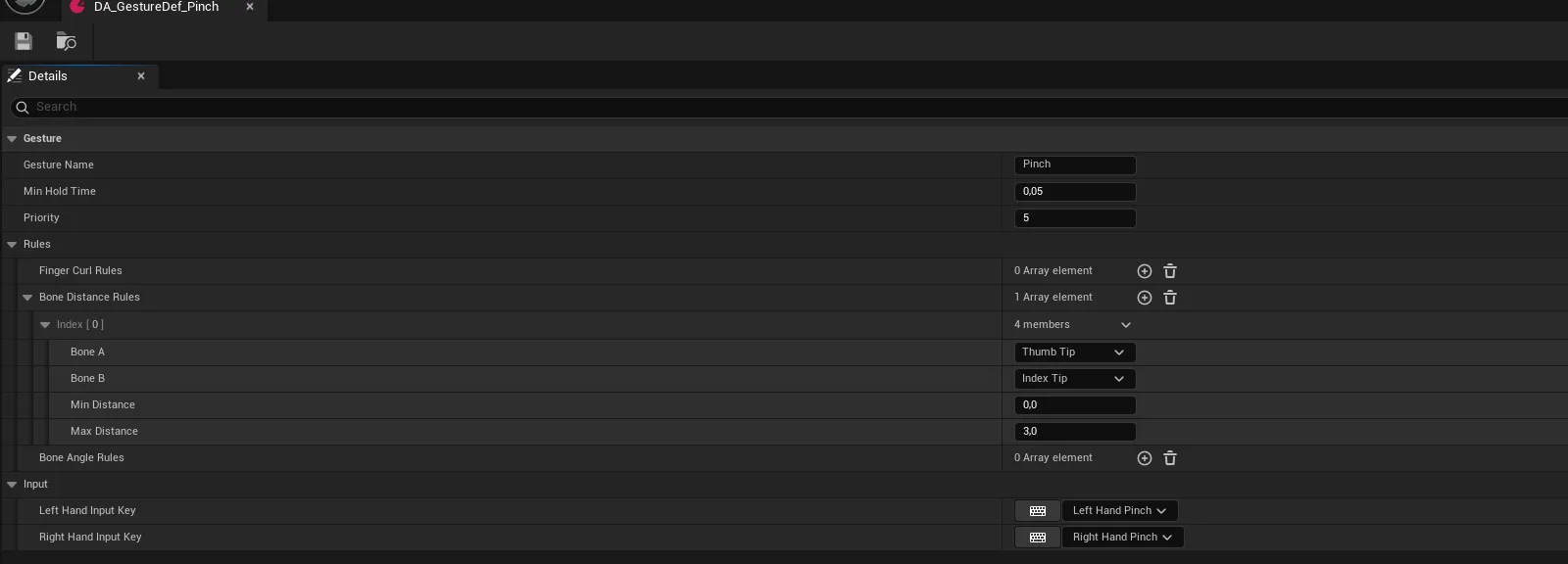
AFS_Core_MotionController/Data/Gestures: pinch, point, fist, grasp, open palm, drag. Use them directly, or duplicate the closest one. - For a new gesture, create an
AFSHandGestureDefinitiondata asset and add finger curl rules, bone distance rules and bone angle rules. All of them must pass at the same time. - Set Min Hold Time so the gesture does not flicker, and Priority so it wins over gestures that match a similar hand shape.
- Assign the left and right synthetic input keys on the definition.
- Bind those keys to an input action in your input mapping context, the same way as a controller button.
Notes
Abilities never know gestures exist: they react to input actions, so a pinch, a trigger pull and a mouse click can all drive the same thing.
Gesture evaluation runs per hand per frame while hand tracking is active. Keep the set of defined gestures small and let priority and hold time do the work.
A gesture never fires? Its rules cannot all be satisfied at once. Widen a curl range first; those are the most common cause.
Hands do not appear? The motion controller classes are not assigned on the pawn, or OpenXR Hand Tracking is not enabled.
Map_Examples_VRHands shows hand tracking, custom poses and gesture-driven interaction.