AFM_Settings
Graphics, audio and gameplay settings built on the state contract, backed by console variables and a save game, with presets for the common console variables.
What it gives you
- A working settings menu with no code
- Console-variable and audio-volume setting types
- Persistence through a save game
- Presets for the standard graphics settings
Requires
Required by
Description
Settings reuse AFM_State's value contract rather than inventing their own. A setting is a
BP_Value_Settings_* object exposing BPI_Value, so the same WBP_SettingItem_* widgets that bind
to world state bind to settings too.
The practical consequence is that adding a setting is an asset, not code. The plugin ships presets for the common console variables — anti-aliasing, shadows, textures, view distance, foliage, post-process, dynamic resolution, pixel density, fixed foveated rendering — plus volume settings per sound class.
Setup
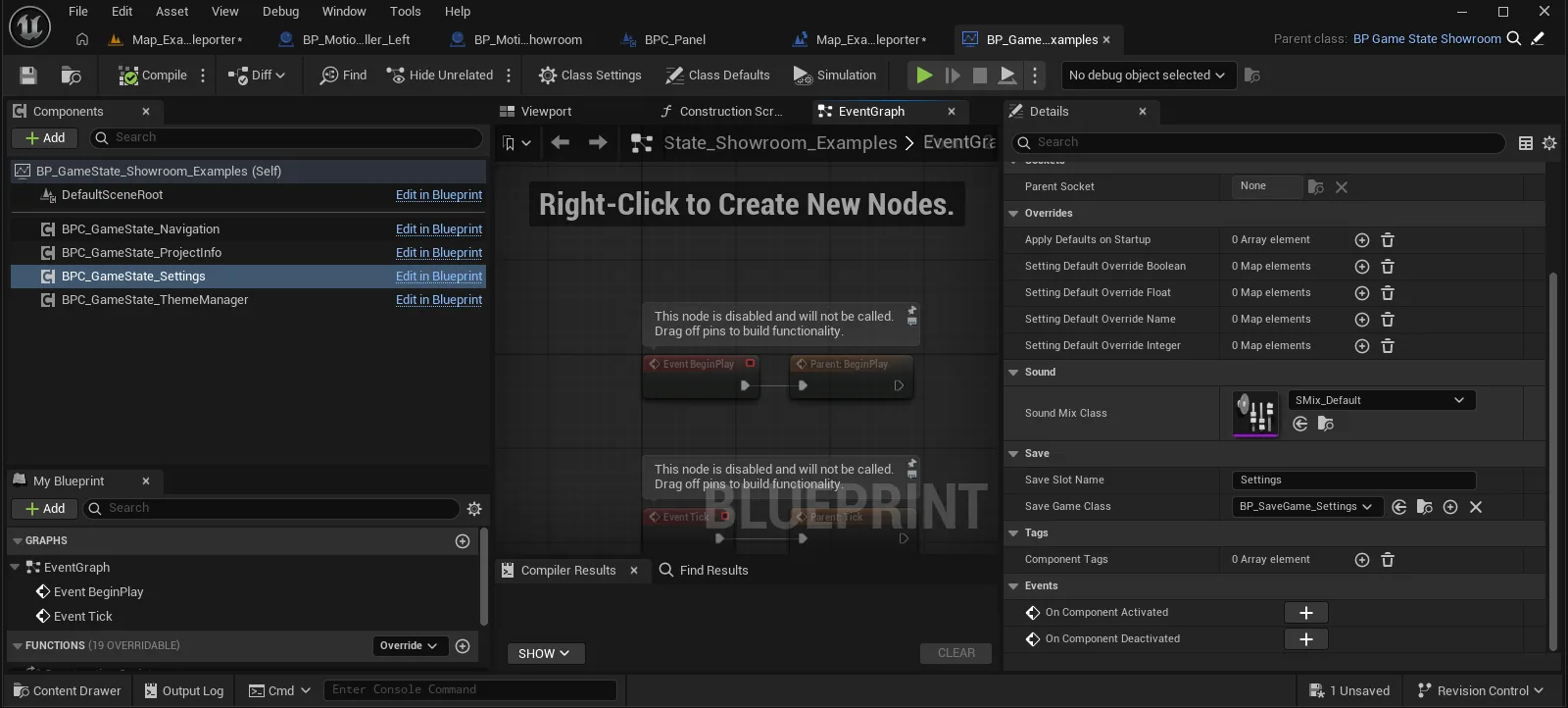
- Enable
AFM_Settings. - Add
BPC_GameState_Settingsto your game state. - Register the setting presets you want in its settings list.
- Add the settings page to your menu —
DA_WidgetPage_Settings_Desktopis ready to use.
Usage
Adding a setting
See Add a setting.
Persisting
BP_SaveGame_Settings handles storage. Values are written on change and restored on startup by the
settings component.
Reading a setting from gameplay
Ask the settings component for the value object and read it through BPI_Value, rather than reading
the console variable directly — this keeps the save game and the live value in step.
Key properties
| Property | When to change |
|---|---|
Name / Caption | Always — the label and helper text in the menu |
| Console variable name | On the _Console variants, to target a different CVar |
| Value mapping | To change how integer steps map to CVar values |
Extending
Derive from the BP_Value_Settings_* base matching your type. The correct widget is chosen from the value type automatically.
Example map
The settings page in Map_Examples_Lobby is the shipped settings menu.
Troubleshooting
A setting does not persist. It is not registered with BPC_GameState_Settings; unregistered values work in-session but are never written to the save game.
API reference
Every blueprint asset in this plugin. Expand an asset to see its members.
Blueprints
BP_SaveGame_Settings0 members
No editor-visible members; this asset configures defaults only.
BP_Value_Settings5 members
| Kind | Name | Signature | Description |
|---|---|---|---|
| var | NameDescription | text | Heading a setting shows in the interface, handed over whenever a widget asks the setting for its title. Leave empty for a row with no label of its own. |
| var | CaptionDescription | text | Explanatory line offered under the heading, handed over whenever a widget asks the setting for its caption. Leave empty for a row with a heading alone. |
| var | SettingsComponent | BPC_GameState_Settings | Owning settings component, filled in as the object is built by Get Object For Settings. Volume settings route their sound changes back through it, so a setting created by hand without one cannot reach the sound mix. |
| event | Value_Reset | (SourceInfo: ST_SourceInfo) | Empty in the base setting; each typed subclass overrides it to write its own default back through its setter. Called on every cached setting by Reset All Settings. |
| event | Init | () | Empty hook run once by Get Object For Settings just after the setting object is built. Override it to read the current value out of wherever the setting really lives, or to bind to whatever the setting mirrors. |
BP_Value_Settings_Bool4 members
| Kind | Name | Signature | Description |
|---|---|---|---|
| var | Text FalseDescription | text | Caption offered to widgets for the off position, returned as the first of the pair of texts. Toggles bound to the setting show it while the value reads false. |
| var | Text TrueDescription | text | Caption offered to widgets for the on position, returned as the second of the pair of texts. Toggles bound to the setting show it while the value reads true. |
| event | Value_toggleBoolean | (SourceInfo: ST_SourceInfo) | Reads the current value through the boolean getter and writes the opposite back through the setter, carrying the source info of whoever pressed. Called by toggle widgets bound to the setting. |
| event | Value_Reset | (SourceInfo: ST_SourceInfo) | Writes the class default back through the boolean setter, carrying the source info of whoever asked for the reset. That default is on for a plain boolean setting and is set on the class rather than per instance. |
BP_Value_Settings_Bool_Console5 members
| Kind | Name | Signature | Description |
|---|---|---|---|
| var | ConsoleCommandSetting | string | Name of the console variable the setting reads and writes, such as a dynamic resolution switch. The variable itself holds the value, so nothing is cached here and a name that matches none reads back as off. |
| var | New_String_FalseSetting | string | Argument appended to the console command when the setting is switched off, zero by default. Change it for a variable whose off position is some other word or number. |
| var | New_String_TrueSetting | string | Argument appended to the console command when the setting is switched on, one by default. Change it for a variable whose on position is some other word or number. |
| fn | Value_getBoolean | (out SourceInfo: ST_SourceInfo, out Value: bool) | Returns the current boolean reading of the console variable named by Console Command, fetched afresh on every call. Nothing is stored on the setting, so a variable changed elsewhere shows up at once. |
| event | Value_setBoolean | (SourceInfo: ST_SourceInfo, Value: bool) | Runs the console command with the on or off argument on the pawn named in the source info, then broadcasts On Value Updated so bound widgets read the variable again. The value is kept by the console variable, not by the setting. |
BP_Value_Settings_Float7 members
| Kind | Name | Signature | Description |
|---|---|---|---|
| var | ValueRangeValue | InputRange | Real range the console variable or sound mix behind the setting works in. The stored 0 to 1 fraction is mapped onto it when written and normalised back out of it when read; it is not what widgets show, which is Display Range. |
| var | UnitsDescription | text | Suffix widgets append to the displayed number, such as a per cent marker. Leave empty for a bare number. |
| var | SegmentsDescription | float[] | Marks along the slider, given in the numbers of Display Range, that widgets draw as notches. Leave empty for a plain unmarked slider. |
| var | Maximum Fractional DigitsDescription | int | Largest number of decimal places widgets show for the value, one by default. Presentation only; the stored fraction keeps its full precision. |
| var | DefaultValueValue | float | Value a reset writes back, as the 0 to 1 fraction across Value Range rather than a real reading. It is not applied at start-up, so the setting opens on whatever the console variable or mix already holds. |
| var | DisplayRangeDescription | InputRange | Range reported to widgets in place of Value Range, letting a slider read 0 to 100 while the variable behind it works in its own units. The interpolated reading is the stored fraction mapped into it. |
| event | Value_Reset | (SourceInfo: ST_SourceInfo) | Writes Default Value back through the float setter, carrying the source info of whoever asked for the reset, so the change travels the same route as a slider move. |
BP_Value_Settings_Float_Console3 members
| Kind | Name | Signature | Description |
|---|---|---|---|
| var | ConsoleCommandSetting | string | Name of the console variable the setting reads and writes, such as a screen percentage. Its reading is normalised across Value Range on the way in and mapped back onto that range on the way out, so widgets only ever deal in 0 to 1. |
| fn | Value_getFloat | (out SourceInfo: ST_SourceInfo, out Value: float) | Returns the current reading of the console variable as a 0 to 1 fraction of Value Range. Fetched afresh on every call, so a variable changed elsewhere shows up at once. |
| event | Value_setFloat | (SourceInfo: ST_SourceInfo, Value: float) | Maps the 0 to 1 value onto Value Range and runs the console command with the result on the pawn named in the source info, then broadcasts On Value Updated. Nothing is stored on the setting; the console variable is the only record. |
BP_Value_Settings_Float_Volume2 members
| Kind | Name | Signature | Description |
|---|---|---|---|
| fn | Value_getFloat | (out SourceInfo: ST_SourceInfo, out Value: float) | Returns the volume held on the setting as a 0 to 1 fraction, which starts at full until something sets it. The sound mix is never read back, so a volume changed anywhere else goes unnoticed. |
| event | Value_setFloat | (SourceInfo: ST_SourceInfo, Value: float) | Stores the 0 to 1 volume, maps it onto Value Range and asks the settings component to override the sound class inside its mix, then broadcasts On Value Updated. Nothing reaches the mix when the setting has no Settings Component, which Get Object For Settings normally supplies. |
BP_Value_Settings_Integer3 members
| Kind | Name | Signature | Description |
|---|---|---|---|
| var | TextsDescription | text[] | Option labels offered to widgets, one per choice, with the value acting as the position in the list. Leave empty for a setting that shows a bare number rather than a named option. |
| var | DefaultValueSetting | int | Option a reset writes back, as a position in Texts. It is not applied at start-up, so the setting opens on whatever the underlying variable already holds. |
| event | Value_Reset | (SourceInfo: ST_SourceInfo) | Writes Default Value back through the integer setter, carrying the source info of whoever asked for the reset, so the change travels the same route as picking an option. |
BP_Value_Settings_Integer_Console2 members
| Kind | Name | Signature | Description |
|---|---|---|---|
| fn | Value_getInteger | (out SourceInfo: ST_SourceInfo, out Value: int) | Returns the current integer reading of the console variable named by Console Command, fetched afresh on every call. Nothing is cached on the setting. |
| event | Value_setInteger | (SourceInfo: ST_SourceInfo, Value: int) | Runs the console command with the chosen number on the pawn named in the source info, then broadcasts On Value Updated so bound widgets read the variable again. The console variable holds the value; the setting keeps no copy. |
BP_Value_Settings_Name5 members
| Kind | Name | Signature | Description |
|---|---|---|---|
| fn | CurrentIndex | (out Index: int) | Returns the position of the current name in the setting's list of identifiers, which is how selectors know which option to show. The answer is -1 when the current name is missing from that list, including the None a setting reports until a subclass supplies a real one. |
| event | Value_Name_Set | (SourceInfo: ST_SourceInfo, Name: name) | Empty in this base setting; subclasses override it to write the name wherever the setting really lives. Stepping and resetting both go through it, so a subclass that leaves it empty accepts no changes at all. |
| event | Value_Name_NextValue | (SourceInfo: ST_SourceInfo) | Moves the setting on to the entry after the current one in its list of identifiers and writes it back through Value Name Set. Called by steppers and next buttons bound to the setting. |
| event | Value_Name_PreviousValue | (SourceInfo: ST_SourceInfo) | Moves the setting back to the entry before the current one in its list of identifiers and writes it back through Value Name Set. Called by steppers and previous buttons bound to the setting. |
| event | Value_Reset | (SourceInfo: ST_SourceInfo) | Writes the default identifier back through Value Name Set, carrying the source info of whoever asked for the reset. That default is None unless a subclass sets one, and Value Name Set does nothing until a subclass implements it. |
Blueprints/Presets
BP_Value_Settings_Bool_Console_DynamicResolution0 members
No editor-visible members; this asset configures defaults only.
BP_Value_Settings_Float_Console_PixelDensity0 members
No editor-visible members; this asset configures defaults only.
BP_Value_Settings_Float_Volume_Master0 members
No editor-visible members; this asset configures defaults only.
BP_Value_Settings_Float_Volume_Music0 members
No editor-visible members; this asset configures defaults only.
BP_Value_Settings_Float_Volume_SFX0 members
No editor-visible members; this asset configures defaults only.
BP_Value_Settings_Float_Volume_UI0 members
No editor-visible members; this asset configures defaults only.
BP_Value_Settings_Float_Volume_Voice0 members
No editor-visible members; this asset configures defaults only.
BP_Value_Settings_Integer_Console_AntiAA0 members
No editor-visible members; this asset configures defaults only.
BP_Value_Settings_Integer_Console_Effects0 members
No editor-visible members; this asset configures defaults only.
BP_Value_Settings_Integer_Console_FFR0 members
No editor-visible members; this asset configures defaults only.
BP_Value_Settings_Integer_Console_Foliage0 members
No editor-visible members; this asset configures defaults only.
BP_Value_Settings_Integer_Console_PostProcess0 members
No editor-visible members; this asset configures defaults only.
BP_Value_Settings_Integer_Console_ShadowQuality0 members
No editor-visible members; this asset configures defaults only.
BP_Value_Settings_Integer_Console_Texture0 members
No editor-visible members; this asset configures defaults only.
BP_Value_Settings_Integer_Console_ViewDistance0 members
No editor-visible members; this asset configures defaults only.
Components
BPC_GameState_Settings19 members
| Kind | Name | Signature | Description |
|---|---|---|---|
| var | SoundMixClassSound | SoundMix | Mix whose class overrides carry the volume settings, applied whenever Set Global Sound Volume runs. Leave it unset and the volume settings change nothing, because there is no mix to override. |
| var | ApplyDefaultsOnStartupOverrides | Class<BP_Value_Settings>[] | Setting classes meant to be created and put back to their defaults as play begins. Begin Play is empty here and nothing else in the graph reads the list, so filling it in has no effect on its own; call Load Settings or the apply functions yourself. |
| var | SettingDefaultOverride_BooleanOverrides | Map<Class<BP_Value_Settings_Bool>, bool> | Replacement defaults for boolean settings, keyed by setting class, in the shape Apply Settings Boolean takes. Nothing in the graph reads the map, so hand it to that function yourself if you want these values pushed out. |
| var | SaveSlotNameSave | string | Slot that saved settings are written to and read back from, always at user index 0. Point it somewhere new after a save and the old values are no longer found; an empty slot causes a fresh save object to be created instead. |
| var | SaveGameClassSave | Class<BP_SaveGame_Settings> | Class of save object created when the slot is still empty, holding the four maps of stored values. Leave it unset and no save object can be built, so saving and loading quietly do nothing. |
| var | SettingDefaultOverride_FloatOverrides | Map<Class<BP_Value_Settings_Float>, float> | Replacement defaults for float settings, keyed by setting class, given as the 0 to 1 fraction the float settings work in rather than real units. Nothing in the graph reads the map; pass it to Apply Settings Float to push the values out. |
| var | SettingDefaultOverride_NameOverrides | Map<Class<BP_Value_Settings_Name>, name> | Replacement defaults for name settings, keyed by setting class, each value being one of the identifiers that setting offers. Nothing in the graph reads the map; pass it to Apply Settings Name to push the values out. |
| var | SettingDefaultOverride_IntegerOverrides | Map<Class<BP_Value_Settings_Integer>, int> | Replacement defaults for integer settings, keyed by setting class, each value being an index into that setting's list of options. Nothing in the graph reads the map; pass it to Apply Settings Integer to push the values out. |
| fn | getObjectForSettings | (Key: Class<BP_Value_Settings>, out SettingObject: BP_Value_Settings) | Returns the live setting object for a setting class, creating it on first request, running its Init and caching it so later requests share the one instance. The new object is given the settings component as its Settings Component; despite being marked pure it does build objects, so every setting a screen touches ends up in the cache. |
| fn | getSettingsSaveGame | (out SaveGameSettings: BP_SaveGame_Settings) | Returns the settings save object, loading it from the slot on first use or creating a fresh one of Save Game Class when the slot is empty, then keeping it for later calls. Nothing comes back when the slot holds a save of some other class, which leaves saving and loading with nothing to work on. |
| fn | LoadSettingsLoad | () | Applies the four maps of saved values out of the save object, building each setting object as it goes. Call it once as play begins; the values are pushed out on the machine that calls it and are recorded as coming from the local player pawn. |
| fn | SaveSettingsSave | (Settings: Class<BP_Value_Settings>[]) | Reads the current value of every listed setting class through its value interface, records it in the matching map of the save object and writes the whole save object to the slot. Classes that are not boolean, float, name or integer settings are passed over. |
| fn | ApplySettings_BooleanApply | (ref const Settings: Map<Class<BP_Value_Settings_Bool>, bool>) | Pushes each stored boolean into its setting, fetching or creating the setting object for every key in the map. Changes are reported as coming from the local player pawn under the source name Settings Component, so listeners treat them as an ordinary set. |
| fn | ApplySettings_FloatApply | (ref const MapPin: Map<Class<BP_Value_Settings_Float>, float>) | Pushes each stored float into its setting, fetching or creating the setting object for every key in the map. Values are the 0 to 1 fractions float settings work in, not readings in the real units of Value Range. |
| fn | ApplySettings_NameApply | (ref const MapPin: Map<Class<BP_Value_Settings_Name>, name>) | Writes each stored name into its setting, fetching or creating the setting object for every key in the map. Names are not checked against the identifiers a setting offers, so a stale entry in a save is passed on unchanged. |
| fn | ApplySettings_IntegerApply | (ref const MapPin: Map<Class<BP_Value_Settings_Integer>, int>) | Writes each stored number into its setting, fetching or creating the setting object for every key in the map. Used by Load Settings to restore the integer settings, with the local player pawn recorded as the source of each change. |
| fn | SaveAllSettingsSave | () | Saves every setting built so far by handing the cached setting classes to Save Settings. Settings that have never been asked for are absent from the cache and so are left out of the save. |
| event | SetGlobalSoundVolume | (SoundClass: SoundClass, Volume: float) | Applies a volume to one sound class by overriding it inside Sound Mix Class. Called by the volume settings each time their value changes; with no mix set the call does nothing. |
| event | ResetAllSettings | () | Runs Value Reset on every setting object built so far, so each writes its own default back through its setter. Settings never requested are untouched and nothing is written to the slot, so follow it with Save All Settings to keep the reset. Called by the Reset button on the settings screen. |