AFS_Core_Highlight
Hover feedback in three interchangeable styles — material parameter, mesh copy and shared post-process outline — spawned on demand by interactions.
What it gives you
- Three highlight styles with different cost and appearance
- Automatic lifetime: no unhover event to handle
- Shared stencil pooling for the post-process style
Requires
Required by
Description
Highlighting is deliberately not built into interactions. An interaction names a Highlight Class and the framework spawns it on first hover — so an object that is never hovered never pays for the component.
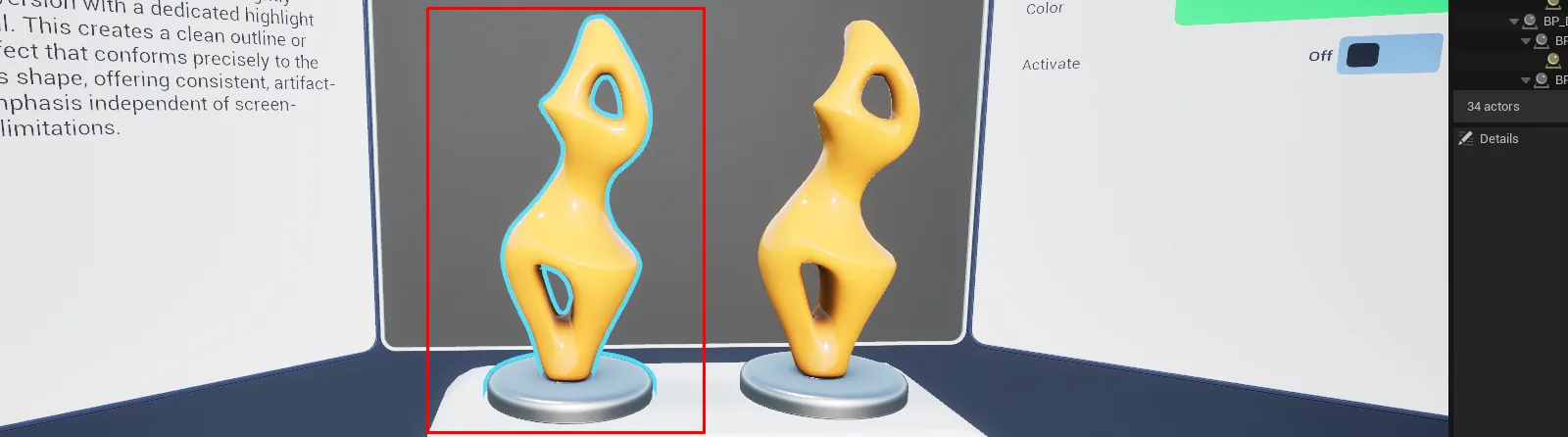
The three styles trade cost against flexibility. The material style writes parameters on the object's own material and is cheapest. The mesh-copy style duplicates the geometry under a highlight material, for objects whose materials you do not control. The post-process style assigns a custom depth stencil and draws a true outline through a shared full-screen pass, pooling stencil indices by colour.
Lifetime is handled by a timeout rather than by explicit events: TickHighlight is called each frame
while hovering, and the highlight ends automatically once the calls stop.
Setup
- Enable
AFS_Core_Highlight. - On any interaction component, set Highlight Class and Highlight Color.
- For the post-process style, confirm Custom Depth-Stencil is enabled in Project Settings.
The Engine.ini that enables custom depth ships in AFS_Core_Snapping, not in this plugin. If you
are using highlighting without snapping, set Custom Depth-Stencil Pass to Enabled with Stencil
under Project Settings, Rendering yourself — otherwise the post-process style silently draws nothing.
The other two styles are unaffected.
Usage
Choosing a style
| Style | Use when |
|---|---|
BPC_Highlight_Material | You control the object's material. Cheapest. |
BPC_Highlight_MeshCopy | You cannot modify the material. |
BPC_Highlight_PostProcess | You want a true outline and can afford the pass. |
Limiting which meshes highlight
Tag the meshes and set Highlight Tag on the interaction. Leave it empty to highlight everything.
Changing colour at runtime
Call UpdateHighlightColor on the interaction component.
Key properties
| Property | When to change |
|---|---|
Highlight Color | Per interaction, to signal type or state |
Highlight Tag | To restrict which meshes respond |
Parameter Color / Parameter Highlight | On the material style, to match your material's parameter names |
Sound Start / Sound Stop | Hover feedback |
Extending
See Custom highlight style. Derive from BPC_Highlight and override StartHighlight, EndHighlight and UpdateColor.
Performance notes
On mobile and standalone headsets prefer the material style. The post-process style costs a full-screen pass and requires Custom Depth-Stencil.
Example map
Map_Examples_Highlight shows all three styles side by side on identical objects.
Troubleshooting
Post-process highlights do not draw. Custom Depth-Stencil is disabled in Project Settings → Rendering.
The material style does nothing. The object's material does not expose the parameter names set in Parameter Color and Parameter Highlight.
API reference
Every blueprint asset in this plugin. Expand an asset to see its members.
Components
BPC_Highlight9 members
| Kind | Name | Signature | Description |
|---|---|---|---|
| var | HighlightColorColor | LinearColor | Colour used to highlight the object. Normally supplied by the interaction component that spawns this highlight. |
| var | Sound_StartSound | SoundBase | Sound played when highlighting begins. |
| var | Sound_StopSound | SoundBase | Sound played when highlighting ends. |
| var | HighlightTagReferences | name | Component tag limiting which meshes on the owner are highlighted. Leave empty to highlight every mesh. |
| fn | getComponentsToHighlight | (out MeshComponents: MeshComponent[]) | Returns the mesh components this highlight applies to, honouring the Highlight Tag filter. |
| fn | StartHighlight | () | Begins the highlight effect and plays the start sound. Override in a subclass to implement a new highlight style. |
| fn | EndHighlight | () | Ends the highlight effect and plays the stop sound. Override in a subclass to implement a new highlight style. |
| event | TickHighlight | () | Keeps the highlight alive for this frame. The highlight ends automatically once these calls stop arriving, so hovering needs no explicit end event. |
| event | UpdateColor | (HighlightColor: LinearColor) | Changes the highlight colour while the highlight is running. |
BPC_Highlight_Material6 members
| Kind | Name | Signature | Description |
|---|---|---|---|
| var | Parameter_ColorSettings | name | Name of the colour parameter on the object's material that this highlight writes to. |
| var | Parameter_HighlightSettings | name | Name of the scalar parameter on the object's material that this highlight toggles. |
| event | StartHighlight | () | Enables the highlight by driving the configured material parameters. |
| event | EndHighlight | () | Disables the highlight by resetting the configured material parameters. |
| event | SetHighlight | (Set: bool) | Sets the highlight parameter directly, bypassing the start and stop transitions. |
| event | UpdateColor | (HighlightColor: LinearColor) | Writes a new colour into the material's colour parameter. |
BPC_Highlight_MeshCopy2 members
| Kind | Name | Signature | Description |
|---|---|---|---|
| event | StartHighlight | () | Spawns a copy of the object's meshes rendered with the highlight material. Use this style when the object's own material cannot be modified. |
| event | EndHighlight | () | Overrides the base end-of-highlight step with an empty body, because this variant's mesh copy removes itself as it fades out. Nothing needs doing here unless a child adds state of its own. |
BPC_Highlight_PostProcess3 members
| Kind | Name | Signature | Description |
|---|---|---|---|
| fn | getPostProcess | (out PostProcess: BP_PostProcess_Highlight) | Returns the shared post-process highlight actor, creating it if this is the first highlight in the level. |
| event | StartHighlight | () | Assigns a custom depth stencil to the object so the shared post-process pass draws an outline around it. |
| event | EndHighlight | () | Releases the object's stencil so the outline is removed. |
Helper
BP_Helper_MeshCopy_Highlight0 members
No editor-visible members; this asset configures defaults only.
PostProcess
BP_PostProcess_Highlight4 members
| Kind | Name | Signature | Description |
|---|---|---|---|
| fn | RequestStencilForColor | (RequestColor: LinearColor, Reference: Object, out Stencil: int) | Reserves a custom depth stencil index for the requested outline colour and returns it. Colours are pooled, so objects sharing a colour share a stencil. |
| fn | ReleaseStencil | (Reference: Object) | Releases the stencil previously reserved for the given object. |
| fn | FreeUpUnusedStencil | () | Reclaims stencil indices no longer referenced by any object, keeping the limited stencil range available. |
| fn | getOutlineMaterial | (out OutlineMaterial: MaterialInstanceDynamic) | Returns the dynamic material instance driving the outline post-process, so colours can be updated at runtime. |