AFS_Core_Pawn
The VR, desktop and mobile pawns, motion controllers, hand animation, touch input, and the C++ hand-tracking and gesture system with its Hand Pose Studio editor.
What it gives you
- Three pawn families in Pawn and Character variants
- Motion controller actors with per-hand abilities
- Hand tracking, gesture recognition and synthetic input keys
- Hand Pose Studio for authoring grip poses
Requires
AFM_Abilities AFM_AutoDestroy AFM_Replication AFM_Teleport AFS_Libraries
Engine: OpenXR OpenXRHandTracking
Required by
Description
This plugin provides the player. Three pawn families — VR, desktop and mobile — each in a plain
Pawn and a Character variant, so you can choose between simple movement and full character
movement without changing anything else.
The VR pawn spawns its motion controllers as actors rather than components, attached to a
CameraHandle that sits between the actor root and the camera. That separation is what makes
room-scale work: the capsule can be recentred under the player's head and its height adjusted to the
real player without dragging the tracked camera with it.
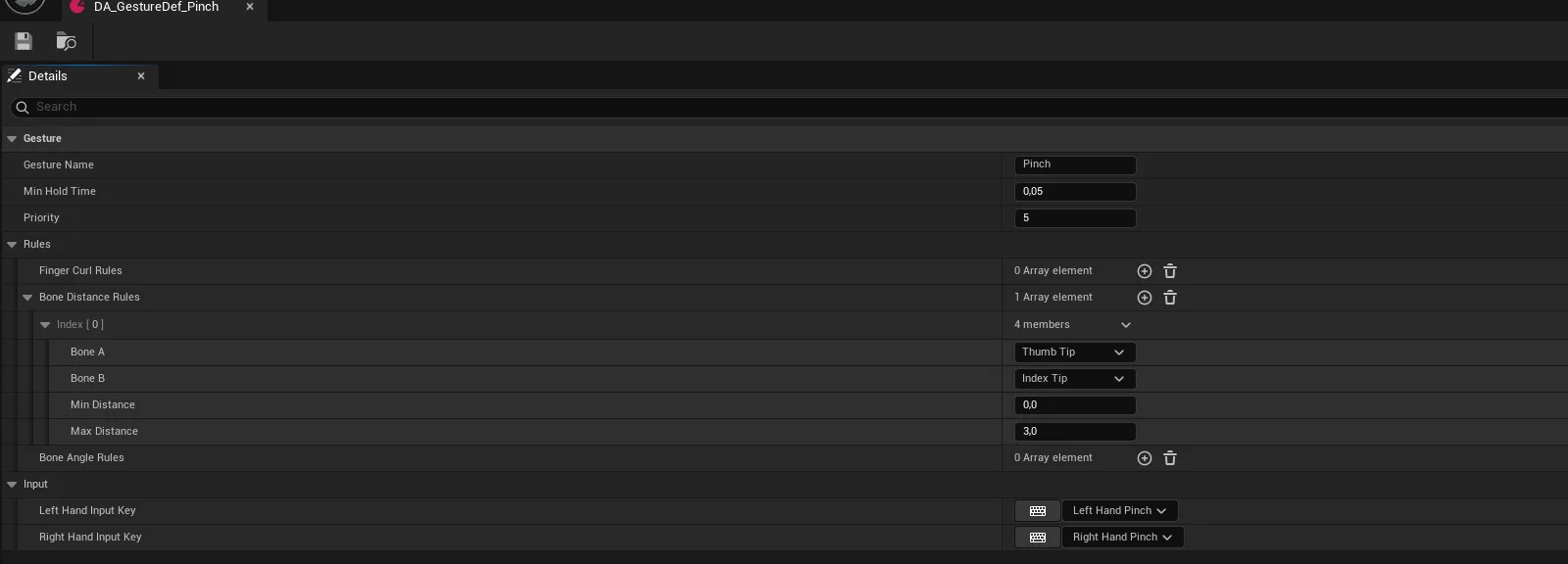
Hand tracking is handled in C++. Gestures are described declaratively as data assets — finger curl ranges, bone distances, bone angles, a hold time and a priority — and when one is recognised the plugin injects a synthetic input key. That means gestures bind in Enhanced Input exactly like a controller button, and no ability needs to know gestures exist.
Setup
- Enable
AFS_Core_Pawn. OpenXR and OpenXR Hand Tracking are enabled with it. - Subclass the pawn you need — start from
BP_Pawn_VR_Char_Showroomrather than the rawBP_Pawn_VR_Char, since the showroom variant already has the common abilities attached. - On the VR pawn, set Left Controller and Right Controller to the motion controller classes you want.
AFE_Showroomships controller-mesh and hand-mesh variants of each. - Assign your pawn classes in the level's
PDA_Level.
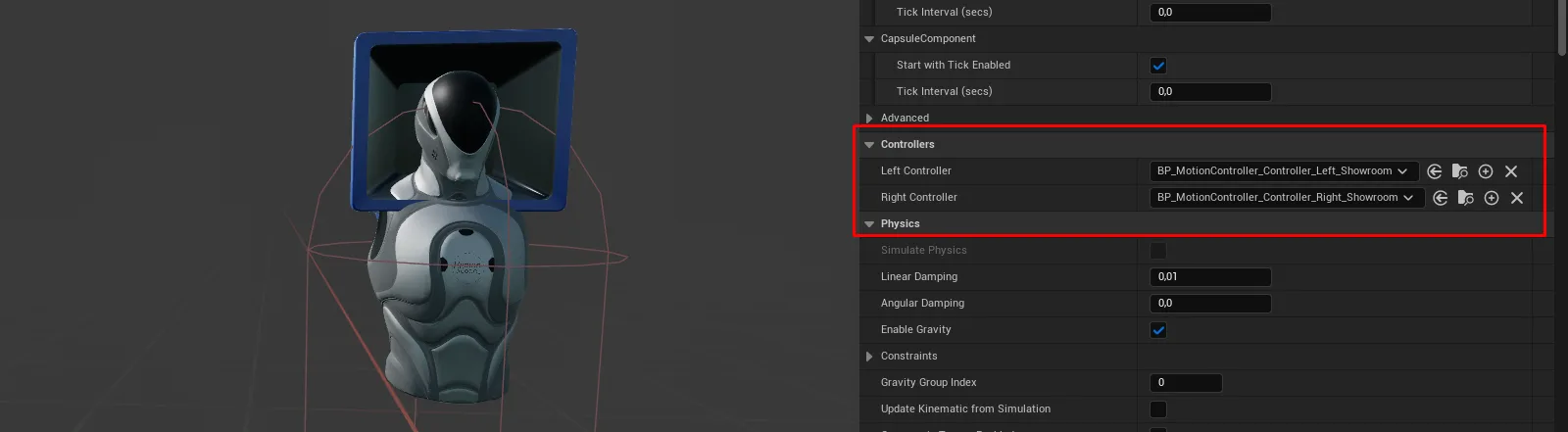
With no headset connected the VR pawn still spawns its controllers, pinned to fixed offsets in front of the camera. This keeps VR code paths exercised when you test in a flat editor window.
Usage
Choosing which pawn spawns
You do not choose in the level — you choose in the PDA_Level data asset. Leave Pawn Select on
Dynamic and the framework detects headset, then mobile platform, then falls back to desktop.
Adding an ability to a hand
Add a BPC_ControllerAbility subclass to the motion controller Blueprint, not to the pawn. It
receives its pawn, controller and side through InitiateControllerAbility.
Recentring the capsule after movement
Call Interface_RecenterCapsule on the pawn. Locomotion already does this; call it yourself if you
move the player by other means.
Defining a gesture
Create a UAFSHandGestureDefinition data asset. Add finger curl rules, bone distance rules and bone
angle rules — all must pass simultaneously. Set Min Hold Time to avoid flicker and Priority
to resolve overlaps. Assign the left and right input keys, then bind those keys in your input
mapping context.
Authoring a hand pose
Use Hand Pose Studio — see Author a hand pose.
Key properties
| Property | On | When to change |
|---|---|---|
Left Controller / Right Controller | BP_Pawn_VR | To swap between controller meshes and hand meshes, or to your own |
HMD | BP_Pawn_VR | Rarely; set automatically from the runtime |
Trace Distance | BPC_Input_Touch | To change how far mobile touch input reaches |
Min Hold Time | Gesture definition | Raise if a gesture flickers on and off |
Priority | Gesture definition | Raise when two gestures can both match the same hand shape |
Extending
Derive from a pawn, implement BPI_PawnInfo, and return the right E_Pawn_Type. Assign it in
PDA_Level and the rest of the framework adapts.
To add a new gesture, create a data asset — no code. To add a new synthetic key, extend
FAFSGestureInputKeys in C++ and register it during module startup.
Performance notes
The VR pawn's AutoAdjustCapsuleHeight polls on a 0.5 s loop rather than ticking. Gesture
evaluation runs per hand per frame while hand tracking is active — if you define many gestures,
use Priority and Min Hold Time to keep the matching set small.
Example map
Map_Examples_Interaction_Hands demonstrates hand tracking, custom poses and gesture-driven interaction.
Troubleshooting
The player spawns at floor height. The pawn is the plain Pawn variant where the Character
variant was expected, or teleport location correction is not being applied.
Hands do not appear. The motion controller classes are not assigned on the pawn, or OpenXR Hand Tracking is not enabled.
A gesture never fires. Its rules cannot all be satisfied simultaneously — widen a curl range first, since those are the most commonly over-tightened.
API reference
Every blueprint asset in this plugin. Expand an asset to see its members.
AnimBP
ABP_Hand9 members
| Kind | Name | Signature | Description |
|---|---|---|---|
| event | BlueprintInitializeAnimation | () | Asks the owning motion controller which hand it is and sets the mirror flag from the answer. The source animations are all right-handed, so the left hand is mirrored through the hand mirror table; a controller that does not report a side leaves the hand unmirrored. |
| event | BlueprintUpdateAnimation | (DeltaTimeX: float) | Deliberately empty. Every pose value is pushed in from the motion controller through the hand animation interface rather than pulled each frame, so there is nothing to do per tick. |
| event | Hand_SetHandValue_Index | (IsPointing: bool) | Points or unpoints the index finger, easing the point blend towards its new weight instead of snapping. Only the index metacarpal chain is affected, so it layers over whatever grip or custom pose is playing. |
| event | Hand_SetHandPose | (HandPose: AnimSequenceBase) | Plays a custom pose over the whole hand, fading it in over roughly a fifth of a second. Pass an empty sequence to fade back to the driven finger poses. |
| event | Hand_SetHandValue_Thumb | (IsThumbUp: bool) | Raises or lowers the thumb, easing the thumb blend towards its new weight. Only the thumb chain is affected, so it combines with pointing and gripping. |
| event | Hand_SetHandValue_GripAxis | (Axis: float) | Curls the whole hand towards the grasp pose by the given amount, 0 for open and 1 for closed. Interpolated at roughly twice the speed of the pointing and thumb blends so squeezing feels immediate. |
| event | Hand_SetHandTracking | (Set: bool) | Fades between the driven finger poses and the control rig pose fed by the tracked joint transforms. Turning it on without also supplying joint transforms leaves the hand in its reference pose. |
| event | Hand_SetHandValue_TriggerAxis | (Axis: float) | Curls the index finger by the analogue trigger amount, 0 to 1, easing towards the new value at the same speed as the grip axis. Independent of the pointing blend, which drives the same finger from a boolean. |
| event | Hand_HandTrackingTransforms | (ref const Transforms: Transform[]) | Stores the tracked hand joint transforms, in space relative to the hand mesh, for the control rig to read. Applied without smoothing and only visible while hand tracking is blended in. |
Blueprints/Desktops
BP_Pawn_Desktop6 members
| Kind | Name | Signature | Description |
|---|---|---|---|
| fn | ResetTraceTimer | () | Internal handler that marks the cached trace stale so the next Get Latest Trace runs a fresh line trace. Fired by a timer set to the trace refresh interval rather than called directly. |
| event | InputKey_AnyKey_Pressed | (Key: Key) | Watches every key press and drops the pawn back into Game Only control as soon as a gamepad key is used, hiding the mouse cursor. Keyboard and mouse presses are ignored. |
| event | Interface_setScreenControlMode | (ScreenControl: E_ScreenControlMode) | Switches between Game Only, Game And UI and UI Only: stores the mode, recentres the mouse, shows the cursor for the two modes that need it and applies the matching input mode to the player controller. Does nothing when there is no local player controller. |
| event | setAbilityRestriction | (AbilityTag: name, Set: bool, Reason: name) | Adds or removes a named blocker on every pawn ability carrying the given tag, so a whole class of ability can be suppressed at once. Several reasons can be held at the same time; the ability returns only when all are released. |
| event | Client_Possessed | (NewController: Controller) | Called on the owning client once the pawn has a controller. Waits until the pawn really is locally controlled, adds the desktop input mappings, applies the current screen control mode, puts the crosshair on screen and hands the pawn to every pawn ability. |
| event | Client_Unpossessed | (OldController: Controller) | Called on the owning client when the pawn loses its controller. Removes the desktop input mappings, unpossesses every pawn ability and takes the crosshair off screen. |
BP_Pawn_Desktop_Char0 members
No editor-visible members; this asset configures defaults only.
Blueprints/Mobile
BP_Pawn_Mobile5 members
| Kind | Name | Signature | Description |
|---|---|---|---|
| event | setAbilityRestriction | (AbilityTag: name, Set: bool, Reason: name) | Adds or removes a named blocker on every pawn ability carrying the given tag. Several reasons can be held at once; the ability returns only when all of them are released. |
| event | OnSwipeUpdate_Interpolated | (Index: ETouchIndex, Delta: Vector2D) | Turns a smoothed swipe of the first finger into look input, feeding the horizontal and vertical deltas into yaw and pitch inverted and heavily scaled down. Bound to the touch component; swipes by any other finger are ignored. |
| event | Client_Possessed | (NewController: Controller) | Called on the owning client once the pawn has a controller. Waits until the pawn really is locally controlled, adds the mobile input mappings and hands the pawn to every pawn ability. |
| event | Client_Unpossessed | (OldController: Controller) | Called on the owning client when the pawn loses its controller. Removes the mobile input mappings and unpossesses every pawn ability. |
| event | OnOneFingerDoubleTab | (ScreenLocation: Vector2D) | Teleports the character to whatever the last touch trace hit, provided the trace blocked and the surface is within 30 degrees of level, so walls and steep slopes are refused. Bound to the touch component's one-finger double tap. |
BP_Pawn_Mobile_Char0 members
No editor-visible members; this asset configures defaults only.
Blueprints/VR
BP_Pawn_VR11 members
| Kind | Name | Signature | Description |
|---|---|---|---|
| fn | SetupMotionControllerControls | (MotionControllerClass: Class<BP_MotionController>, Side: E_Side = "Left") | Replaces the hand on one side: destroys the controller already registered there, then spawns the given class attached to the camera handle with the pawn, headset type and side already filled in. Passing no class leaves that side empty. |
| fn | CorrectPawnPositionPawn | (InVector: Vector = "0, 0, 0", InRotation: Rotator = "0, 0, 0", UseRotation: bool = false, out Location: Vector, out Rotation: Rotator) | Returns the actor location and rotation needed to put the headset, rather than the capsule, at the position you ask for. Only the horizontal offset between capsule and camera is removed, so height is left alone; with Use Rotation on, the supplied rotation is corrected by the player's current head yaw as well. |
| fn | getFocussedComponentDebug | (out SceneComponent: SceneComponent) | Debug stub with no implementation behind it. Always returns nothing, whatever the move focus setting. |
| event | SwitchControllers | (LeftController: Class<BP_MotionController>, RightController: Class<BP_MotionController>) | Swaps both hands at once, destroying whatever is there and spawning the two given classes for left and right. Use it to move between hand meshes and controller meshes at runtime. |
| event | Server_PrepareVRPawn | (HMD: E_HMD) | Records which headset the player is on, replicating it to the hands, and then spawns the left and right controllers configured on the pawn. Called from Client Possessed once the pawn is locally controlled. |
| event | AutoAdjustCapsuleHeight | (Set: bool) | Starts a twice-a-second loop that resizes the capsule to match the player's head height, clamped between 40 and 300 centimetres, and shifts the actor and camera handle by the same amount so the view does not jump. Only corrects drifts of 15 centimetres or more; pass false to end the loop. |
| event | Interface_RegisterControllerToVRPawn | (MotionController: BP_MotionController, Side: E_Side) | Records a newly spawned motion controller against its hand side so the pawn can reach it later. When no headset is enabled it also parks the controller at a fixed offset in front of the camera and clears its motion source, which is what makes the hands visible when previewing in a flat window. |
| event | setAbilityRestriction | (AbilityTag: name, Set: bool, Reason: name) | Adds or removes a named blocker on every pawn ability carrying the given tag, and on every matching controller ability on both hands. Use it to suppress a capability across the whole pawn rather than hand by hand. |
| event | Interface_RecenterCapsule | () | Moves the capsule horizontally under the headset and pulls the camera handle back by the same amount, so collision follows the player around the play space without the view shifting. Called by teleport and locomotion after they move the pawn. |
| event | Client_Possessed | (NewController: Controller) | Called on the owning client once the pawn has a controller. Waits until the pawn really is locally controlled, prepares the VR pawn and spawns the hands, forces Game Only input with the cursor hidden, sets the spectator screen to a single cropped eye and hands the pawn to every pawn ability. |
| event | Client_Unpossessed | (OldController: Controller) | Called on the owning client when the pawn loses its controller, and unpossesses every pawn ability. The spawned hands are left alone; destroy them yourself if the pawn is to be reused. |
BP_Pawn_VR_Char0 members
No editor-visible members; this asset configures defaults only.
Blueprints/VR/MotionControllers
BP_MotionController6 members
| Kind | Name | Signature | Description |
|---|---|---|---|
| var | PawnInternal | Pawn | Owning VR pawn, handed over on spawn. Used to tell whether this hand belongs to the locally controlled player, so replicated hands do not run local-only logic. |
| var | HMDInternal | E_HMD | Headset family this hand was spawned for, taken from the pawn. Hand controllers use it to pick the mesh offset that suits the physical controller, since each one sits differently in the palm. |
| var | SideInternal | E_Side | Which hand this is, Left or Right, fixed at spawn by the pawn. Abilities read it through Get Motion Controller Side to choose their input mappings, grip sockets and mirrored hand poses. |
| event | SetMeshVisibility | (Set: bool) | Broadcasts Mesh Visibility Changed with the requested state. Nothing is hidden here; the derived controller listens for the broadcast and hides its own mesh, so an ability can ask for the hand to disappear without knowing what it looks like. |
| event | SetupMotionController | () | Empty hook left for a derived controller to do its own setup after being spawned and given its pawn, side and headset type. Neither shipped controller uses it. |
| event | MC_SetFocusControllerAbility | (ControllerAbility: BPC_ControllerAbility, Set: bool) | Gives one controller ability exclusive use of this hand by blocking every other ability on it under the Unfocussed reason. Passing false releases that blocker again; abilities call it themselves when they take and give up focus. |
Blueprints/VR/MotionControllers/Controller
BP_MotionController_Controller4 members
| Kind | Name | Signature | Description |
|---|---|---|---|
| fn | SetControllerMesh | (ControllerMaterial: MaterialInterface, LeftControllerMesh: StaticMesh, RightControllerMesh: StaticMesh) | — |
| event | ChangeControllerMesh | (OpenXR: bool, CustomHMD: E_HMD) | — |
| event | SetupMotionController | () | — |
| event | MC_SetControllerVisibility | (const Set: bool) | — |
BP_MotionController_Controller_Left0 members
No editor-visible members; this asset configures defaults only.
BP_MotionController_Controller_Right0 members
No editor-visible members; this asset configures defaults only.
Blueprints/VR/MotionControllers/Hand
BP_MotionController_Hands13 members
| Kind | Name | Signature | Description |
|---|---|---|---|
| fn | DrawHandtrackingDebugHand Tracking | () | — |
| fn | UpdateHandTrackingMeshHand Tracking | () | — |
| event | SetupMotionController | () | — |
| event | Server_SnapToSocket | (SnapSocket: ST_Socket) | — |
| event | Server_SetPose | (GrabPose: AnimSequenceBase) | — |
| event | MCHands_SnapToSocket | (Socket: ST_Socket) | — |
| event | MCHands_SetHandCollision | (Collision: ECollisionEnabled) | — |
| event | Server_GribAxis | (GribAxis: float) | — |
| event | ServerSetThumbDown | (ThumbDown: bool) | — |
| event | Server_SetIndexDown | (IndexDown: bool) | — |
| event | MCHands_SetPose | (HandPose: AnimSequenceBase) | — |
| event | CheckHandTracking | () | — |
| event | Server_TriggerAxis | (TriggerAxis: float) | — |
BP_MotionController_Hands_Left1 members
| Kind | Name | Signature | Description |
|---|---|---|---|
| fn | MCHands_getGrabWorldTransform | (out Transform: Transform) | — |
BP_MotionController_Hands_Right1 members
| Kind | Name | Signature | Description |
|---|---|---|---|
| fn | MCHands_getGrabWorldTransform | (out Transform: Transform) | — |
Components
BPC_Input_Touch22 members
| Kind | Name | Signature | Description |
|---|---|---|---|
| var | MaxTapTimeSettings | float | Longest a finger may stay down, in seconds, and still be classified as a tap rather than a hold. Raise it if short deliberate presses are being missed. |
| var | MaxDoubleTabTimeSettings | float | Window in seconds after a tap in which a second tap counts as a double tap. The single tap is broadcast immediately either way, so a double tap fires both the single and the double delegate. |
| var | SwipeSensitivityThresholdSettings | float | Distance in screen pixels a finger must travel before the touch is reclassified from a tap to a swipe. Lower values make swiping easier to trigger at the cost of losing taps to small wobbles. |
| var | SwipeInterpolationSpeedSettings | float | Smoothing speed applied to the swipe delta before it is broadcast through On Swipe Update Interpolated, which is what the mobile pawn steers its camera with. Higher values track the finger more closely and jitter more. |
| var | HoldTimeSettings | float | Seconds a finger must remain down before the touch is treated as a hold rather than a tap. |
| var | UseTraceTrace | bool | Whether a world trace is run under the first finger on press and on tap. Switch it off to save the trace, but Get Latest Trace then never refreshes and anything that reads it, such as double-tap teleport, stops responding. |
| var | TraceHitDistanceTrace | float | How far into the world the touch trace reaches from the camera, in centimetres. Surfaces beyond it are never reported as a hit. |
| fn | TouchPressedTouch | (ref const Index: ETouchIndex, TouchLocation: Vector) | Starts tracking a finger: records its location as both the current and the initial position, zeroes its duration and delta, classifies it as a tap for now, and raises Event Touch Pressed. Call it from the pawn's touch input binding. |
| fn | TouchMovedTouch | (ref const Index: ETouchIndex, TouchLocation: Vector) | Updates the stored screen position for a finger and raises Event Touch Moved. The delta and the tap or swipe classification are worked out on tick, not here. |
| fn | TouchReleasedTouch | (ref const Index: ETouchIndex, TouchLocation: Vector) | Ends tracking of a finger: raises Event Touch Released with the duration it was held, which is where taps, swipes and drags are dispatched, and then clears every map entry for that index. |
| fn | getAngleAndDegreeUtil | (InitialVector: Vector2D, EndVector: Vector2D, IntervalSize: int, out Angle: float, out Index: int) | Returns the direction from one screen point to another as an angle in degrees, wrapped to 0-360. The interval index is meant to bucket that angle into equal segments, but the division is inverted, so it comes back as zero for any interval size below a full turn. |
| fn | getTouchLocationsGetter | (ref const Index: ETouchIndex, out Found: bool, out Location: Vector2D) | Returns the latest screen position of a finger, with Found telling you whether that finger is being tracked at all. Location is meaningless when Found is false. |
| fn | getTouchInitialLocationGetter | (ref const Index: ETouchIndex, out Location: Vector2D) | Returns the screen position at which a finger first went down, which is the anchor a swipe or drag is measured from. Comes back as zero once that finger has been released. |
| fn | getTouchDeltaGetter | (ref const Index: ETouchIndex, out Delta: Vector2D) | Returns how far a finger has moved since the last update, in screen pixels. Left at zero for a finger that is not being tracked. |
| fn | getTouchDurationGetter | (ref const Index: ETouchIndex, out Duration: float) | Returns how long a finger has been held down, in seconds, counted from the moment it was pressed. Comes back as zero for a finger that is not being tracked. |
| fn | getTouchFunctionGetter | (ref const Index: ETouchIndex, out Function: E_Touch_Function) | Returns what a finger is currently being treated as, tap, swipe or drag. Every touch starts as a tap and is reclassified as it moves; an untracked index reports None. |
| fn | isAnyOtherFingerTabbing | (IgnoreIndex: ETouchIndex = "Touch1", out Found: bool, out FoundIndex: ETouchIndex) | Returns the first finger other than the one you pass in that is still classified as a tap. Used on release to tell a two-finger tap from a one-finger tap; Found is false when no other finger is down. |
| fn | ClearIndex | (ref const Index: ETouchIndex) | Forgets a finger entirely, removing its location, initial location, delta, duration and classification. Called on release, and also on the partner finger of a two-finger tap so it cannot fire a second time. |
| event | EventTouchPressed | (TouchIndex: ETouchIndex, ScreenLocation: Vector2D) | Raised by Touch Pressed once the finger has been recorded, and refreshes the world trace under it. Bind to it to react to a finger going down before it has been classified. |
| event | EventTouchReleased | (TouchIndex: ETouchIndex, ScreenLocation: Vector2D, Duration: float) | Raised by Touch Released and does the actual gesture dispatch. A tap becomes a one- or two-finger single or double tap, broadcasts the matching delegate and pulses a synthetic input key for a twentieth of a second; a swipe broadcasts On Swipe End; a drag broadcasts On Drag Release. |
| event | EventTouchMoved | (TouchIndex: ETouchIndex, ScreenLocation: Vector2D) | Raised by Touch Moved after the finger's stored position has been updated. Empty by default; bind to it to react to finger movement without polling. |
| event | UpdateTrace | (Index: ETouchIndex, ref const ScreenPosition: Vector2D) | Line traces from the given screen position into the world on the visibility channel and stores the result as the latest trace, which the mobile pawn hands out through Get Latest Trace. Only the first finger traces, and only while Use Trace is on. |
Interfaces
BPI_AnimBP_Hand7 members
| Kind | Name | Signature | Description |
|---|---|---|---|
| fn | Hand_SetHandValue_IndexHandAnimBP | (IsPointing: bool) | Implemented by the hand's animation blueprint to point or unpoint the index finger. Called by the hand motion controller when the pointing state changes or replicates in. |
| fn | Hand_SetHandValue_ThumbHand Anim BP | (IsThumbUp: bool = false) | Implemented by the hand's animation blueprint to raise or lower the thumb. Called by the hand motion controller when the thumbs-up state changes or replicates in. |
| fn | Hand_SetHandValue_TriggerAxisHand Anim BP | (Axis: float = 0) | Implemented by the hand's animation blueprint to curl the index finger by the analogue trigger amount, 0 to 1. Called by the hand motion controller as the trigger moves. |
| fn | Hand_SetHandValue_GripAxisHand Anim BP | (Axis: float = 0) | Implemented by the hand's animation blueprint to close the hand by the analogue grip amount, 0 for open and 1 for a full grasp. Called by the hand motion controller as the grip moves. |
| fn | Hand_SetHandTrackingHand Anim BP | (Set: bool) | Implemented by the hand's animation blueprint to blend between the driven finger poses and the pose built from tracked joints. Called by the hand motion controller when hand tracking starts or stops being available. |
| fn | Hand_SetHandPoseHand Anim BP | (HandPose: AnimSequenceBase) | Implemented by the hand's animation blueprint to play a custom pose over the whole hand. Called by the hand motion controller, typically when something gripped supplies its own pose; an empty sequence means return to the driven poses. |
| fn | Hand_HandTrackingTransformsHand Anim BP | (const Transforms: Transform[]) | Implemented by the hand's animation blueprint to receive the tracked joint transforms for this hand, relative to the hand mesh. Called by the hand motion controller once per frame while tracking is valid. |
BPI_Pawn_VR1 members
| Kind | Name | Signature | Description |
|---|---|---|---|
| fn | Interface_RegisterControllerToVRPawnVR Pawn | (MotionController: BP_MotionController, Side: E_Side = "Left") | Implemented by the VR pawn to take ownership of a freshly spawned motion controller for one hand. The controller calls it on itself so the pawn can look it up later by side, for example when applying an ability restriction to both hands. |
Libraries
ML_MotionController0 members
No editor-visible members; this asset configures defaults only.
Widgets/Crosshair
Widget_Crosshair2 members
| Kind | Name | Signature | Description |
|---|---|---|---|
| fn | ShouldCrosshairBeVisible | () → bool | Returns true only while there is a local player controller, the mouse cursor is hidden and the pawn reports Game Only screen control. Any free-mouse or menu mode therefore hides the crosshair. |
| fn | Get_Crosshair_ColorAndOpacity_0 | () → LinearColor | Returns the tint for the crosshair image, taken from the interaction state the pawn is currently in, which is how the crosshair changes as you look at something you can act on. Falls back to opaque white when the pawn has no interaction state component. |
Widgets/Touch
UI_Thumbstick6 members
| Kind | Name | Signature | Description |
|---|---|---|---|
| var | Position | Vector2D | Centre of the stick in viewport pixels, used as the reference point when deciding whether a touch has landed on it. Recalculated from the widget's own geometry every tick, so a value set in the designer is overwritten on the first frame. |
| var | Thumbstick Size | Vector2D | Width and height of the stick in pixels, applied to the size box on construction. The larger of the two also serves as the capture radius, and half of each bounds how far the thumb image can be dragged from the centre. |
| var | Invert X | bool | Whether the horizontal axis is flipped before the stick value is broadcast through Stick Input. The thumb image itself always follows the finger. |
| var | Invert Y | bool | Whether the vertical axis is flipped before the stick value is broadcast through Stick Input. Screen coordinates grow downwards, so a movement stick usually wants this on. |
| var | Scale Output | float | Multiplier applied to the stick value before it is broadcast through Stick Input. Lower it for a look stick that should be less twitchy than the movement stick; 1 passes the full deflection through. |
| fn | Touch Input Check | (FingerIndex: ETouchIndex = "Touch1") | Claims a finger for this stick if it is currently pressed and landed within the stick's radius, recording where it went down as the anchor for the deflection. Called from the tick for the first two fingers in turn while the stick is idle. |
UI_TouchSimple4 members
| Kind | Name | Signature | Description |
|---|---|---|---|
| event | OnPressed | () | Called when the on-screen jump button is pressed. Empty in this sample layout; fill it in, or copy the widget, to drive your own action. |
| event | Stick Input | (NewParam: Vector2D) | Called every frame the left movement stick is being dragged, with its current deflection. Empty in this sample layout; feed the value into your pawn's movement input. |
| event | Stick Input | (NewParam: Vector2D) | Called every frame the right aiming stick is being dragged, with its current deflection, already scaled down by that stick's output scale. Empty in this sample layout; feed the value into your pawn's look input. |
| event | OnReleased | () | Called when the on-screen jump button is released. Empty in this sample layout; pair it with On Pressed for actions that need a hold. |