AFS_UX_Locomotion
Smooth movement and snap or smooth turning as controller abilities, with camera- or controller-relative direction.
What it gives you
- Thumbstick movement with configurable reference frame
- Snap turn or smooth turn from one component
- Per-hand input binding
Requires
Required by
Description
Locomotion is two independent controller abilities, so you can put movement on one hand and turning on the other — the standard VR arrangement — without either knowing about the other.
BPC_ControllerAbility_Movement converts thumbstick input into world movement. Movement
Direction decides the reference frame: relative to the camera means the player moves where they
look, relative to the controller means they can steer with the hand independently of gaze, which
some users find more comfortable.
BPC_ControllerAbility_Turn handles rotation. Setting Rotate Step Duration to zero gives a snap
turn; a small non-zero value gives a quick smooth turn. Snap turning is the safer default for
comfort.
Setup
- Enable
AFS_UX_Locomotion. - Add
BPC_ControllerAbility_Movementto one motion controller andBPC_ControllerAbility_Turnto the other. - Assign Mapping Contexts Default for the left and right hand.
Usage
Comfort settings
Expose Rotate Step Degree and Rotate Step Duration as game settings — see Add a setting. Comfort preferences vary enormously between users.
Blocking movement contextually
Call setAbilityRestriction on the pawn with the locomotion tag while a menu is open or an object is
held.
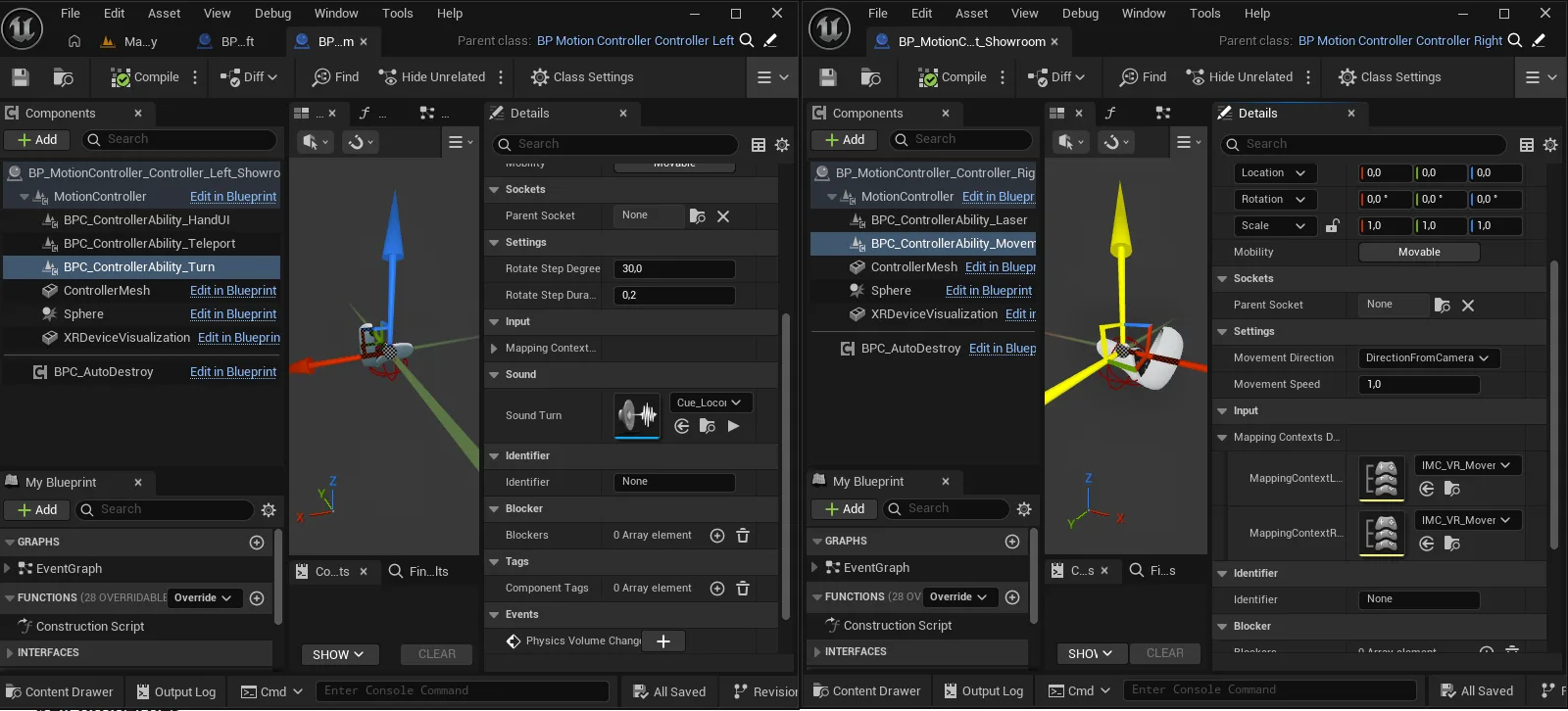
Key properties
| Property | When to change |
|---|---|
Movement Direction | Camera-relative or controller-relative steering |
Movement Speed | Overall movement multiplier |
Rotate Step Degree | Snap turn increment; 30–45° is typical |
Rotate Step Duration | Zero for snap, small non-zero for quick smooth turn |
Extending
Derive from either ability to add acceleration curves, dash movement or vignetting.
Performance notes
Movement calls Interface_RecenterCapsule each frame it moves, which keeps the capsule under the player. This is intentional and inexpensive.
Example map
Map_Examples_Locomotion demonstrates both abilities with configurable settings.
Troubleshooting
The player drifts away from the capsule. Interface_RecenterCapsule is not being called — it is invoked by movement, so custom movement code must call it too.
API reference
Every blueprint asset in this plugin. Expand an asset to see its members.
Components
BPC_ControllerAbility_Movement5 members
| Kind | Name | Signature | Description |
|---|---|---|---|
| var | MovementDirectionSettings | E_Locomotion_Direction | Whether the thumbstick moves the player relative to where they are looking or relative to where the controller points. Controller-relative allows steering with the hand independently of gaze. |
| var | MovementSpeedSettings | float | Multiplier applied to movement input. |
| var | Mapping Contexts DefaultInput | ST_MappingContext_Side | Input mapping contexts applied for the left and right hand, so movement can be bound to a specific controller. |
| fn | getControlDirection | (Vector2D: Vector2D, out MovementVector: Vector) | Converts a two-axis input into a world movement direction using the configured movement direction mode. |
| event | InitiateControllerAbility | (Pawn: Pawn, MotionController: Actor, Side: E_Side) | Sets up the movement ability once the owning motion controller is ready. |
BPC_ControllerAbility_Turn6 members
| Kind | Name | Signature | Description |
|---|---|---|---|
| var | RotateStepDegreeSettings | float | Degrees turned per snap turn input. Set to a small value for near-continuous turning. |
| var | RotateStepDurationSettings | float | How long a turn takes, in seconds. Zero gives an instant snap turn, which is more comfortable for many players. |
| var | Mapping Contexts DefaultInput | ST_MappingContext_Side | Input mapping contexts applied for the left and right hand. |
| var | Sound_TurnSound | SoundBase | Sound played on each turn. |
| event | InitiateControllerAbility | (Pawn: Pawn, MotionController: Actor, Side: E_Side) | Sets up the turn ability once the owning motion controller is ready. |
| event | Turn | (Side: E_Side) | Turns the player one step in the given direction. |
Helper
BP_Helper_ControllerAbility_Movement1 members
| Kind | Name | Signature | Description |
|---|---|---|---|
| var | ControllerAbility | BPC_ControllerAbility_Movement | The movement ability this helper visualises. |
BP_Helper_ControllerAbility_Turn1 members
| Kind | Name | Signature | Description |
|---|---|---|---|
| var | ControllerAbility | BPC_ControllerAbility_Turn | The turn ability this helper visualises. |