Home › Start › Starting a new project
Starting a new project
Starting a real project on the framework rather than editing the demo content.
Structure
Keep your own content out of the framework plugins. Framework plugins should stay untouched so they
can be updated; your project content lives in the project's own Content folder and subclasses what
it needs.
- Subclass the showroom pawns rather than editing them, exactly as
AF_Examplesdoes withBP_Pawn_VR_Char_Showroom_Examples. - Subclass
BP_GameMode_Showroomfor your own game mode. - Create your own themes as new
BP_PDA_Themeassets rather than editing the shipped ones.
Minimum viable project
- Create a
PDA_Leveldata asset. Set the game mode and the three pawn classes. - Create your map and place a
BP_MapInfoactor in it, pointing at the level data asset. - Set the project's default map to your map.
- Add a
BPC_GameState_ThemeManagerandBPC_GameState_Settingsto your game state if you want theming and settings.
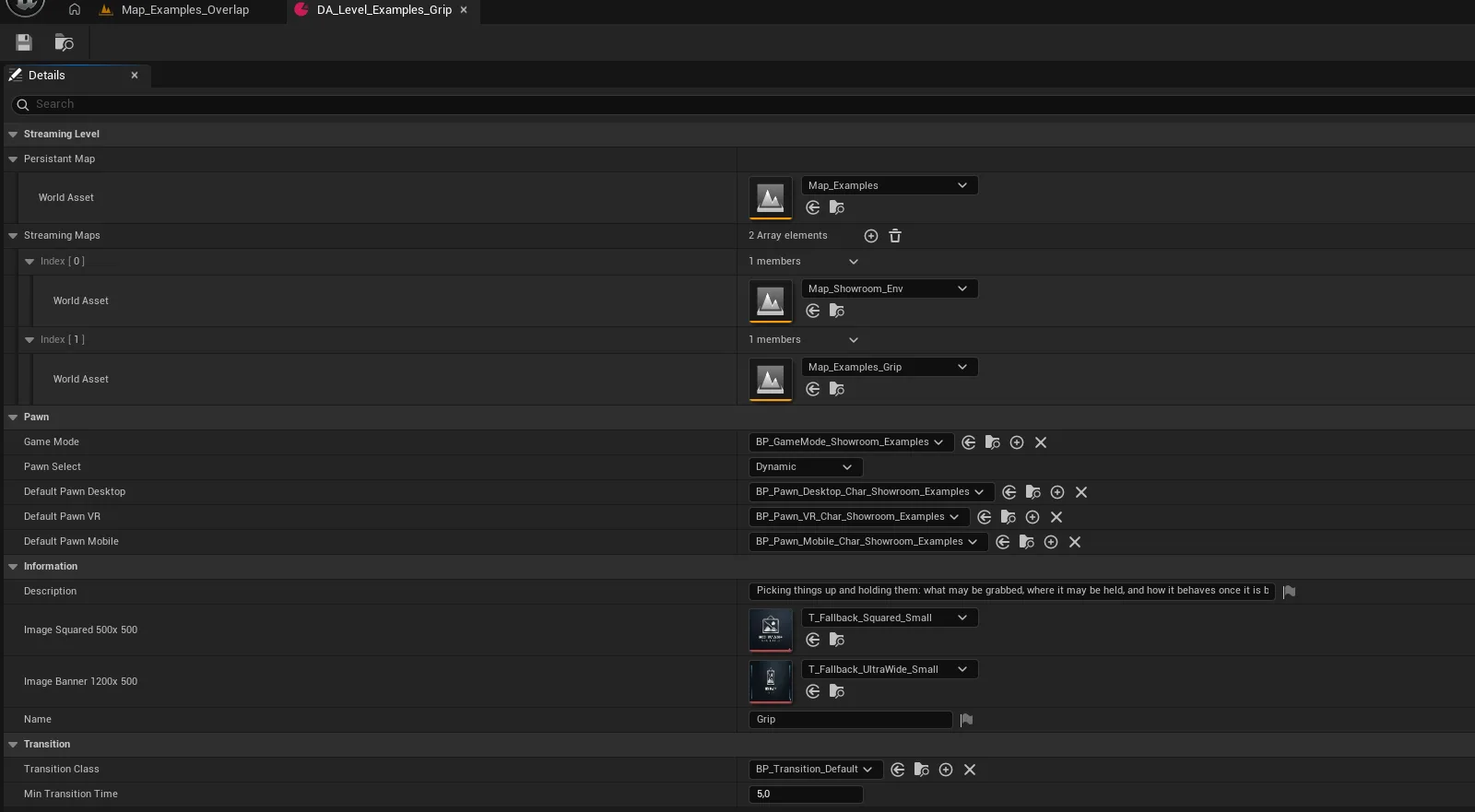
howto_newlevel_01.pngCreating the level data asset
What to copy versus what to subclass
Tip
Subclass anything with logic. Copy anything that is purely data. Themes, colour data assets, level data assets and position data assets are meant to be duplicated and edited; components, pawns and widgets are meant to be subclassed.