AFM_State
The value system: boolean, float, integer, name, colour, trigger and drag state components sharing one contract, so UI can bind to any of them generically.
What it gives you
- Typed state components for world objects
- A shared event listener contract UI binds to
- Drag state for levers, sliders and dials
- The same contract the settings menu uses
Requires
Description
AFM_State exists so that UI never needs to know what it is displaying.
Each value type has a component — BPC_State_Boolean, _Float, _Integer, _Name, _Color,
_Trigger and _Drag — and all of them expose a BP_Value event listener through BPI_Value,
along with a title and caption. A widget binds to "a value", not to a specific object.
That indirection is why AFM_Settings can reuse the identical widgets: settings are just values
backed by console variables and a save game instead of by an actor. Implement BPI_Value on
anything of your own and the whole settings UI works with it unchanged.
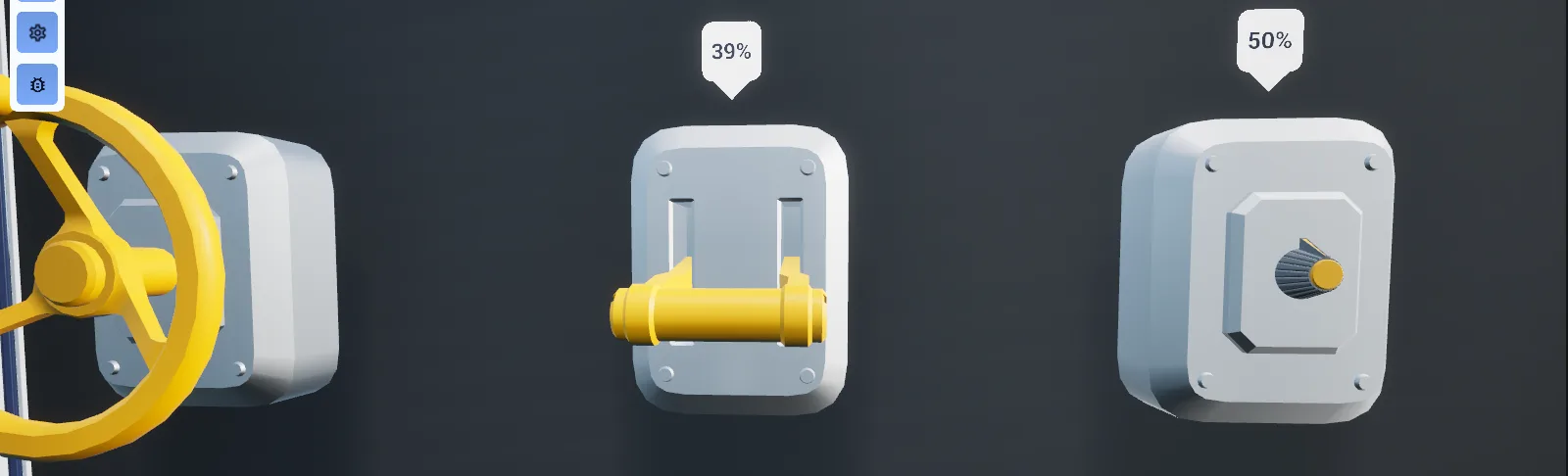
BPC_State_Drag is the most substantial of the set. It converts hand or pointer movement into a
constrained value along an axis, with snapping, sections and sound — this is what levers, drawers,
dials and physical sliders are built from.
Setup
- Enable
AFM_State. - Add the state component matching your value type to the actor.
- Set Title and Caption — these appear in any UI bound to the value.
- Bind to the component's value-changed delegate, or bind a widget to it.
Usage
Driving a lever
Add BPC_State_Drag, configure the drag type and axis, and pair it with
BPC_Interaction_Grip_Latch or BPC_Interaction_Overlap_Drag. The interaction supplies the input;
the state component owns the value.
Binding UI to a value
Any widget that takes a BPI_Value will bind to your component. The WBP_SettingItem_* widgets are
built for exactly this.
Resetting
Call Value_Reset with Source Info to return the value to its default.
Key properties
| Property | When to change |
|---|---|
Title / Caption | Always — these are the label and helper text any bound UI displays |
| Drag type and snap mode | BPC_State_Drag — choose free, sectioned or snapped movement |
| Sound cues | Continuous and per-section drag feedback |
Extending
Derive from BPC_State for a new value type, implement BPI_Value plus a typed interface, and every
existing binding mechanism works with it. Implement BPI_Value directly on a plain object when you
do not need a component.
Multiplayer notes
State components implement IOutsidePawnRPCInterface, so they call server RPCs directly without
routing through the pawn. This requires AFPNetDriver to be the active net driver.
Example map
Map_Examples_States demonstrates every state type driving both objects and UI.
Troubleshooting
State changes do not replicate. AFPNetDriver is not active — see
Multiplayer guide.
A drag feels wrong. Check the drag type first; multi-axis and single-axis behave very differently and the axis is easy to set on the wrong component.
API reference
Every blueprint asset in this plugin. Expand an asset to see its members.
Blueprints
BPC_State3 members
| Kind | Name | Signature | Description |
|---|---|---|---|
| var | TitleContent | text | Heading widgets show for this state, handed over whenever a widget asks the value for its title. Leave empty for a control with no label of its own. |
| var | CaptionContent | text | Supporting line offered to widgets beneath the title, edited as multi-line text. Leave empty to show the title alone. |
| event | Value_Reset | (SourceInfo: ST_SourceInfo) | Empty in the abstract base; each value type overrides it to push its Default Value back out through its own setter. Called by configurator and settings screens that reset every value on an actor at once. |
BPC_State_Boolean9 members
| Kind | Name | Signature | Description |
|---|---|---|---|
| var | DefaultValueValue | bool | Setting a reset returns to, and the one Apply and Toggle broadcast from the editor. It is not written to the live value at start-up, so the state begins false until something sets it. |
| var | Text FalseContent | text | Caption offered to widgets for the off position, returned as the first of the pair of texts. Buttons bound to this state show it while the value is false. |
| var | Text TrueContent | text | Caption offered to widgets for the on position, returned as the second of the pair of texts. Buttons bound to this state show it while the value is true. |
| fn | ApplyValue | () | Broadcasts Default Value to everything bound to On Value Updated without storing it or telling the server. An editor button, so meshes and widgets in the level preview the default. |
| fn | ToggleValue | () | Flips Default Value and broadcasts the new setting to On Value Updated. An editor button for previewing both positions; the replicated runtime value is left alone. |
| event | Server_SetValue | (SourceInfo: ST_SourceInfo, InValue: bool) | Server RPC that stores the setting and its source info as the replicated value, whose notify then updates the other machines. Called by the boolean setter after the local update rather than directly. |
| event | Value_toggleBoolean | (SourceInfo: ST_SourceInfo) | Inverts the last replicated setting and writes the result back through the boolean setter. Called by buttons that switch on press; the flip reads the replicated copy, so toggling faster than replication can repeat a setting. |
| event | Value_setBoolean | (SourceInfo: ST_SourceInfo, Value: bool) | Stores the setting locally, broadcasting On Value Updated at once for the pawn that acted, then mirrors it to the server so every other client picks it up through replication. |
| event | Value_Reset | (SourceInfo: ST_SourceInfo) | Writes Default Value back through the boolean setter, carrying the given source info, so listeners and the server see it as an ordinary change. |
BPC_State_Color6 members
| Kind | Name | Signature | Description |
|---|---|---|---|
| var | DefaultValueValue | LinearColor | Colour recorded as the intended starting point of this state. Nothing in the graph reads it, since the reset here is deliberately empty, so setting it does not on its own push a colour to listeners. |
| var | InterpolationSpeedConfig | float | Rate at which the smoothed colour chases the current one while the component ticks, which is what materials should read to fade rather than jump. Higher values arrive sooner. |
| var | ErrorToleranceConfig | float | Difference below which the smoothed colour counts as having reached the current one, ending the per-frame chase. Raise it to settle sooner, lower it for a closer match. |
| event | Server_SetValue | (SourceInfo: ST_SourceInfo, InValue: LinearColor) | Server RPC that stores the colour and its source info as the replicated value, whose notify then updates the other machines. Called by the colour setter rather than directly. |
| event | Value_setColor | (SourceInfo: ST_SourceInfo, Value: LinearColor) | Stores the colour locally, broadcasts On Value Updated and switches ticking on so the smoothed reading catches up, then mirrors the change to the server. |
| event | Value_Reset | (SourceInfo: ST_SourceInfo) | Deliberately empty override, so a reset sweep across an actor leaves its colour where the player left it. Set the colour explicitly if you need the original one back. |
BPC_State_Drag42 members
| Kind | Name | Signature | Description |
|---|---|---|---|
| var | TagToControlledComponentReferences | name | Component tag naming the scene component this drag moves; the first tagged component on the owner is found once and cached. Leave it as None and nothing is found, so the drag has nothing to move. |
| var | DragTypeConfig | E_Drag_Type | Path the handle travels: a slide along local X, Y or Z, a roll, pitch or yaw angle, or a distance along the owner's spline with or without following its rotation. None leaves the handle where it is. |
| var | ValueRangeConfig | InputRange | Lowest and highest drag position, in centimetres for the sliding types and degrees for the turning ones. Positions are clamped to it, and the percentage broadcast with each move is the position mapped across it. |
| var | DefaultValueConfig | float | Position Apply moves the handle to, in the units of Value Range. It gives the object its resting pose in the editor and is not applied again at start-up. |
| var | SnapConfig|Snap | E_Drag_Snap | What happens once the hand lets go: Free Movement leaves the handle where it was released, while the other modes run it on to a section snap value or back to the start at Snapping Speed. |
| var | SnappingSpeedConfig|Snap | float | Rate at which the handle travels to its snap target after release. Higher values snap sooner; it has no effect while Snap is Free Movement. |
| var | FollowSpeedConfig | float | Rate at which the drag position chases the hand while it is held, used by the per-frame interpolation. Lower values let the object lag behind the hand, higher values make it stick to it. |
| var | InvertPercentConfig | bool | Whether the percentage broadcast with each move is flipped, so the minimum of Value Range reads as 1 rather than 0. Only that broadcast changes; the drag position itself is untouched. |
| var | SectionSeedSections | ST_Drag_SectionSeed[] | Recipe for generating sections: each entry gives a name, a share of Value Range and a justification placing its snap value at the start, middle or end. Pressing Create Sections turns it into Section Set and overwrites what was there. |
| var | SectionSetSections | ST_Drag_Section[] | Sections the drag range is divided into, each with a range, a snap value, a pull strength, an identifier and a label. Entering or leaving one raises a section trigger, and the identifiers are the options widgets see. Author it directly or generate it from Section Seed. |
| var | SoundTickDistanceSound | float | Distance the handle must travel since the last tick sound before another one plays, in the units of Value Range. Raise it for a coarser ratchet; this governs the one-shot cue, not the looping sound. |
| var | LoopingSoundSound | SoundBase | Continuous sound spawned attached to the dragged component the first time the drag needs audio, and destroyed again once movement stops. It starts at zero volume, so something has to raise it. Leave empty for a silent drag. |
| var | DisplayRangeContent | InputRange | Range reported to widgets in place of Value Range, letting a slider read 0 to 100 while the handle travels a few centimetres. Section snap values are mapped into it before being handed over as segment marks. |
| var | UnitsContent | text | Suffix widgets append to the displayed value, per cent by default. Presentation only; it has no bearing on the drag itself. |
| var | FractionalDigitsContent | int | Largest number of decimal places widgets show for the value. Passed to them together with the display range and the segment marks. |
| var | AttenuationSound | SoundAttenuation | Sound attenuation applied to both the looping drag sound and the tick cue played as the handle moves. Leave empty to have both play unattenuated. |
| fn | getControlledComponentDrag | (out HandleComponent: SceneComponent) | Returns the scene component the drag moves, taking the first component on the owner that carries Tag To Controlled Component and caching it for later calls. Returns nothing when no component matches. |
| fn | getTransformFromPositionDrag | (NewPosition: float, ref out NewTransform: Transform) | Builds the relative transform the handle should have at a given position, branching on the drag type: the sliding types replace one location axis, the turning ones replace one rotation axis, and the spline types sample the owner's spline at that distance. Pitch is clamped to plus or minus 90 degrees. |
| fn | getSplineComponentDrag | (out SplineComponent: SplineComponent) | Returns the first spline component on the owning actor, which the two spline drag types sample for their transforms. Returns nothing when the actor has no spline. |
| fn | getClosestSegmentDrag | (out Segment: ST_Drag_Section, out Index: int) | Returns the section whose range contains the current drag position, together with its index. The index is -1 when the handle sits outside every section. |
| fn | SearchForBestPointToOffsetDrag | (Location: Vector, RotationDelta: Rotator, TakeLocationForRotationReference: bool, out ClosestPosition: float) | Returns the drag position that best matches the hand's location and rotation, by stepping the helper's offset handle along the drag and comparing. Inside a section the answer is pulled towards that section's snap value by its pull strength, which gives the drag its magnetism. |
| fn | ApplyConfig | () | Moves the handle to Default Value by running an ordinary position change with no source info. An editor button, so the object sits at its resting position in the level. |
| fn | FindSectionDrag | (SectionName: name, out Value: float, out Found: bool) | Returns the snap value of the section with the given identifier and whether one was found. The value comes back as zero when the identifier matches nothing. |
| fn | CreateSectionsSections | () | Rebuilds Section Set from Section Seed, splitting Value Range between the seeds in proportion to their shares and placing each snap value at the start, middle or end of its slice according to its justification. An editor button that overwrites Section Set. |
| fn | getAudioComponentSound | (out AudioComponent: AudioComponent) | Returns the audio component carrying the looping drag sound, spawning it attached to the dragged component on first use and caching it. It spawns at zero volume, so it stays inaudible until something raises the volume. |
| fn | getCurrentSectionSections | (out Section: name, out Index: int) | Returns the identifier and index of the first section whose range contains the current drag position. Reports None and -1 while the handle sits between sections. |
| event | SetNewDragPosition | (SourceInfo: ST_SourceInfo, Position: float) | Moves the handle to a new position and, when the acting pawn is the local one and the owning actor replicates, forwards the position to the server. The entry point interactions use while a hand is dragging. |
| event | CallTriggerConstant | (SourceInfo: ST_SourceInfo, Distance: float, Percent: float, Velocity: float) | Broadcasts On Drag State Changed Constant with the position, the percentage across Value Range and the movement since the last update. Raised on every change; bind to the delegate rather than calling it. |
| event | CallTriggerSingle | (SourceInfo: ST_SourceInfo, const SectionIdentifier: name, Set: bool) | Broadcasts On Drag State Changed Section as the handle enters or leaves a section, saying which section and whether it is now inside. Internal; bind to the delegate instead. |
| event | InitiateDrag | (LocationOffset: Vector) | Places the helper's offset handle on the dragged component and its location offset at the grab point, then cancels any automatic movement under way. Called by the overlap drag interaction the moment a hand takes hold. |
| event | ReleaseDrag | (SourceInfo: ST_SourceInfo) | Publishes the position the handle was let go at as the replicated position and switches ticking back on so snapping can run. Called by the interaction that was dragging when the hand releases. |
| event | AdjustPositionToReferenceLocation | (SourceInfo: ST_SourceInfo, Location: Vector, RotationDelta: Rotator, DeltaTime: float, TakeLocationForRotationReference: bool) | Interpolates the handle at Follow Speed towards the position that best matches the hand's location and rotation, and plays continuous haptics scaled by how far it moved. Called each frame by the dragging interaction. |
| event | SetDragPosition | (SourceInfo: ST_SourceInfo, Position: float) | Clamps the position to Value Range, moves the dragged component there and records the movement delta. Plays the tick cue once the handle has travelled Sound Tick Distance, broadcasts the constant update, and raises a section trigger for every section entered or left. |
| event | Server_SetDragPosition | (SourceInfo: ST_SourceInfo, Position: float) | Server RPC that stores the position as the replicated position so the other clients follow. Called for the locally controlled pawn once the position has already been applied locally. |
| event | Value_Name_Set | (SourceInfo: ST_SourceInfo, Name: name) | Treats the name as a section identifier and starts an automatic move to that section's snap value. Names matching no section are ignored, and the move only runs for the pawn in the source info. |
| event | MoveToSection | (SourceInfo: ST_SourceInfo, SectionIdentifier: name) | Starts an automatic move to the snap value of the named section, but only on the machine whose pawn is described by the source info. Nothing happens when the identifier matches no section. |
| event | AutoMoveToPosition | (SourceInfo: ST_SourceInfo, ShouldMove: bool, TargetPosition: float) | Records a target for automatic movement and switches ticking on so the handle travels there, or stops the movement outright when asked not to move. Used both by section moves and by the float setter. |
| event | Value_setFloat | (SourceInfo: ST_SourceInfo, Value: float) | Moves the handle to a value given as 0 to 1 across Value Range, as an automatic movement rather than an instant jump. This is how a slider widget drives a drag. |
| event | Value_Name_NextValue | (SourceInfo: ST_SourceInfo) | Steps the handle on to the section after the one it is in and starts an automatic move to that section's snap value. Called by steppers and next buttons bound to the drag. |
| event | Value_Name_PreviousValue | (SourceInfo: ST_SourceInfo) | Steps the handle back to the section before the one it is in and starts an automatic move to that section's snap value. Called by steppers and previous buttons bound to the drag. |
| event | MovementStopped | () | Switches component ticking off and destroys the looping sound component. Raised when an automatic move ends or is cancelled, so anything that needs the tick must start it again. |
| event | Value_Reset | (SourceInfo: ST_SourceInfo) | Deliberately empty override, so a reset sweep leaves the handle exactly where it is. Use Apply, or set the value through the float interface, to send the drag back to Default Value. |
BPC_State_Float11 members
| Kind | Name | Signature | Description |
|---|---|---|---|
| var | DefaultValueValue | float | Value a reset writes back. It is not applied at start-up, and the reset passes it on without source info, so the change appears to come from no pawn in particular. |
| var | InterpolationSpeedConfig | float | Rate at which the smoothed reading chases the current value while the component ticks, for meshes and materials that should ease rather than jump. Higher values settle sooner. |
| var | RangeConfig | InputRange | Lowest and highest meaningful value, handed to sliders as their range and used to map the smoothed reading into real units. Incoming values are not clamped to it, so anything may set a value outside it. |
| var | UnitsContent | text | Suffix widgets append to the displayed value, such as a per cent or second marker. Leave empty for a bare number. |
| var | SegmentsContent | float[] | Marks along the range, given as values, that sliders draw as notches. Leave empty for a plain unmarked slider. |
| var | Display Fractional DigitsContent | int | Largest number of decimal places widgets show for the value. Presentation only; the stored value keeps its full precision. |
| event | Server_SetValue | (SourceInfo: ST_SourceInfo, InValue: float) | Server RPC that stores the value and its source info as the replicated value, whose notify then updates the other machines. Called by the float setter rather than directly. |
| event | Value_setFloat | (SourceInfo: ST_SourceInfo, Value: float) | Stores the value locally and mirrors it to the server. The local update broadcasts On Value Updated with the change since the previous value and switches ticking on so the smoothed reading catches up. |
| event | Value_setBoolean | (SourceInfo: ST_SourceInfo, Value: bool) | Writes 1 for true and 0 for false through the float setter, letting a button drive a float state. Anything above 0.5 reads back as true. |
| event | Value_toggleBoolean | (SourceInfo: ST_SourceInfo) | Reads the current value as a boolean, treating anything above 0.5 as true, and writes the opposite back as 1 or 0. Called by buttons bound to a float state. |
| event | Value_Reset | (SourceInfo: ST_SourceInfo) | Writes Default Value back through the float setter. The source info handed in is discarded, so the reset is recorded as belonging to no pawn. |
BPC_State_Integer5 members
| Kind | Name | Signature | Description |
|---|---|---|---|
| var | DefaultValueValue | int | Value a reset writes back, carrying the source info of whoever asked for the reset. It is not applied at start-up. |
| var | TextsContent | text[] | Labels for the positions this state can take, in index order. Drop-downs and steppers build their entries from them, so leaving it empty gives those widgets nothing to show. |
| event | Server_SetValue | (SourceInfo: ST_SourceInfo, InValue: int) | Server RPC that stores the value and its source info as the replicated value, whose notify then updates the other machines. Called by the integer setter rather than directly. |
| event | Value_setInteger | (SourceInfo: ST_SourceInfo, Value: int) | Stores the value locally and mirrors it to the server. Listeners are told through the replication notify, which ignores a value equal to the one already cached, so setting the same number twice raises nothing. |
| event | Value_Reset | (SourceInfo: ST_SourceInfo) | Writes Default Value back through the integer setter, carrying the given source info, so the change travels the same route as any other. |
BPC_State_Name10 members
| Kind | Name | Signature | Description |
|---|---|---|---|
| var | NameState | ST_State_Name | Current name together with the source info of whoever last set it. The value entered here is what the state starts the level on; it is replicated, and each update raises On Value Updated on every machine. |
| var | AvailableNamesConfig | name[] | Names this state may take, in order. Drop-downs use them as their option identifiers and Current Index looks the present name up in them, so a name missing from the list reports an index of -1. |
| var | Default ValueValue | name | Name a reset writes back. Leave it as None to have a reset clear the state rather than select one of the available names. |
| var | TextsContent | text[] | Labels shown for the entries of Available Names, matched to them by index. Leave empty and widgets have only the raw names to display. |
| fn | CurrentIndexState | (out Index: int) | Returns the position of the current name within Available Names, or -1 when the name is not one of them. |
| event | Value_Name_Set | (SourceInfo: ST_SourceInfo, Name: name) | Hands the name straight to the server, which stores it and lets replication tell everyone. Nothing changes locally until the replicated value comes back, and the name is not checked against Available Names. |
| event | Value_Name_NextValue | (SourceInfo: ST_SourceInfo) | Moves the state on to the following entry of Available Names, going through the same server route as an ordinary set. Called by steppers and next buttons. |
| event | Value_Name_PreviousValue | (SourceInfo: ST_SourceInfo) | Moves the state back to the preceding entry of Available Names, going through the same server route as an ordinary set. Called by steppers and previous buttons. |
| event | Value_Reset | (SourceInfo: ST_SourceInfo) | Sets the state back to Default Value through the ordinary name setter, so the reset is replicated like any other change. |
| event | Server_SetName | (SourceInfo: ST_SourceInfo, Value: name) | Server RPC that stores the name and its source info; replication then raises On Value Updated everywhere. Every name change goes through here, so the value only ever changes on the server first. |
BPC_State_Trigger4 members
| Kind | Name | Signature | Description |
|---|---|---|---|
| var | TextContent | text | Caption offered to widgets for the action this trigger performs. Buttons bound to a trigger state show it as their label. |
| event | Server_Trigger | (SourceInfo: ST_SourceInfo) | Server RPC that passes the trigger on to the multicast so every machine hears it. Raised after the local broadcast rather than called directly. |
| event | Multicast_Trigger | (Sourceinfo: ST_SourceInfo) | Raises On Trigger on each machine, skipping the one whose own player pawn set it off since that client has already fired locally. |
| event | Value_Trigger | (SourceInfo: ST_SourceInfo) | Fires the trigger: raises On Trigger at once so the acting player gets an immediate response, then routes it through the server so the other clients follow. |
Helpers
BP_Helper_DragOffset0 members
No editor-visible members; this asset configures defaults only.
Interfaces
BPI_Value4 members
| Kind | Name | Signature | Description |
|---|---|---|---|
| fn | Value_getEventListenerValue | (out EventListener: BP_Value) | Implemented by a value to hand out the object whose On Value Updated delegate widgets bind to. The state components create that object on the first request and keep it, so binding works before any value has been set. |
| fn | Value_ResetValue | (SourceInfo: ST_SourceInfo) | Implemented by a value to put itself back to its configured default. Called on every value of an actor by configurator and settings screens; the colour and drag states deliberately do nothing. |
| fn | Value_getTitleValue_Info | (out Text: text) | Implemented by a value to supply the heading widgets show for it. The state components answer with their Title. |
| fn | Value_getCaptionValue_Info | (out Text: text) | Implemented by a value to supply the supporting line shown beneath the title. The state components answer with their Caption. |
BPI_Value_Boolean4 members
| Kind | Name | Signature | Description |
|---|---|---|---|
| fn | Value_getBooleanValue_Boolean | (out SourceInfo: ST_SourceInfo, out Value: bool) | Implemented by a boolean value to report its current setting and the source info of whoever last changed it. The float state answers it too, counting anything above 0.5 as true. |
| fn | Value_setBooleanValue_Boolean | (SourceInfo: ST_SourceInfo, Value: bool) | Implemented by a boolean value to take a new setting from the pawn described by the source info. Buttons call it when their selection changes. |
| fn | Value_toggleBooleanValue_Boolean | (SourceInfo: ST_SourceInfo) | Implemented by a boolean value to flip itself. Called by buttons that switch on press instead of being told which setting to take. |
| fn | Value_Boolean_getTextsValue Boolean | (out Text_False: text, out Text_True: text) | Implemented by a boolean value to supply the captions for its off and on positions, which buttons use as their label. The float state returns neither. |
BPI_Value_Color3 members
| Kind | Name | Signature | Description |
|---|---|---|---|
| fn | Value_getColorValue Color | (out SourceInfo: ST_SourceInfo, out Value: LinearColor) | Implemented by a colour value to report the colour it holds and the source info of whoever last set it. The colour picker reads it as it opens. |
| fn | Value_setColorValue Color | (SourceInfo: ST_SourceInfo, Value: LinearColor) | Implemented by a colour value to take a new colour from the pawn described by the source info. The colour picker calls it as the user chooses. |
| fn | Value_getColor_InterpolatedValue Color | (out InterpolatedFloat: LinearColor) | Implemented by a colour value to report the smoothed colour chasing the one it holds. Materials should read this rather than the raw colour if they are to fade instead of jump. |
BPI_Value_Float5 members
| Kind | Name | Signature | Description |
|---|---|---|---|
| fn | Value_getFloatValue_Float | (out SourceInfo: ST_SourceInfo, out Value: float) | Implemented by a float value to report the value it holds and the source info of whoever last set it. Sliders read it while they are being built. |
| fn | Value_setFloatValue_Float | (SourceInfo: ST_SourceInfo, Value: float) | Implemented by a float value to take a new value from the pawn described by the source info. Sliders call it as their handle moves; the drag state reads the value as 0 to 1 across its own range. |
| fn | Value_getFloat_InterpolatedValue_Float | (out InterpolatedFloat: float) | Implemented by a float value to report the smoothed reading chasing the value it holds, for meshes and materials that should ease rather than jump. The drag state does no smoothing and answers zero. |
| fn | Value_getFloat_Interpolated_LerpedValue_Float | (out InterpolatedFloat_Lerped: float) | Implemented by a float value to report the smoothed reading already mapped onto its configured range, saving the caller the lerp. The drag state answers zero. |
| fn | Value_Float_getContentValue Float | (out Range: InputRange, out Units: text, out Segments: float[], out MaximumFractionalDigits: int) | Implemented by a float value to describe how it should be presented: its range, its unit suffix, any segment marks and how many decimal places to show. Sliders call it once while building themselves. |
BPI_Value_Integer3 members
| Kind | Name | Signature | Description |
|---|---|---|---|
| fn | Value_getIntegerValue_Integer | (out SourceInfo: ST_SourceInfo, out Value: int) | Implemented by an integer value to report the value it holds and the source info of whoever last set it. Drop-downs and steppers read it to show the right entry. |
| fn | Value_setIntegerValue_Integer | (SourceInfo: ST_SourceInfo, Value: int) | Implemented by an integer value to take a new value from the pawn described by the source info. Drop-downs call it when one of their options is chosen. |
| fn | ValueInteger_getTextsValue Integer | (out Texts: text[]) | Implemented by an integer value to list the label for each position it can take, in index order. Drop-downs and steppers build their entries from the list. |
BPI_Value_Name6 members
| Kind | Name | Signature | Description |
|---|---|---|---|
| fn | Value_Name_SetValue_Name | (SourceInfo: ST_SourceInfo, Name: name) | Implemented by a name value to take a new name from the pawn described by the source info. The drag state reads the name as the section to move to. |
| fn | Value_Name_GetValueValue_Name | (out SourceInfo: ST_SourceInfo, out Name: name) | Implemented by a name value to report the name it holds and the source info of whoever last set it. The drag state answers with the section its handle is currently sitting in. |
| fn | Value_Name_NextValueValue_Name | (SourceInfo: ST_SourceInfo) | Implemented by a name value to step on to the following entry of its list. Called by steppers and next buttons bound to the value. |
| fn | Value_Name_PreviousValueValue_Name | (SourceInfo: ST_SourceInfo) | Implemented by a name value to step back to the preceding entry of its list. Called by steppers and previous buttons bound to the value. |
| fn | Value_Name_getIDsValue Name | (out IDs: name[]) | Implemented by a name value to list the names it can take, in order, which drop-downs use as their option identifiers. The drag state returns the identifier of each of its sections. |
| fn | Value_Name_getTextsValue Name | (out Texts: text[]) | Implemented by a name value to supply the label for each of its names, matched to them by index. The drag state returns the text of each section. |
BPI_Value_Trigger2 members
| Kind | Name | Signature | Description |
|---|---|---|---|
| fn | Value_TriggerValue_Trigger | (SourceInfo: ST_SourceInfo) | Implemented by a value that fires rather than holds a setting, taking the source info of the pawn that set it off. Buttons call it on press. |
| fn | Value_Trigger_getTextValue Trigger | (out Text: text) | Implemented by a trigger value to supply the caption for the action it performs, which buttons show as their label. |