AFS_UI_InfoPanels
Screen-space info panels shown through the HUD ability, with a one-call library for showing, toggling and removing them.
What it gives you
- Persistent screen-space panels
- Show, toggle, remove and query from one library
- Automatic HUD hosting
Requires
Required by
None
Description
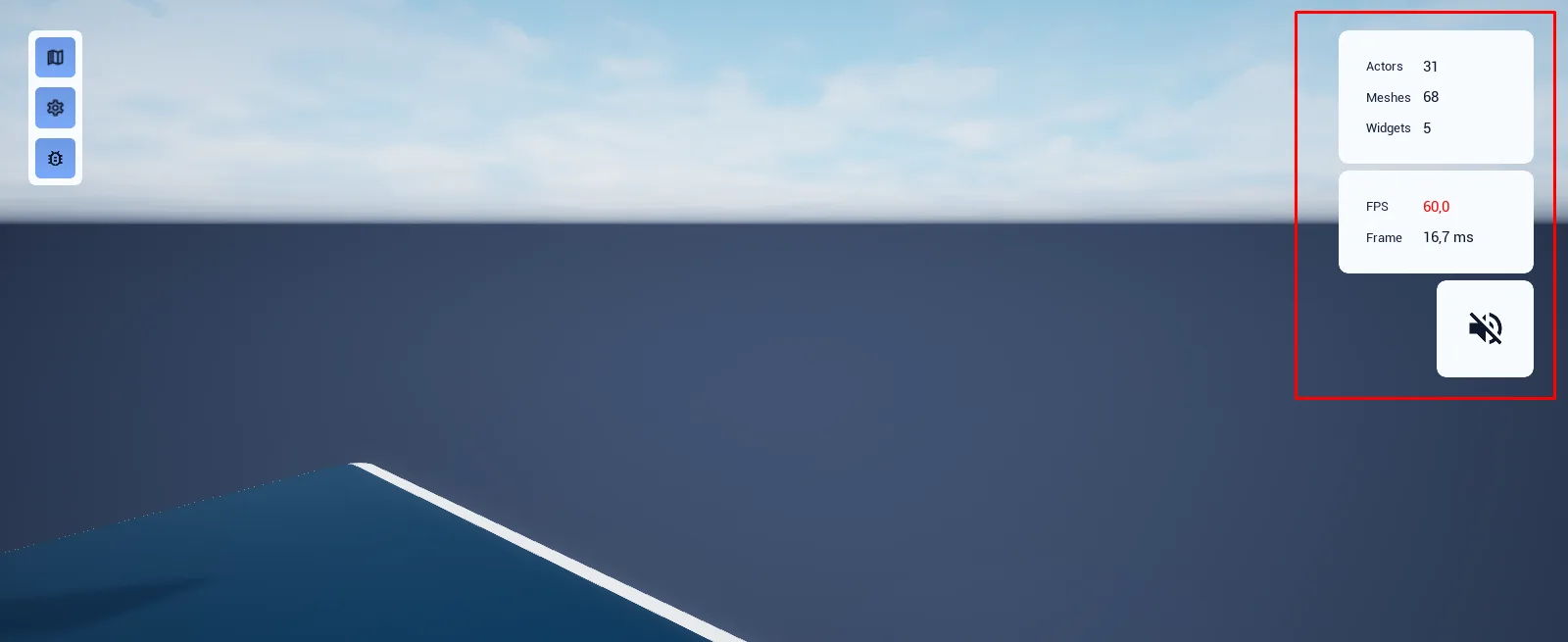
Info panels are persistent screen-space surfaces for information the player refers back to — stats, instructions, debug readouts. They differ from notifications in that they stay until dismissed, and from popups in that they are not modal.
BFL_InfoPanel creates the hosting panel on the HUD ability if it does not exist yet, so a single
call is enough from a cold start.
Setup
- Enable
AFS_UI_InfoPanels. - Confirm the pawn has
BPC_PawnAbility_HUD. - Call
InfoPanel_Showwith your widget class.
Usage
Showing and toggling
InfoPanel_Show adds a panel, InfoPanel_Toggle flips it, InfoPanel_Remove removes it and
InfoPanel_IsVisible queries it. All take the widget class as the key, so you never hold a reference.
Key properties
| Property | When to change |
|---|---|
| Widget class | Acts as the panel's identity — one panel per class |
Extending
Derive your panel content from WBP_Base; derive from WBP_InfoPanel to change the hosting frame.
Example map
Map_Examples_InfoPanels shows several panels. AFU_Debug uses this system for its stat readouts.
Troubleshooting
Calling Show twice creates nothing new. Panels are keyed by widget class by design — use a different class for a second panel.
API reference
Every blueprint asset in this plugin. Expand an asset to see its members.
Libraries
BFL_InfoPanel4 members
| Kind | Name | Signature | Description |
|---|---|---|---|
| fn | InfoPanel_ShowInfoPanel | (Pawn: Pawn, WidgetClass: Class<WBP_Base>, __WorldContext: Object, out InfoWidget: WBP_Base) | Adds an info card of the given widget class to the pawn's stack and returns the widget inside it, creating the containing panel on the pawn's HUD first if this is the first card. Asking for a class that is already showing does nothing, so it is safe to call repeatedly. |
| fn | InfoPanel_ToggleInfoPanel | (Pawn: Pawn, WidgetClass: Class<WBP_Base>, __WorldContext: Object) | Shows the info card for this widget class if it is hidden and closes it if it is showing. The usual way to wire a card to a button or a key. |
| fn | InfoPanel_RemoveInfoPanel | (Pawn: Pawn, WidgetClass: Class<WBP_Base>, __WorldContext: Object) | Closes the info card for this widget class, playing its exit animation. Does nothing if no panel is on screen; the panel itself closes once its last card is gone. |
| fn | InfoPanel_IsVisibleInfoPanel | (Pawn: Pawn, WidgetClass: Class<WBP_Base>, __WorldContext: Object, out IsShown: bool) | Reports whether a card of this widget class is currently in the pawn's stack. Returns false when no panel exists at all, so it can be called before anything has been shown. |
Widgets
WBP_InfoElement3 members
| Kind | Name | Signature | Description |
|---|---|---|---|
| var | WidgetContent | Class<WBP_Base> | Class of the widget shown inside this card. Set on spawn by the panel; the card is only a frame with a close button, and this is what fills it. |
| event | Despawn | () | Plays the pop-in animation in reverse, drops the card behind its neighbours while it shrinks, then broadcasts On Info Element Closed and removes itself. Use this rather than Remove From Parent so the panel is told to restack. |
| event | WidgetElement_PostInitiate | () | Hook that runs after the card has been built. Empty in this class; override it in a card design that needs to set itself up once its inner widget exists. |
WBP_InfoPanel7 members
| Kind | Name | Signature | Description |
|---|---|---|---|
| fn | TickPanelPositionPositioning | (DeltaTime: float) | Eases every card towards its place in the stack, walking the list from the bottom up and offsetting each by the height of the one before it. Call it every frame from the owning HUD so cards slide into the gap when one closes instead of jumping. |
| fn | SpawnPanelWidgetPanel | (WidgetClass: Class<WBP_Base>, out InfoWidget: WBP_Base) | Creates a card for the given widget class, anchors it to the top right of the panel, subscribes to its close event and returns the widget built inside it. Asking for a class already in the stack returns nothing, which is what keeps cards unique. |
| fn | DespawnPanelWidgetPanel | (Widget: Class<WBP_Base>) | Starts the closing animation on the card for this widget class and forgets it, so a card of the same class can be opened again immediately. The card removes itself from the list when the animation finishes. |
| fn | InfoPanel_TogglePanel | (WidgetClass: Class<WBP_Base>) | Closes the card for this widget class if it is in the stack, otherwise opens one. |
| fn | IsPanelSpawnedPanel | (ref const Widget: Class<WBP_Base>, out IsShown: bool) | Reports whether the stack currently holds a card of this widget class. |
| event | AssignCloseWidget | (Target: WBP_InfoElement) | Subscribes the panel to a card's closed event so the stack can restack when that card goes away. Called for you by Spawn Panel Widget. |
| event | OnInfoElementClosed | (InfoElement: WBP_InfoElement) | Drops a closed card from the stack, unsubscribes from it, and closes the whole panel once the last card has gone so no empty frame is left on the HUD. |