First steps
The fastest path from a working install to something you built yourself.
1. Look at an example first
Every feature has a map in AF_Examples. Open Map_Examples_Select and press Play. Click on the
objects — each one has a BPC_Interaction_Select component and nothing else. That is the whole
pattern.
2. Make your own object interactive
- Place any static mesh actor in the level and convert it to a Blueprint.
- Add a
BPC_Interaction_Selectcomponent. - Set Highlight Class to
BPC_Highlight_Materialand pick a Highlight Color. - In the Event Graph, bind to the component's On Select delegate and do something visible.
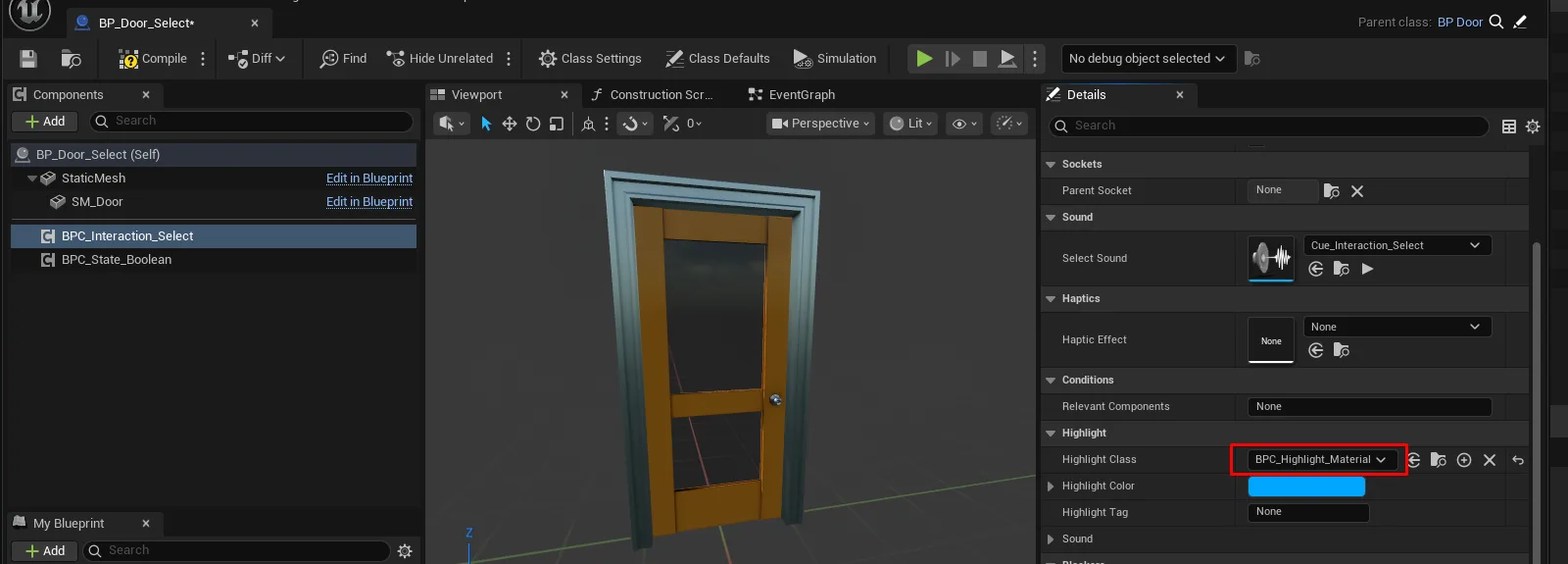
Press Play. The object highlights on hover and fires your event on click — in VR, on desktop and on mobile, with no branching.
The component you add decides the capability. Swap BPC_Interaction_Select for
BPC_Interaction_Grip_Pickup and the same object becomes something you can pick up instead.
3. Add a condition
If the object should only sometimes be selectable, implement Interface_Select on it and return
Override = true with Is Selectable = false when it should be blocked. Not implementing the
interface at all means "always selectable", so you only pay for the complexity when you need it.
4. Where to go next
- Abilities & interactions — the model behind what you just did.
- Make an object grabbable — the same pattern for grip.
- Create a new level — building your own map rather than editing an example.