AFS_UX_Teleporter
Teleport targeting: areas and locations, the aiming controller ability, the indicator, and a game-state manager coordinating destinations.
What it gives you
- Arc-based teleport targeting with a visual indicator
- Free-form areas and fixed destination points
- Selectable teleport targets for desktop
- Destination coordination across players
Required by
Description
Teleport is split between two plugins on purpose. AFS_UX_Teleporter handles targeting — where
the player is aiming and what counts as a valid destination. AFM_Teleport handles execution —
the fade, motion and relocation. You can replace either without touching the other.
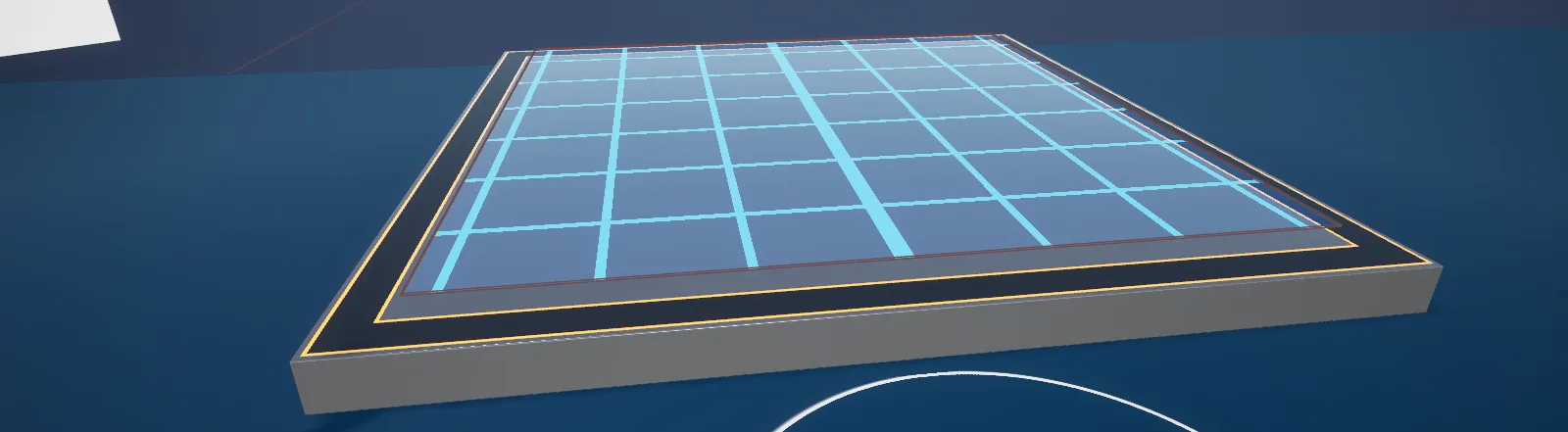
Destinations come in two shapes. BP_TeleportArea covers a region the player may land anywhere
within; BP_TeleportLocation is a fixed point with a defined arrival rotation, for seats and marked
positions. Both have _Select variants that are also selectable by laser or click, so the same
destinations work on desktop.
Setup
- Enable
AFS_UX_TeleporterandAFM_Teleport. - Confirm
BPC_ControllerAbility_Teleportis on the motion controllers andBPC_PawnAbility_Teleport_Characteron the pawn. - Place
BP_TeleportArea_Defaultactors over walkable regions, andBP_TeleportLocation_Defaultactors at fixed destinations.
Usage
Adding a destination
See Add a teleport area.
Making a seat
Use BP_TeleportLocation_Default and set its arrival rotation so the player faces the right way when
they arrive.
Desktop support
Use the _Select variants so destinations respond to click as well as to the arc.
Custom destinations
Implement Interface_TeleportLocation on your own actor.
Key properties
| Property | When to change |
|---|---|
| Arc and indicator settings | On BPC_ControllerAbility_Teleport, to change reach and appearance |
| Fade, motion, tracking level | On AFM_Teleport's pawn ability, for comfort options |
| Arrival rotation | On teleport locations, for seats and marked positions |
Extending
Implement Interface_TeleportLocation for custom destinations, or derive from BP_TeleportArea for custom region behaviour.
Example map
Map_Examples_Teleporter covers areas, locations and nav-mesh teleport. Map_Examples_Teleport covers the execution options.
Troubleshooting
The arc finds nothing. No teleport area or location covers the region, and nav-mesh teleport is not enabled.
API reference
Every blueprint asset in this plugin. Expand an asset to see its members.
Blueprints
BP_TeleportArea4 members
| Kind | Name | Signature | Description |
|---|---|---|---|
| var | GridMaterialRequired | MaterialInterface | Meant to set the look of the teleport grid, but nothing in the blueprint reads it. The grid comes from the material on the Plane component, which the construction script turns into the dynamic instance it fades, so restyle the area there. |
| var | VisibilityRequired | bool | Whether the grid is drawn while you are building the level, applied as the plane's opacity by the construction script. Begin Play hides the actor and restores full opacity, so it makes no difference in a running application, where the area is only shown while a teleporter is searching. |
| fn | ProjectGridLocationToGroundLocation | (GridLocation: Vector, out GroundLocation: Vector) | Returns the point where a 50 centimetre trace straight down from the given location meets the floor, so a target on the grid ends up on the ground under it. Hands back the location it was given when the trace hits nothing. |
| event | ShowTeleportArea | (Set: bool) | Unhides the actor and fades the grid in over a tenth of a second, or fades it out and hides the actor again once the fade has finished. The default teleport area calls it from its On Show Teleporter handler. |
BP_TeleportArea_Default2 members
| Kind | Name | Signature | Description |
|---|---|---|---|
| event | OnTeleporterSourceActivationChanged | (Set: bool) | Bound to the teleport interaction. Switches the plane to query-only collision while any teleporter is searching and back to no collision afterwards, so the area is only in the path of a teleport trace while somebody is aiming. |
| event | OnShowTeleporter | (Show: bool) | Bound to the teleport interaction. Fades the grid in or out through Show Teleport Area when the interaction asks for the area to be shown or hidden. |
BP_TeleportArea_Select4 members
| Kind | Name | Signature | Description |
|---|---|---|---|
| var | Teleport DurationSettings | float | Seconds a teleport onto this area takes once it has been selected, spent fading out and back in. Passed straight to the selecting pawn's teleport ability. |
| var | Teleport Rotation TypeSettings | E_Teleporter_Rotation | Handed to the teleport indicator as it is spawned, where None hides the direction arrow. The rotation the pawn actually arrives with is always taken from the selecting hand, so this only changes what the preview shows. |
| event | OnHighlightTick | (SourceInfo: ST_SourceInfo, TraceResult: HitResult) | Bound to the select interaction and called while a laser rests on the area. Spawns a teleport indicator on the first tick, then each frame moves it to the point under the laser and turns it to match the roll of the selecting hand; it disappears a tenth of a second after the hovering stops. |
| event | OnSelect | (SourceInfo: ST_SourceInfo, HitResult: HitResult) | Bound to the select interaction and called when the area is chosen. Teleports the selecting pawn to the point under the laser with the previewed rotation, over Teleport Duration, fading out and back in with no motion. |
BP_TeleportLocation6 members
| Kind | Name | Signature | Description |
|---|---|---|---|
| var | NonValidColorStyle | LinearColor | Colour the indicator's shared material falls back to when nothing is hovering it. Only the selectable location reads it, restoring this colour a tenth of a second after a laser leaves. |
| var | ValidColorStyle | LinearColor | Colour the indicator's shared material takes while a laser is hovering it. Only the selectable location reads it; the default location never changes its colour. |
| var | NonValidScaleStyle | float | Scale meant for the indicator while its target is not valid. Nothing in this actor or its children reads it, so changing it has no effect. |
| var | ValidScaleStyle | float | Scale meant for the indicator while its target is valid. Like its counterpart it is read nowhere, so changing it has no effect. |
| var | UseRotationSettings | bool | Whether this location dictates the rotation the pawn arrives with. The construction script shows the direction arrow when it is set, the default location passes it to its teleport interaction as Force Rotation, and the selectable location sends the pawn the way this actor faces instead of leaving its rotation alone. |
| event | ShowTeleportLocation | (Set: bool) | Unhides the actor and fades the meshes in over a tenth of a second by driving the opacity of their shared material, or fades them out and hides the actor again. The default location calls it from its On Show Teleporter handler. |
BP_TeleportLocation_Default1 members
| Kind | Name | Signature | Description |
|---|---|---|---|
| event | OnShowTeleporter | (Show: bool) | Bound to the teleport interaction, which raises it whenever a teleporter starts or stops searching. Fades this location in or out through Show Teleport Location. |
BP_TeleportLocation_Select6 members
| Kind | Name | Signature | Description |
|---|---|---|---|
| var | Teleport DurationSettings | float | Seconds a teleport to this location takes once it has been selected. At the default of zero the pawn is moved in a single frame and no fade happens at all. |
| var | Use FadeSettings | E_Teleport_Fade | How the camera is faded when the pawn is sent here. It only shows when Teleport Duration is above zero, as a duration of zero moves the pawn immediately. |
| var | Use MotionSettings | E_Teleport_Motion | How much of the trip here the player sees: None cuts straight across, Indication leans the pawn towards this location, Full Motion flies it the whole way over Teleport Duration. |
| var | Teleport SoundSettings | SoundBase | Sound played to the teleporting player when this location is selected. Leave empty for a silent arrival. |
| event | OnSelect | (SourceInfo: ST_SourceInfo, HitResult: HitResult) | Bound to the select interaction and called when this location is chosen with a laser. Teleports the selecting pawn onto the actor's own location, facing the way the actor faces when Use Rotation is set and keeping its own rotation otherwise, with the duration, fade, motion and sound configured here. |
| event | OnHighlightTick | (SourceInfo: ST_SourceInfo, TraceResult: HitResult) | Bound to the select interaction and called while a laser rests on this location. Switches the shared material to Valid Colour on the first tick and back to Non Valid Colour a tenth of a second after the hovering stops. |
Components
BPC_ControllerAbility_Teleport29 members
| Kind | Name | Signature | Description |
|---|---|---|---|
| var | TeleportOnNeutralThumbstickSettings | bool | Whether letting the thumbstick fall back to its neutral position executes the teleport at the current target rather than only closing the search. Meant to be paired with Teleport Deactivate set to Neutral Thumbstick, as the showroom's left controller does. |
| var | TeleportLineStyleSettings | E_Teleporter_SearchTypes | Shape of the line the teleporter searches along. Projectile predicts an arc launched from the helper's start handle, Straight fires a plain line trace between the ability's line start and end. |
| var | Teleport ModeSettings | E_Teleporter_Style | What counts as valid ground when the surface has no teleport interaction of its own. Teleport On Any Surface accepts surfaces lying within 30 degrees of horizontal, Nav Mesh snaps the point onto the navigation mesh and drops the hit when the projection fails, and None takes whatever was hit. |
| var | Teleport TimeSettings | float | Seconds a teleport onto plain geometry takes, always with a fade out and back in. Targets carrying a teleport interaction ignore it and use their own Teleport Duration. |
| var | Use Teleport MotionSettings | E_Teleport_Motion | How much of the journey the player sees when teleporting onto plain geometry: None cuts across behind the fade, Indication leans the pawn towards the destination, Full Motion flies it the whole way. Targets with a teleport interaction supply their own motion instead. |
| var | Teleport Rotation TypeSettings | E_Teleporter_Rotation | Where the arrival rotation comes from while searching: None keeps the pawn's current rotation, Rotate By Hand follows how far the controller has been rolled since the search opened, Rotate By Thumbstick aims with the stick and holds the last rotation while the stick rests inside its deadzone. A target that forces its own rotation overrides all three. |
| var | Teleport DeactivateSettings | E_Teleporter_Deactivate | When the search closes. Only On Execute keeps the line up until the trigger is pulled, Neutral Thumbstick also ends it as soon as the thumbstick returns to centre. |
| var | Sound_StartSound | SoundBase | Sound played from this component when the search opens, ahead of the looping hold sound on the teleport helper. Leave empty for a silent start. |
| var | Sound_CloseSound | SoundBase | Sound played when the trigger is pulled with nothing solid under the line, so the teleporter closes without moving the pawn. Leave empty for silence. |
| var | Sound_TeleportSound | SoundBase | Sound handed to the pawn's teleport ability when teleporting onto plain geometry. Targets carrying a teleport interaction play their own sound instead; leave empty for silence. |
| var | MaxTraceLengthSettings | float | Launch speed given to the predicted teleport arc, in centimetres per second, which is what decides how far ahead the player can aim. Read only by the Projectile line style. |
| var | MaxInterpolationDistanceSettings | float | Distance in centimetres above which the aim point jumps straight to a new hit instead of easing across to it. Shorter moves ease at Interpolation Speed; left at zero, every move is a jump. |
| var | InterpolationSpeedSettings | float | Speed at which the aim point eases towards a new hit, higher being snappier. Applies only while the move is shorter than Max Interpolation Distance. |
| var | LaserVisualInterpTimeStyle | float | Speed at which the line settles on the colour and thickness wanted for the current state, higher reaching the new look sooner. Despite the name it is an interpolation speed, not a duration in seconds. |
| var | MappingContext_DirectionInput | ST_MappingContext_Side | Input mapping contexts, one per hand side, added at priority 10 for as long as a search is open and removed when it closes. Carries the thumbstick binding that aims the arrival rotation. |
| var | MappingContext_TeleporterInput | ST_MappingContext_Side | Input mapping contexts, one per hand side, added when the component is activated and removed when it is deactivated. Carries the bindings that open the teleporter and execute it, and is applied only on the locally controlled pawn. |
| fn | getDesiredRotationControl | (out Rotation: Rotator) | Returns the rotation the pawn would arrive with at the current aim point. A target whose interaction forces rotation settles it outright; otherwise Teleport Rotation Type chooses between the pawn's rotation, the roll of the hand since the search opened, and the thumbstick direction. |
| fn | getTeleportLocationManagerControl | (out TeleportManager: BPC_Helper_GameState_TeleportManager) | Returns the teleport manager living on the game state, caching it on this component the first time. Adds the manager to the game state when there is not one yet, so it always comes back valid. |
| fn | getActorsToIgnoreController Ability | (out Result: Actor[]) | Returns every actor registered as following the pawn, hands and carried objects included, so the teleport trace passes through them instead of stopping on them. |
| fn | getAllAttachedActors | (out Actors: Actor[]) | Returns the teleport indicator spawned for the current search, so the motion controller counts the preview among the actors this ability keeps in the world. The parent implementation returns nothing at all. |
| fn | TryToTeleportTeleport | () | Executes the teleport at the current aim point. A target with a teleport interaction is asked to do it, so that component's duration, fade and sound apply; plain geometry goes to the pawn's teleport ability with this component's settings; and a line pointing at nothing only plays the close sound. |
| fn | SetHoverStateLaser | () | Classifies whatever the trace hit. A teleport interaction that accepts this ability becomes the current target, is told to tick its highlight and has its own teleport and indicator locations written into the hit result; anything else is judged by Teleport Mode, which can project the point onto the navigation mesh or clear the hit. |
| fn | TraceTeleport | (out TraceResult: HitResult) | Runs the search trace for the current line style and hands back what it found: a straight line trace, or a predicted projectile arc from the start handle whose trace end is set to the last point of the arc. Actors following the pawn are ignored either way. |
| fn | SetLocationValuesTeleport | () | Moves the aim point and the arrival rotation towards the latest hit, easing at Interpolation Speed. Jumps instead of easing on the first frame of a search and when the new point is further away than Max Interpolation Distance; with no blocking hit it follows the end of the trace. |
| fn | SetLaserColorLaser | (WantedColor: LinearColor, RadiusStart: Vector2D = "(X=1.000000,Y=1.000000)", RadiusEnd: Vector2D = "(X=1.000000,Y=1.000000)") | Interpolates the spline line towards the given colour and towards the start and end radii, at the rate set by Laser Visual Interp Time. Does nothing until the line has been spawned. |
| fn | SetLaserVisualsLaser | () | Applies the standard teleporter line look: dark blue and flaring out towards the end while the search is on something solid, red and thinner while it is pointing at nothing. |
| event | InitiateControllerAbility | (Pawn: Pawn, MotionController: Actor, Side: E_Side) | Called by the motion controller once it has spawned this ability, handing over the owning pawn, the controller actor and the hand side. Extend it to add setup that needs to know which hand the teleporter belongs to. |
| event | SetLaser | (Set: bool) | Raises or lowers the teleport line. The spline helper is spawned the first time it is switched on and expanded over 0.3 seconds; switching it off collapses the spline again over the same time and leaves the helper in place for the next search. |
| event | StartTeleporter | (Set: bool) | Opens or closes the teleport search, ignoring any call that does not change the state. Opening enables ticking, raises the line, plays the start and hold sounds, takes focus of the motion controller, adds the direction mapping context, runs a first trace, spawns the indicator and tells the teleport manager a source is active; closing undoes all of it. |
BPC_Interaction_Teleport18 members
| Kind | Name | Signature | Description |
|---|---|---|---|
| var | TeleportDurationSettings | float | Seconds a teleport to this target takes, covering the fade and the movement. Passed to the pawn's teleport ability in place of the teleporter's own timing. |
| var | TeleportFadeSettings | E_Teleport_Fade | How the camera is faded on the way here. Only Fade In And Out and Fade In actually carry the pawn across when Teleport Duration is above zero: with No Fade or Fade Out the teleport stops before the move and the pawn stays where it was, so pair either of those with a duration of zero. |
| var | TeleportMotionSettings | E_Teleport_Motion | How much of the trip to this target the player sees: None cuts across behind the fade, Indication leans the pawn towards the target, Full Motion flies it the whole way across Teleport Duration. |
| var | TeleportLevelSettings | E_Teleport_TrackingLevel | Which part of the pawn is lined up with the chosen location, ground, eye or pawn level, passed to the pawn's teleport ability as its tracking level. |
| var | Sound_TeleportSound | SoundBase | Sound played to the teleporting player when a teleport to this target is executed. Leave empty for a silent arrival. |
| var | ShowBehaviorSettings | E_Teleporter_ShowBehavior | When the owning actor is asked to show itself. Unchanged leaves it alone; Show On Teleporter Source Activation broadcasts On Show Teleporter the moment any teleporter starts searching and again once the last one stops; Show On Hover raises nothing on activation, leaving the actor to react to being hovered. |
| var | ForceRotationSettings | bool | Whether the arrival rotation is dictated by this target rather than by how the player aimed. When set, Teleport To Location takes the rotation from Get Desired Teleport Rotation and the teleporter's thumbstick or hand rotation is discarded. |
| var | ShowIndicatorSettings | bool | Whether the teleporter keeps its floating indicator visible while this target is under the line. Turn it off for targets such as a seat that already make the arrival point obvious. |
| fn | CanTeleportTarget | (SourceInfo: ST_SourceInfo, out CanTeleport: bool) | Returns whether this target accepts a teleport, which here is true whenever the interaction is active; the Source Info is not looked at. Override it to turn particular pawns or hands away. |
| fn | getForceRotationTarget | (out ForceRotation: bool) | Returns the Force Rotation setting. Internal accessor used when working out the rotation the pawn arrives with. |
| fn | getDesiredTeleportLocationTarget | (ImpactLocation: Vector, out DesiredLocation: Vector) | Returns where the pawn should land for a given impact point, which in this base implementation is the impact point unchanged. Child components override it to send the pawn to a scene component or to ask the owning actor. |
| fn | TeleportToLocationTeleport | (Pawn: Pawn, ImpactLocation: Vector, InputRotation: Rotator) | Teleports the pawn here through its teleport ability, using the point from Get Desired Teleport Location and this component's duration, fade, motion, tracking level and sound. The rotation comes from Get Desired Teleport Rotation when Force Rotation is set, and from the rotation the caller aimed with otherwise. |
| fn | getDesiredTeleportRotationTarget | (out TeleportRotation: Rotator) | Returns the rotation the pawn should arrive with, which in this base implementation is zero. Child components override it to read the rotation of the target itself. |
| fn | getDesiredIndicatorLocationTarget | (ImpactLocation: Vector, out DesiredLocation: Vector) | Returns where the teleporter should draw its indicator for a given impact point, which here is the impact point unchanged. Overridden by children that want the preview somewhere other than where the line landed. |
| fn | getDistanceTo2DLocationTarget | (ReferenceLocation: Vector2D, out TeleportLocation: Vector2D) | Asks the owning actor, through the Teleport Location interface, for the point on the ground plane a teleport should be sent to. In spite of the name it hands back a location rather than a distance, and leaves the output at zero when the owner does not implement that interface. |
| fn | getShowIndicatorTarget | (out Show: bool) | Returns whether the teleporter's indicator should stay visible over this target. Plain accessor over Show Indicator. |
| event | TeleportSourceActivated | (Set: bool) | Called by the teleport manager when the first teleporter starts searching and again when the last one stops. Stores the state, broadcasts On Teleporter Source Activation Changed, and raises On Show Teleporter as well when Show Behaviour asks for it; repeated calls with the same value are ignored. |
| event | TickHighlight | (SourceInfo: ST_SourceInfo, TraceResult: HitResult) | Called by a teleporter while its search line rests on this target. The override is empty, so a teleport target runs none of the base interaction's highlighting and never broadcasts On Highlight Tick. |
BPC_Interaction_Teleport_Interface4 members
| Kind | Name | Signature | Description |
|---|---|---|---|
| fn | getDesiredTeleportLocation | (ImpactLocation: Vector = "0, 0, 0", out DesiredLocation: Vector) | Returns the landing point the owning actor asks for through the Teleport Location interface. Falls back to the impact point the line hit when the owner does not implement that interface. |
| fn | getDesiredTeleportRotation | (out TeleportRotation: Rotator) | Returns the arrival rotation the owning actor asks for through the Teleport Location interface. Falls back to the owner's own actor rotation when that interface is not implemented. |
| fn | getDesiredIndicatorLocation | (ImpactLocation: Vector = "0, 0, 0", out DesiredLocation: Vector) | Returns the indicator position the owning actor asks for through the Teleport Location interface. Falls back to the owner's actor location rather than to the impact point when that interface is not implemented. |
| fn | getDistanceTo2DLocation | (ReferenceLocation: Vector2D, out TeleportLocation: Vector2D) | Asks the owning actor for its ground-plane teleport point through the Teleport Location interface, exactly as the parent does, and leaves the output untouched when the owner does not implement it. |
BPC_Interaction_Teleport_Scene10 members
| Kind | Name | Signature | Description |
|---|---|---|---|
| var | NameOfTargetComponentTarget | name | Component tag meant to pick the scene component the pawn is teleported onto. Nothing reads it as things stand, because Get Target Component searches by the indicator tag instead, so give both settings the same tag unless you want the pawn to land on the indicator. |
| var | NameOfIndicatorComponentTarget | name | Component tag picking the scene component the teleport preview is drawn at. It also decides where the pawn lands, since Get Target Component searches by this tag as well. |
| var | AttachToTargetSettings | bool | Whether the pawn stays attached to the target component after arriving, so it rides along when that component moves. Use it for seats and moving platforms; leave it off for a fixed spot on the floor. |
| fn | getDesiredTeleportLocation | (ImpactLocation: Vector = "0, 0, 0", out DesiredLocation: Vector) | Returns the world location of the target component rather than the point the line hit, so the pawn always lands on the same spot on this actor. |
| fn | getDesiredTeleportRotation | (out TeleportRotation: Rotator) | Returns the world rotation of the target component, so a pawn arriving here faces the way that component points. Only reached when Force Rotation is set. |
| fn | getDesiredIndicatorLocation | (ImpactLocation: Vector = "0, 0, 0", out DesiredLocation: Vector) | Returns the world location of the indicator component, so the teleporter draws its preview there instead of where the line landed. |
| fn | getDistanceTo2DLocation | (ReferenceLocation: Vector2D, out TeleportLocation: Vector2D) | Returns the target component's world position flattened to X and Y, ignoring the reference location it is handed. |
| fn | getTargetComponentComponents | (out SceneComponent: SceneComponent) | Returns the first scene component on the owning actor tagged with Name Of Indicator Component. In spite of the name it does not read Name Of Target Component, so an actor that tags target and indicator differently lands the pawn on its indicator. |
| fn | TeleportToLocation | (Pawn: Pawn, ImpactLocation: Vector = "0, 0, 0", InputRotation: Rotator = "0, 0, 0") | Teleports the pawn onto the target component, passing that component and Attach To Target through so the pawn can ride it once it arrives. Duration, fade, motion, tracking level and sound come from this component as in the parent. |
| fn | getIndicatorComponentComponents | (out SceneComponent: SceneComponent) | Returns the first scene component on the owning actor tagged with Name Of Indicator Component, which is where the teleport preview is drawn. |
Helper
BPC_Helper_GameState_TeleportManager4 members
| Kind | Name | Signature | Description |
|---|---|---|---|
| event | TeleporterSourceActivated | (ref const Source: Object) | Called by a teleporter as it starts searching. Records that source and tells every registered teleport interaction that a source is now active, which is what makes teleport targets show themselves. |
| event | TeleportSourceDeactivated | (ref const Source: Object) | Called by a teleporter as it stops searching. Drops that source, and only tells the registered teleport interactions to stand down once no source is left, so targets stay up while a second hand is still aiming. |
| event | RegisterTeleportComponent | (ref const NewItem: BPC_Interaction_Teleport) | Adds a teleport interaction to the manager's list so that it hears about teleporters starting and stopping. Called by the interaction itself when its component is activated. |
| event | UnregisterTeleportComponent | (ref const NewItem: BPC_Interaction_Teleport) | Removes a teleport interaction from the list and tells it the source has gone, so a target deactivated mid-search hides itself again. Called by the interaction when its component is deactivated. |
BP_Helper_ControllerAbility_Teleport2 members
| Kind | Name | Signature | Description |
|---|---|---|---|
| var | ControllerAbility | BPC_ControllerAbility_Teleport | The teleport ability that spawned this helper, handed over on spawn. The helper's input events hold no logic of their own; they call straight into this ability. |
| fn | getThumbStickDirection | () → Vector2D | Returns the current thumbstick axes for this helper's hand side, read from the sided input action. The teleport ability uses it to aim the arrival rotation. |
BP_Helper_TeleportIndicator8 members
| Kind | Name | Signature | Description |
|---|---|---|---|
| var | TeleportRotationType | E_Teleporter_Rotation | Which rotation scheme the teleporter that spawned this indicator is using, passed in on spawn. Read once at Begin Play, where None hides the direction arrow, so changing it later has no effect. |
| fn | SetColor | (Color: LinearColor) | Applies one colour to the ring, the inner circle and the arrow at once by setting the Color parameter on each of their materials. |
| fn | getDesiredColor | () → LinearColor | Returns the colour the indicator ought to be showing: blue while the current aim point can be teleported to, red while it cannot. |
| event | Appear | () | Called by the teleporter once the indicator has been spawned. Unhides the actor and scales it up over 0.3 seconds. |
| event | Disappear | () | Called by the teleporter when the search closes. Runs the appear timeline backwards and destroys the actor once it has shrunk away, so an indicator is never reused. |
| event | SetDesiredRotation | (DesiredRotation: Rotator) | Stores the rotation the indicator should show. Called every frame by the teleporter with the rotation the pawn would arrive with. |
| event | SetCanTeleport | (CanTeleport: bool) | Stores whether the current aim point can be teleported to, which is what decides the colour through Get Desired Colour. Called every frame by the teleporter. |
| event | SetShowIndicator | (ShowIndicator: bool) | Stores whether the indicator should be on show. Called every frame by the teleporter, which passes on the Show Indicator setting of the target under the line, or true over plain geometry. |
Interface
Interface_TeleportLocation4 members
| Kind | Name | Signature | Description |
|---|---|---|---|
| fn | Teleport_getIndicatorLocationTeleport | (ImpactLocation: Vector, out IndicatorLocation: Vector) | Implemented by an actor to say where the teleport preview should be drawn for the point the line hit. Called by the interface teleport component; left unanswered it reports the world origin, so implement it deliberately. |
| fn | Teleport_getTeleportLocationTeleport | (ImpactLocation: Vector, out TeleportLocation: Vector) | Implemented by an actor to say where a pawn teleporting to it should land, given the point the line hit. The default teleport area answers with that point projected down onto the ground; left unanswered it reports the world origin. |
| fn | Teleport_getTeleportRotationTeleport | (out TeleportRotation: Rotator) | Implemented by an actor to say which way a pawn teleporting to it should face. Read only when the teleport interaction forces rotation, and reports zero when left unanswered. |
| fn | Teleport_getTeleportLocation2DTeleport | (ImpactLocation: Vector2D, out TeleportLocation: Vector2D) | Implemented by an actor to say where on the ground plane a teleport should land, in X and Y. The default teleport area answers with the closest point on its own grid, which pulls an aim near the edge back onto the area. |