AFS_UI_Pawn
Body-locked spatial UI positioned from data assets, with element pooling and a keyboard anchor for text entry.
What it gives you
- UI that follows the player rather than the world
- Position presets as data assets
- Element pooling so panels are reused, not respawned
Requires
None
Required by
None
Description
Spatial UI in VR has to decide what it is anchored to. AFS_UI_Pawn anchors to the player's
body: panels sit at a defined distance and angle and follow as the player moves, without being
rigidly locked to head rotation, which is uncomfortable.
Positions are PDA_PawnUIPosition data assets rather than hard-coded offsets, so a project can
define its own near, mid and far placements once and reuse them. Elements are pooled rather than
spawned and destroyed, and the component ticks at 0.5 s because body-locked UI does not need
per-frame updates.
Setup
- Enable
AFS_UI_Pawn. - Add
BPC_PawnAbility_PawnUIto the pawn. - Create or pick a
PDA_PawnUIPositionfor the placement you want.
Usage
Showing a widget
Call AddWidget on the component with your widget class and a position data asset. BFL_Popups does
exactly this internally.
Defining a position
Duplicate a shipped PDA_PawnUIPosition and adjust distance, height and angle.
Key properties
| Property | When to change |
|---|---|
| Position data asset | Distance, height and angle of the panel |
| Tick interval | Lower only if panels visibly lag; the 0.5 s default is deliberate |
Extending
Create your own PDA_PawnUIPosition assets. For different anchoring behaviour, derive from BP_Helper_PawnUIPosition.
Performance notes
Elements are pooled. Prefer showing and hiding a widget over adding and removing it, so pooling can do its job.
Example map
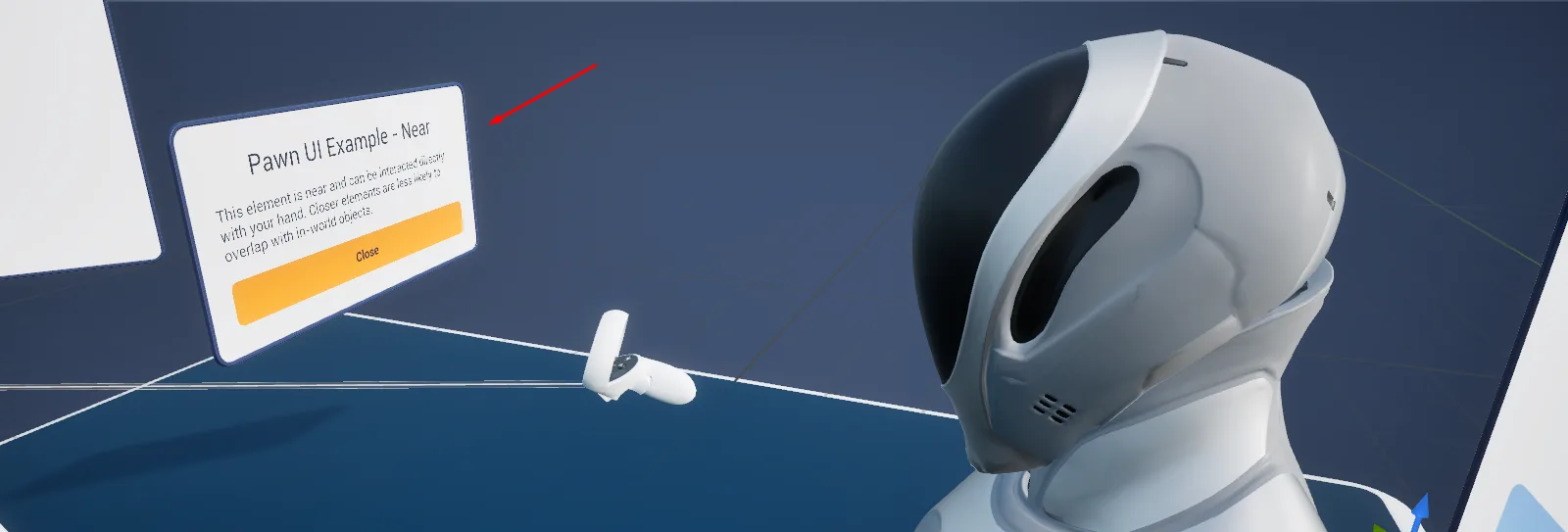
Map_Examples_PawnUI shows panels at two distances.
Troubleshooting
The panel is behind the player. The position data asset's angle is measured from the pawn's forward vector, not the camera's — check which you intended.
API reference
Every blueprint asset in this plugin. Expand an asset to see its members.
Components
BPC_PawnAbility_PawnUI14 members
Pawn ability owning the UI that travels with the pawn. Add Widget places a widget at a position data asset: floating in the world around a VR pawn as a pooled element actor, or handed to the HUD ability on desktop and mobile, so the same call works on all three. Add it to a pawn to grant pawn UI, and drive it through Add, Toggle and Remove Widget or the pawn UI library.
| Kind | Name | Signature | Description |
|---|---|---|---|
| fn | updateTolerancesPositioning | () | Pushes the tightest location and rotation thresholds found across the open elements' position assets onto the body anchor, so the anchor follows the player as closely as the fussiest open panel wants. Run with nothing open it leaves the anchor on a threshold of 100000, which effectively stops it following at all. |
| fn | getPooledElementElements | (Widgets: class<WBP_Base>, out Element: BP_Helper_PawnUI_Element) | Returns the pooled element actor previously built for a widget class, if one is being held for reuse. Comes back empty when nothing has been pooled for that class, which is what tells Add Widget to spawn a fresh element. |
| fn | isWidgetOpen_ObjectWidget | (Widget: WBP_Base, out Open: bool) | Returns whether one particular widget instance is currently on screen, rather than any instance of its class. Answered from the element list on a VR pawn and from the HUD component on desktop and mobile. |
| fn | isWidgetOpen_ClassWidget | (Widget: class<WBP_Base>, out Open: bool) | Returns whether any instance of a widget class is currently on screen. Answered from the element list on a VR pawn and from the HUD component on desktop and mobile, so it reports on whichever surface the pawn actually uses. |
| fn | RemoveElementElements | (PlayerUIElement: BP_Helper_PawnUI_Element) | Drops an element actor from the open list, detaches it keeping world transform, refreshes the follow thresholds, fades it out and re-spaces whatever is left at its position. Once the last element goes the body anchor is torn down two seconds later. |
| fn | RemoveWidget_ObjectWidget | (Widget: WBP_Base) | Closes one particular widget instance rather than every instance of its class. On a VR pawn the element actor hosting that widget is removed; on desktop and mobile the call is passed to the HUD component. |
| fn | RemoveWidget_ClassWidget | (Widget: class<WBP_Base>) | Closes every open instance of a widget class. On a VR pawn each backing element actor is faded out and either destroyed or returned to the pool; on desktop and mobile the removal is passed to the HUD component. |
| fn | ToggleWidgetWidget | (Widget: class<WBP_Base>, Position: PDA_PawnUIPosition, References: Struct_References, UsePooling: bool, out WidgetObject: WBP_Base) | Closes the widget class if any instance of it is already open, otherwise adds it at the given position. The widget object is only filled in on the opening pass, so expect it to be empty when the call closed something. |
| fn | AddWidgetWidget | (Widget: class<WBP_Base>, Position: PDA_PawnUIPosition, Pooling: bool, References: Struct_References, out WidgetObject: WBP_Base) | Shows a widget at the given position and returns the widget object. On a VR pawn it spawns, or reuses from the pool, a body-locked element actor, first clearing that position unless the position asset is stackable; on desktop and mobile it hands the work to the HUD component using the position's HUD frame info. Switch on Pooling to keep the actor for reuse. |
| fn | getElementsOfPositionPositioning | (Position: PDA_PawnUIPosition, out FilteredElements: BP_Helper_PawnUI_Element[]) | Returns the open element actors added at the given position asset, in the order they were added. Empty when nothing is currently shown at that position. |
| fn | getIndexOfElementPositioning | (Element: BP_Helper_PawnUI_Element, out Index: int) | Returns the place an element holds among the other open elements sharing its position asset, which is what decides how far forward it is pushed in the stack. Comes back as -1 when the element is not open. |
| fn | PositionAllElementsOfPositionPositioning | (Distance: PDA_PawnUIPosition) | Re-seats every open element that shares the given position asset, each one offset by its place in that group so a stack fans out instead of overlapping. Called after any add or removal so the survivors close the gap. |
| event | SetPositionHelper | (Set: bool) | Spawns the body anchor that elements are positioned against, seeds its thresholds and subscribes to its repositioned delegate; a second call with true does nothing while an anchor already exists. Passing false starts a retriggerable two second delay and then destroys the anchor, but only if no element has appeared meanwhile. |
| event | OnRepositioned_Event | () | Internal handler called by the body anchor each time it has moved to catch up with the player. Re-seats every open element against the anchor's new transform. |
DataAssets/Keyboard
BP_KeyboardLocation_PawnUI2 members
Placement rule that opens the virtual keyboard as a pawn UI element floating in front of the player instead of on the flat HUD, using the keyboard position data asset. Point a text field's Keyboard Location at this class for VR pawns; nothing references it by default, and the pawn needs the pawn UI ability.
| Kind | Name | Signature | Description |
|---|---|---|---|
| fn | OnOverlayClosed | (Overlay: BP_Overlay) | Internal handler that broadcasts Keyboard Closed when an overlay hosting the keyboard reports it has shut. Nothing binds it in this location, as the keyboard here is a body-locked panel rather than an overlay. |
| fn | CreateKeyboard | (Pawn: Pawn, KeyboardClass: class<WBP_Keyboard>, ExtensionClass: class<WBP_Keyboard_Extension>, KeyBoardSizeMultiplier: float, CloseOnEnter: bool, TextBoxWidget: Widget, InputWidget: WBP_TextField, WidgetInteractionComponent: WidgetInteractionComponent, out Keyboard: WBP_Keyboard) | Creates the virtual keyboard for a text field and returns it. Empty on this base asset, which fixes only the contract and the Keyboard Closed delegate; pick one of the supplied locations, or override this, to decide where the keyboard appears. |
DataAssets/Positions
PDA_PawnUIPosition0 members
Data asset describing one place around the pawn where UI may appear: the distance, pitch and height offset used in VR, how far the player must move or turn before panels follow, whether several widgets stack there, and the frame used when the same widget goes to a flat HUD instead. Create one per position your project needs and pass it to Add Widget.
No editor-visible members; this asset configures defaults only.
Helper
BP_Helper_PawnUIPosition7 members
Invisible reference frame the pawn UI is arranged around, following the pawn's camera location and yaw. It only re-centres once the player has moved or turned past the tolerances of the open panels, which is what keeps the UI still while you look about and brings it with you when you walk. The pawn UI ability spawns one while elements are open.
| Kind | Name | Signature | Description |
|---|---|---|---|
| var | PawnEssentials | Pawn | The pawn this anchor follows. Its camera component supplies the location and yaw the anchor snaps to, so an anchor spawned without one never moves and every panel hanging off it sits at the world origin. |
| var | Location ThreshholdSettings | float | How far the camera may drift from the last anchored position, in centimetres, before the anchor follows it. Spawned at zero and then overwritten by Update Thresholds with the tightest value among the open elements, so a figure set by hand does not survive the next add or removal. |
| var | Rotation ThreshholdSettings | float | How far the camera's yaw may turn from the last anchored rotation, in degrees, before the anchor turns to follow. Spawned at zero and overwritten by Update Thresholds in the same way as the location threshold. |
| fn | UpdateThresholds | (LocationDeltaThreshhold: float, RotationDeltaThreshhold: float) | Overwrites both follow thresholds in one call. Driven by the pawn UI component every time an element is added or removed, so it always wins over values set in the editor or on spawn. |
| fn | UpdatePosition | () | Snaps the anchor to the pawn camera's current location and yaw only, ignoring pitch and roll so panels never tilt, records that pose and broadcasts On Repositioned. Runs on begin play; call it yourself to make the panels catch up at once instead of waiting for a threshold to be crossed. |
| fn | getReferencePositionDefault | (out Transform: Transform, out RightVector: Vector) | Returns the pawn camera's yaw as a transform, along with the camera's right vector. The location is pinned to the world origin rather than the camera, so treat the transform as orientation only. |
| fn | getTransformForAngleAndDistance | (Position: PDA_PawnUIPosition, Index: int, out Transform: Transform) | Returns the world transform an element should sit at for a given position asset, by placing the internal arrow at the asset's distance, height and pitch. Each step up the stack index pulls the element one centimetre nearer the player, and the scale is derived from the distance so a far panel is drawn bigger to stay legible. |
BP_Helper_PawnUI_Element11 members
Carrier actor for one panel of pawn UI: a widget component on a lagging spring arm, with a scale-up appearance, fade sounds and an auto-destroy. Spawned by the pawn UI ability, which also pools it when pooling is asked for, and it removes itself from the ability when the widget requests closing. Not an actor to place.
| Kind | Name | Signature | Description |
|---|---|---|---|
| var | WidgetProperties | class<WBP_Base> | Class of widget hosted by this element, created on the widget component the first time the element appears. Also the key the pool matches on, so a later request for the same class can reuse this actor. |
| var | PositionProperties | PDA_PawnUIPosition | Placement asset deciding where the element sits: distance, height, pitch and the thresholds the anchor follows the player with. It also groups the element with the others at the same position for stacking and for clearing a non-stackable slot. |
| var | Player UIComponentProperties | BPC_PawnAbility_PawnUI | The pawn UI component that spawned this element, called back when the hosted widget asks to close. Leave it empty and the widget's close request goes nowhere, stranding the element on screen. |
| var | ReferencesReferences | Struct_References | Reference struct resolved into the widget at the moment its class is created, giving it the objects it is meant to show. Leave empty for widgets that need no context. |
| var | PoolingPooling | bool | Whether the element survives removal instead of being destroyed. A pooled element is hidden and kept in the component's pool for the next request for the same widget class, which saves a respawn at the cost of holding the widget in memory. |
| fn | getDesiredWidth | (out Width: float) | Returns the width this element would like to be allotted when panels are laid out beside each other. The body is a stub that always answers zero; override it in a derived element if your layout needs a real figure. |
| fn | getRelativeTransform | () → Transform | Returns the element's transform relative to the actor it is attached to, falling back to its world transform when it is attached to nothing. Elements are detached as they are removed, so from that point it reports world space. |
| event | Disappear | () | Shrinks the element away, hides the widget and unregisters it from the replicated UI stand-in shown to other clients. A pooled element stops there and waits to be reused; an unpooled one first arms the fade handler that destroys it once the fade has run out. |
| event | SpawnScale | (Set: bool) | Plays the 0.6 second scale curve forwards to grow the panel from a hundredth of its size, or reverses it to shrink away. It also slides the spring arm a few centimetres vertically over 0.3 seconds, which is what gives the panel its lift as it opens. |
| event | Appear | () | Grows the panel in, creates the widget from the stored class if it does not exist yet, makes it visible and registers it for replicated UI. Called by the pawn UI component immediately after the element is spawned or taken from the pool; a pooled element reappears with its widget state intact. |
| event | OnFadeComplete_Destroy | (Visible: bool) | Internal handler bound to the widget component's fade delegate only while an unpooled element is disappearing. Destroys the actor once the fade has finished on the way out, and does nothing when the fade ended visible. |
Libraries
FL_PawnUI2 members
Function library wrapping the pawn UI ability in two static calls, Add Element and Remove Element, so a widget can be put in front of a pawn without first fetching the component. Call them from anywhere with a pawn to hand; the pawn must carry the pawn UI ability.
| Kind | Name | Signature | Description |
|---|---|---|---|
| fn | PawnUI_RemoveElementPawnUI | (Pawn: Pawn, Widget: class<WBP_Base>, __WorldContext: Object) | Finds the pawn UI component on the given pawn and closes every open instance of a widget class through it. Unchecked in the same way as its counterpart: a pawn without the component gives an access-none warning rather than a quiet no-op. |
| fn | PawnUI_AddElementPawnUI | (Pawn: Pawn, Widget: class<WBP_Base>, Position: PDA_PawnUIPosition, Pooling: bool, References: Struct_References, __WorldContext: Object, out WidgetObject: WBP_Base) | Finds the pawn UI component on the given pawn and adds a widget at a position through it, returning the widget object. There is no validity check, so a pawn without the component produces an access-none warning and an empty widget. |