AF_Examples
One map per feature with the blueprints that demonstrate it, plus the showroom subclasses that host them.
What it gives you
- A worked example for every system
- Reference implementations to copy from
- A lobby that links them together
Requires
AFE_Showroom AFM_Abilities AFM_Replication AFM_Spawner AFM_State AFM_Teleport AFM_Visibility AFS_Core_Highlight AFS_Core_Pawn AFS_Core_Snapping AFS_UI AFS_UI_Labels AFS_UI_Menu AFS_UX_Gaze AFS_UX_Grip AFS_UX_Locomotion AFS_UX_Overlap AFS_UX_Select AFS_UX_Teleporter
Required by
None
Description
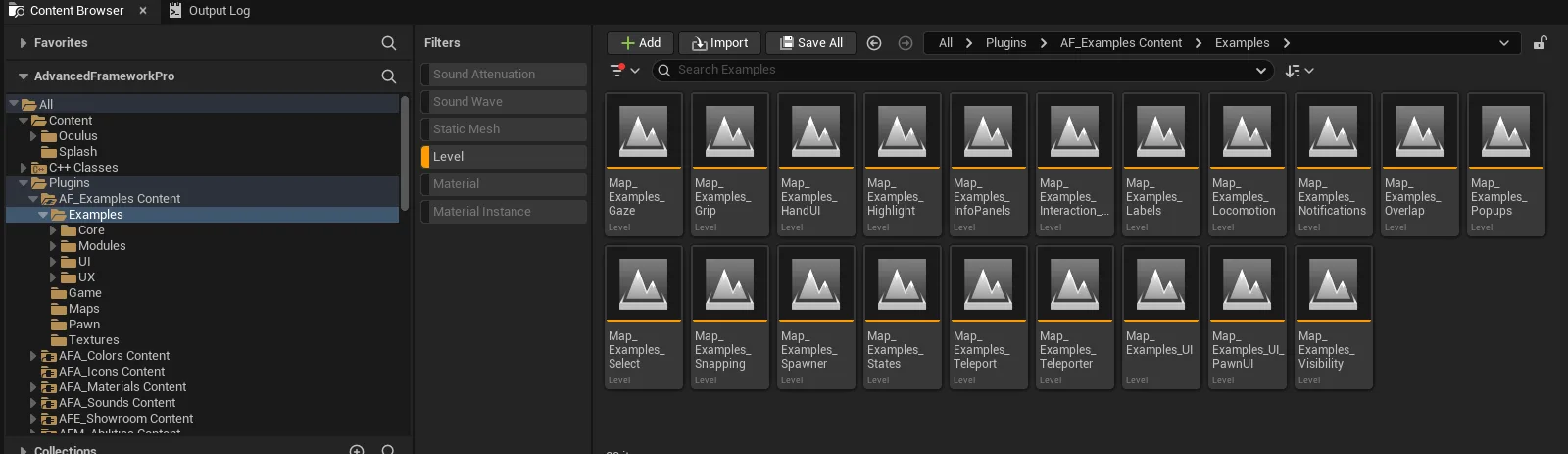
The example content is the fastest reference in the framework. When something is not behaving as expected, the corresponding example map is usually the quickest way to find the difference — the setups are minimal and deliberate.
The maps are also a reasonable curriculum: working through Select, Grip, Overlap, Teleporter and UI in that order covers most of what a project needs.
See Example maps for the full index of what each map demonstrates.
Setup
- Enable
AF_Examples. - Open
Map_Examples_Lobbyand press Play. Navigate to any example from the menu.
Usage
Using an example as a starting point
Copy the demonstrated Blueprint into your own content rather than referencing it, then modify. The example blueprints are intentionally minimal so they read clearly.
Key properties
| Property | When to change |
|---|---|
| Nothing | Example content is reference material; copy rather than edit |
Extending
Not extended — copy from it into your own project content.
Example map
This plugin is the examples.
Troubleshooting
An example map does not open. Its plugin dependencies are not all enabled; the examples exercise most of the framework.
API reference
Every blueprint asset in this plugin. Expand an asset to see its members.
Examples/Core/Highlight/Blueprints
BP_Statue_Highlight_Material2 members
| Kind | Name | Signature | Description |
|---|---|---|---|
| event | OnValueUpdated | (SourceInfo: ST_SourceInfo, Value: LinearColor) | Bound to the Colour state and called when a new colour is picked. Hands it to the material highlight component through Update Colour, so the tint written into the statue's own materials changes while the level runs. |
| event | OnValueUpdated_1 | (SourceInfo: ST_SourceInfo, Value: bool) | Bound to the Activate state and left empty, so the switch changes nothing. Highlighting is driven by whatever hovers the statue; wire this to the material highlight component's Set Highlight to drive it from the panel instead. |
BP_Statue_Highlight_MeshCopy2 members
| Kind | Name | Signature | Description |
|---|---|---|---|
| event | OnValueUpdated | (SourceInfo: ST_SourceInfo, Value: LinearColor) | Bound to the Colour state and called when a new colour is picked. Hands it to the mesh-copy highlight component through Update Colour, which is the tint the duplicate mesh is drawn in. |
| event | OnValueUpdated_1 | (SourceInfo: ST_SourceInfo, Value: bool) | Bound to the Activate state and left empty, so the switch changes nothing. Highlighting is driven by whatever hovers the statue; wire this to Start Highlight and End Highlight on the mesh-copy component to drive it from the panel instead. |
BP_Statue_Highlight_PostProcess2 members
| Kind | Name | Signature | Description |
|---|---|---|---|
| event | OnValueUpdated | (SourceInfo: ST_SourceInfo, Value: LinearColor) | Bound to the Colour state and called when a new colour is picked. Hands it to the post-process highlight component through Update Colour, which is the tint of the outline drawn around the statue by the shared post-process actor. |
| event | OnValueUpdated_1 | (SourceInfo: ST_SourceInfo, Value: bool) | Bound to the Activate state and left empty, so the switch changes nothing. Highlighting is driven by whatever hovers the statue; wire this to Start Highlight and End Highlight on the post-process component to drive it from the panel instead. |
BP_Statue_Highlight_Select0 members
No editor-visible members; this asset configures defaults only.
Examples/Core/Snapping/Content/Battery
BP_Battery_Anchor1 members
| Kind | Name | Signature | Description |
|---|---|---|---|
| var | ColorColor | LinearColor | Tint applied to the battery's material in the construction script, so a change in the details panel shows at once. It is also read back by any lightbulb that snaps into the anchor, which lights in the same shade. |
BP_Example_Snapping_Anchor7 members
| Kind | Name | Signature | Description |
|---|---|---|---|
| var | Batteries | BP_Battery_Anchor[] | List of the battery anchors a bulb can be plugged into, in the order the two lightbulb states offer them. The chosen option is used as an index into it, so keep the entries lined up with the Yellow, Green and Red labels. |
| var | Lightbulb_1 | BP_Lightbulb_Anchor | First of the two bulbs the panel drives; its connector is moved to whichever battery anchor the Lightbulb 1 state names. Leave it empty and that state has nothing to attach. |
| var | Lightbulb_2 | BP_Lightbulb_Anchor | Second bulb placed in the level, so the example can show two of them sharing one bank of batteries. Its own state handler is empty, so this one is moved by hand rather than from the panel. |
| event | OnValueUpdated | (SourceInfo: ST_SourceInfo, Integer: int) | Bound to the Lightbulb 1 state and called when a battery is chosen. On the machine of the player who chose, attaches that bulb's connector to the anchor of the battery at the chosen index; the detach handler writes -1 into the same state, which lies outside Batteries. |
| event | OnConnectorAttached_Event | (Anchor: BPC_Anchor, Connector: BPC_Connector_Anchor) | Internal handler bound at begin play to the attach delegate of every battery anchor. When a bulb lands on a battery it writes that battery's index into the bulb's own integer state, so the panel follows a connection made by hand. |
| event | OnValueUpdated_1 | (SourceInfo: ST_SourceInfo, Integer: int) | Bound to the Lightbulb 2 state and left empty, so choosing a battery for the second bulb changes nothing. Copy the Lightbulb 1 handler into it to see both halves of the example working. |
| event | OnConnectorDetached_Event | (Anchor: BPC_Anchor, Connector: BPC_Connector_Anchor) | Internal handler bound at begin play to the detach delegate of every battery anchor. Writes -1 into the state of the bulb that came free, which clears the selection shown on the panel. |
BP_Lightbulb_Anchor2 members
| Kind | Name | Signature | Description |
|---|---|---|---|
| event | OnConnectorAttached | (Connector: BPC_Connector, AttachedToComponent: SceneComponent) | Bound to the connector and called once the bulb has snapped onto an anchor. Fades the light up over half a second and, when the anchor belongs to a battery, fades the bulb across to that battery's Colour. |
| event | OnConnectorDetached | (Connector: BPC_Connector, DetachedFromComponent: SceneComponent) | Bound to the connector and called when the bulb is pulled off an anchor. Fades the light back down and fades the shade to black, so a bulb carried away goes dark. |
Examples/Core/Snapping/Game
BP_GameMode_Showroom_Examples_Snapping0 members
No editor-visible members; this asset configures defaults only.
Examples/Modules/Spawner/Blueprints
BP_Spawner_Example2 members
| Kind | Name | Signature | Description |
|---|---|---|---|
| event | OnValueUpdated_Interpolated_Lerped | (SourceInfo: ST_SourceInfo, Float: float, Delta: float) | Bound to the Despawn Time state and called each frame while its eased value travels to the new setting. Hands that value to Update Despawn Timer, which passes it to the hologram waiting on the pad, so shapes taken from now on survive for up to 10 seconds after release. |
| event | OnValueUpdated | (SourceInfo: ST_SourceInfo, Name: name) | Bound to the Type state and called when an option is chosen. Switches the spawn class and the preview mesh together, between small cube, large cube, pyramid and ball, through Update Spawner, which changes the hologram in place rather than building a new one. |
Examples/Modules/States/Example
BP_Example_States7 members
| Kind | Name | Signature | Description |
|---|---|---|---|
| event | OnValueUpdated | (SourceInfo: ST_SourceInfo, Value: bool) | Bound to the boolean state and called when it changes. Prints True or False onto the text render beside the Boolean title, which is how this example shows a live value. |
| event | OnValueUpdated_1 | (SourceInfo: ST_SourceInfo, Value: LinearColor) | Bound to the colour state and left empty, so the text render beside the Colour title stays blank while the value changes. Fill it in as the boolean and drag handlers do. |
| event | OnDragStateChanged_Constant | (SourceInfo: ST_SourceInfo, Distance: float, Percent: float, Velocity: float) | Bound to the drag state and called on every frame of the drag. Prints the percentage across the drag range onto the text render beside the Drag title. |
| event | OnValueUpdated_2 | (SourceInfo: ST_SourceInfo, Value: float, Delta: float) | Bound to the float state and left empty, so the text render beside the Float title stays blank. It is the hook to fill in when you want the live value shown. |
| event | OnValueUpdated_3 | (SourceInfo: ST_SourceInfo, Integer: int) | Bound to the integer state and left empty, so the text render beside the Integer title stays blank. Fill it in to display the chosen option, which the state offers as the numbers 0 to 4. |
| event | OnValueUpdated_4 | (SourceInfo: ST_SourceInfo, Name: name) | Bound to the name state and left empty, so the text render beside the Name title stays blank. Fill it in to display the chosen option, One through Four. |
| event | OnTrigger | (SourceInfo: ST_SourceInfo) | Bound to the trigger state and called each time its button is pressed. Writes Triggered onto the text render beside the Trigger title and clears it again one second later. |
Examples/Modules/Teleport/Blueprints
BP_Example_Teleport2 members
| Kind | Name | Signature | Description |
|---|---|---|---|
| fn | getEyeLevel | (out OutputPin: E_Teleport_TrackingLevel) | Returns a tracking level taken from the Eye Level name state, mapping its first three options onto ground, eye and pawn level. Nothing calls it: the trigger asks for ground level directly and that state has no options configured, so read it as an illustration of the enum. |
| event | OnTrigger | (SourceInfo: ST_SourceInfo) | Bound to the trigger state and called when Go is pressed. Reads the fade, motion and duration states, finds the arrow component tagged with the chosen destination, and asks the acting pawn's teleport ability to move it there at ground level. |
Examples/Modules/Visibility/Blueprints
BP_Example_Visibility2 members
| Kind | Name | Signature | Description |
|---|---|---|---|
| event | OnTrigger | (SourceInfo: ST_SourceInfo) | Bound to the Destroy trigger state and called when Delete is pressed. Destroys the whole actor, guitar and state components together, so the example has to be reloaded to come back. |
| event | OnValueUpdated | (SourceInfo: ST_SourceInfo, Value: bool) | Bound to the Visible state and called when it changes. Hands the value to the visibility switch, which fades all seven guitar meshes out or in together rather than toggling each one. |
Examples/UI/InfoPanels/Widgets
WBP_Example_UI_InfoPanels1 members
| Kind | Name | Signature | Description |
|---|---|---|---|
| event | OnButtonClicked | (Group: WBP_Group_Button, Index: int, ID: name) | Bound to the four checkboxes and called when one is ticked or unticked. Ticking puts the matching sample panel on the player pawn through Info Panel Show and unticking takes it away through Info Panel Remove, so any combination of the four can be up at once. |
WBP_Example_UI_InfoPanels_Display0 members
No editor-visible members; this asset configures defaults only.
WBP_Example_UI_InfoPanels_FPS0 members
No editor-visible members; this asset configures defaults only.
WBP_Example_UI_InfoPanels_Mute0 members
No editor-visible members; this asset configures defaults only.
WBP_Example_UI_InfoPanels_Stats1 members
| Kind | Name | Signature | Description |
|---|---|---|---|
| event | CollectData | () | Counts every actor in the world, tallies the static mesh and widget components across them and writes the three totals into the panel's rows. Nothing calls it as the sample ships, so the placeholder figures stand until you call it yourself, from a timer for a reading that keeps up. |
Examples/UI/Labels/Blueprints
BP_Plant_Example_Label3 members
| Kind | Name | Signature | Description |
|---|---|---|---|
| event | OnValueUpdated | (SourceInfo: ST_SourceInfo, Value: bool) | Bound to the Show state and called when it changes. Shows or hides all three labels at once through Show Label, which spawns and destroys the label actors rather than only making them invisible. |
| event | OnValueUpdated_1 | (SourceInfo: ST_SourceInfo, Value: bool) | Bound to the Auto Scale state and left empty, so the switch does nothing as the example ships. Pass the value on to the labels' scale curve to have them shrink with distance. |
| event | OnValueUpdated_2 | (SourceInfo: ST_SourceInfo, Name: name) | Bound to the Rotation state and left empty, so stepping through No Rotation, Rotate Z, Rotate Limited and Rotate All Axis changes nothing. Hand the chosen option to each label's Update Rotate to see it work. |
BP_RemoteControl_Label2 members
| Kind | Name | Signature | Description |
|---|---|---|---|
| event | OnActorPickup | (GrabCoordinator: BPC_PickupCoordinator) | Bound to the pickup coordinator and called when the first hand takes hold of the remote. Deactivates the Grab This label, so the hint disappears once the player has acted on it. |
| event | OnActorReleased | (GrabCoordinator: BPC_PickupCoordinator) | Bound to the pickup coordinator and called once the last hand has let go. Reactivates the Grab This label, so the hint is back for the next player. |
BP_Statue_Example_Label0 members
No editor-visible members; this asset configures defaults only.
Examples/UI/Notifications/Widgets
WBP_Example_UI_Notifications1 members
| Kind | Name | Signature | Description |
|---|---|---|---|
| event | OnButtonClicked | (Group: WBP_Group_Button, Index: int, ID: name) | Bound to the two-button column and called when Short Notification or Long Notification is pressed. Switches on which of the two it was, with a branch each and nothing further in either as the page ships; Show Default Notification belongs in them, taking its life span from the Duration slider below, 2 to 20 seconds. |
Examples/UI/PawnUI/Widgets
WBP_Example_PawnUI_Far1 members
| Kind | Name | Signature | Description |
|---|---|---|---|
| event | OnClicked | (Button: WBP_Button) | Bound to the Close button and called when it is pressed. Closes this panel and nothing else; no result is reported to the page that spawned it, so pressing Far again puts up a fresh copy. |
WBP_Example_PawnUI_Near1 members
| Kind | Name | Signature | Description |
|---|---|---|---|
| event | OnClicked | (Button: WBP_Button) | Bound to the Close button and called when it is pressed. Closes this panel and nothing else; no result is reported to the page that spawned it, so pressing Near again puts up a fresh copy. |
WBP_Example_UI_PawnUI1 members
| Kind | Name | Signature | Description |
|---|---|---|---|
| event | OnButtonClicked | (Group: WBP_Group_Button, Index: int, ID: name) | Bound to the Near and Far buttons and called when either is pressed. Adds the matching sample panel to the player pawn through Pawn UI Add Element, paired with the near or far position asset. There is no removal branch, so a second press puts up a second copy. |
Examples/UI/Popups/Widgets
WBP_Example_UI_Popups5 members
| Kind | Name | Signature | Description |
|---|---|---|---|
| event | OnButtonClicked | (Group: WBP_Group_Button, Index: int, ID: name) | Bound to the four-button column and called when one is pressed. Switches on which of them it was, with a branch for the confirmation, warning, error and choice popups; the branches carry nothing further as the page ships, so Show Popup Default belongs in them with one of the answer handlers below bound to the popup it returns. |
| event | ButtonPressed_Event | (Index: int) | Answer handler for the multiple-choice popup. Writes You selected option, followed by the position of the button pressed, into the line under the buttons. |
| event | CustomEvent | (Index: int) | First of three identical answer handlers, one per popup that only needs acknowledging. Writes You accepted the error into the line under the buttons and discards the position it was given, so any of the popup's buttons reads the same. |
| event | CustomEvent_1 | (Index: int) | Second of three identical answer handlers, one per popup that only needs acknowledging. Writes You accepted the error into the line under the buttons and discards the position it was given. |
| event | CustomEvent_2 | (Index: int) | Third of three identical answer handlers, one per popup that only needs acknowledging. Writes You accepted the error into the line under the buttons and discards the position it was given. |
Examples/UI/UI/Blueprints
BP_Example_UI3 members
| Kind | Name | Signature | Description |
|---|---|---|---|
| var | WidgetActorReference | BP_Widget | Widget actor this example is meant to restyle, filled in per level. Nothing in the graph reads it; the theme is switched on the game state's theme manager, which every bound widget listens to anyway. |
| event | OnValueUpdated | (SourceInfo: ST_SourceInfo, Name: name) | Bound to the Theme state and called when an option is chosen. Hands the chosen name to the game state's theme manager through Set Theme Type, which restyles every bound widget in the session, the two example themes registered at begin play included. |
| event | OnValueUpdated_1 | (SourceInfo: ST_SourceInfo, Value: bool) | Bound to the Show state and left empty, so the switch does nothing as the example ships. It is the hook for showing and hiding the widget actor named in Widget Actor Reference. |
Examples/UI/UI/Widgets/General
WBP_Example_UI0 members
No editor-visible members; this asset configures defaults only.
WBP_Example_UI_Basics0 members
No editor-visible members; this asset configures defaults only.
WBP_Example_UI_Display0 members
No editor-visible members; this asset configures defaults only.
WBP_Example_UI_Input0 members
No editor-visible members; this asset configures defaults only.
WBP_Example_UI_Layout0 members
No editor-visible members; this asset configures defaults only.
Examples/UI/UI/Widgets/General/Basics
WBP_Example_UI_Basics_Borders1 members
| Kind | Name | Signature | Description |
|---|---|---|---|
| event | OnSelectionChanged | (Button: WBP_Button) | Bound to the Switch button and called as it is selected and deselected. Eases the two-colour gradient border's blend to 1 or 0 rather than snapping it, pushing each step in through the Widget Blend interface, which is the whole of the wiring on this page. |
WBP_Example_UI_Basics_Images0 members
No editor-visible members; this asset configures defaults only.
WBP_Example_UI_Basics_Switcher1 members
| Kind | Name | Signature | Description |
|---|---|---|---|
| event | OnButtonClicked | (Group: WBP_Group_Button, Index: int, ID: name) | Bound to the four-chip selector and called when a chip is picked. Switches the borders below to the same position through Switch To Index, which is all it takes to drive a switcher from a selector. |
WBP_Example_UI_Basics_Text0 members
No editor-visible members; this asset configures defaults only.
WBP_Example_UI_Basics_Throbber0 members
No editor-visible members; this asset configures defaults only.
Examples/UI/UI/Widgets/General/Display
WBP_Example_UI_Display_Info2 members
| Kind | Name | Signature | Description |
|---|---|---|---|
| event | OnSelectionChanged | (Button: WBP_Button) | Bound to the Show Error button and called as it is selected and deselected. Puts Wrong text on the text field's error wrapper and This needs to be checked on the checkbox's, and clears both by passing empty text when the button is deselected. |
| event | OnIndexSelected | (Index: int) | Bound to the stepper and called when its number changes. Writes that number into the indicator badge and hides the badge while the number is zero, which is the pattern to copy for a count that should disappear when nothing is outstanding. |
WBP_Example_UI_Display_Lists0 members
No editor-visible members; this asset configures defaults only.
WBP_Example_UI_Display_Load3 members
| Kind | Name | Signature | Description |
|---|---|---|---|
| event | OnClicked | (Button: WBP_Button) | Bound to the Load button and called when it is pressed. Puts the loading switcher into its throbber state for three seconds, then picks a count of 0 to 2 at random, resizes the button group to it and sets No items found as the replacement text when that count came out zero. |
| event | WidgetElement_PostInitiate | () | Called once the whole widget tree has been initiated and themed. Left empty here, so the page opens with the group and the fallback in the state set in the designer and only changes once Load or the stepper is used. |
| event | OnIndexSelected | (Index: int) | Bound to the stepper beside the fallback and called when its number changes. Resizes the second button group to that many buttons and shows the No Buttons Found replacement in place of the group while the number is zero. |
WBP_Example_UI_Display_Progress1 members
| Kind | Name | Signature | Description |
|---|---|---|---|
| event | WidgetElement_PostInitiate | () | Called once the whole widget tree has been initiated and themed. Left empty here, so both bars keep the sample percentages set in the designer; this is where a page of your own would read its starting values from wherever it keeps them. |
Examples/UI/UI/Widgets/General/Input
WBP_Example_UI_Input_Buttons1 members
| Kind | Name | Signature | Description |
|---|---|---|---|
| event | OnButtonGroupInitiated | () | Bound to the colour row's group and called once it has built its buttons. Walks them and hands each colour button one of fourteen colour assets by position, which is how the row is filled without placing fourteen widgets by hand; Cyan appears twice in that list, so the fifth and sixth swatches match. |
WBP_Example_UI_Input_Selector0 members
No editor-visible members; this asset configures defaults only.
WBP_Example_UI_Input_Slider0 members
No editor-visible members; this asset configures defaults only.
WBP_Example_UI_Input_Text0 members
No editor-visible members; this asset configures defaults only.
Examples/UI/UI/Widgets/General/Layout
WBP_Example_UI_Layout_Boxes0 members
No editor-visible members; this asset configures defaults only.
WBP_Example_UI_Layout_Expand1 members
| Kind | Name | Signature | Description |
|---|---|---|---|
| event | OnSelectionChanged | (Button: WBP_Button) | Bound to the Collapse and Expand button and called as it is selected and deselected. Collapses both collapse widgets while it is selected and expands them again when it is not; the expandable above opens from its own header and is untouched by this. |
WBP_Example_UI_Layout_Overlays7 members
| Kind | Name | Signature | Description |
|---|---|---|---|
| event | OnClicked | (Button: WBP_Button) | Bound to the Show Confirmation Overlay button. Raises a confirmation overlay on the parent widget with the title Confirm, an icon, a message and the answers Nope at secondary and Sure at primary emphasis, then binds the handler that writes the answer into the result line. |
| event | OnClicked_1 | (Button: WBP_Button) | Bound to the Show Loading Overlay button and carrying nothing further, so no overlay is raised. Spawn Overlay Loading belongs here; a loading overlay has no buttons, so keep the widget it hands back and close it yourself when the work is done. |
| event | OnButtonClicked_Event | (Confirm: bool) | Result handler bound to the confirmation overlay as it is raised. Writes You confirmed or You denied the last action into the line under the buttons, according to which of the two answers was pressed. |
| event | OnClicked_2 | (Button: WBP_Button) | Bound to the Show Notification Overlay button and carrying nothing further, so no overlay is raised. Spawn Overlay Notification belongs here, with the acknowledgement handler beside it bound to the overlay's On Button Clicked. |
| event | OnButtonClicked_Event_0 | () | Acknowledgement handler meant for the notification overlay, which reports no answer of its own. It repeats the confirmation handler's confirmed-or-denied wording without a result to read, so treat it as a copy left in place rather than a pattern to follow. |
| event | OnClicked_3 | (Button: WBP_Button) | Bound to the Show Custom Overlay button and carrying nothing further, so no overlay is raised. It is where the custom example overlay in the More folder is spawned and its On Example Closed delegate bound to the handler below. |
| event | OnExampleClosed_Event | () | Handler for the custom example overlay's Close button, which broadcasts before it closes itself. Writes You closed the example Overlay into the result line, showing how an overlay you have written reports back to the page that raised it. |
WBP_Example_UI_Layout_Scrolling0 members
No editor-visible members; this asset configures defaults only.
Examples/UI/UI/Widgets/General/Layout/More
WBP_Example_Overlay1 members
| Kind | Name | Signature | Description |
|---|---|---|---|
| event | OnClicked | (Button: WBP_Button) | Bound to the Close button and called when it is pressed. Broadcasts On Example Closed, which the overlays catalogue page listens to for its result line, then closes the overlay; that order matters, since the delegate is gone once the widget is closed. |
Examples/UI/UI/Widgets/HUD
WBP_Example_UI_HUD1 members
| Kind | Name | Signature | Description |
|---|---|---|---|
| event | OnButtonClicked | (Group: WBP_Group_Button, Index: int, ID: name) | Bound to the nine position checkboxes and called when one is ticked or unticked. Ticking adds the sample widget for that position with its own frame info, Game Only around the edges, Game And UI along the bottom and UI Only for the centre one, which takes input away from the game; unticking removes it. |
WBP_Example_UI_HUD_Bottom0 members
No editor-visible members; this asset configures defaults only.
WBP_Example_UI_HUD_BottomLeft0 members
No editor-visible members; this asset configures defaults only.
WBP_Example_UI_HUD_BottomRight0 members
No editor-visible members; this asset configures defaults only.
WBP_Example_UI_HUD_Center0 members
No editor-visible members; this asset configures defaults only.
WBP_Example_UI_HUD_Left0 members
No editor-visible members; this asset configures defaults only.
WBP_Example_UI_HUD_Right0 members
No editor-visible members; this asset configures defaults only.
WBP_Example_UI_HUD_Top0 members
No editor-visible members; this asset configures defaults only.
WBP_Example_UI_HUD_TopLeft0 members
No editor-visible members; this asset configures defaults only.
WBP_Example_UI_HUD_TopRight0 members
No editor-visible members; this asset configures defaults only.
Examples/UX/Gaze/Blueprints
BP_Cog_Gaze1 members
| Kind | Name | Signature | Description |
|---|---|---|---|
| event | OnGazeTriggered | (SourceInfo: ST_SourceInfo) | Bound to the gaze interaction and called once the player has looked at the gear for the dwell time. Toggles the cog's boolean state, which is what starts and stops the gear turning and its machine sound. |
BP_Cubboard_Gaze2 members
| Kind | Name | Signature | Description |
|---|---|---|---|
| event | OnHighlightTick | (SourceInfo: ST_SourceInfo, TraceResult: HitResult) | Bound to the gaze interaction and raised while the player's gaze rests on the cupboard. Left empty here, so hovering shows the dwell indicator and nothing more; it is the hook for a highlight or a sound of your own. |
| event | OnGazeTriggered | (SourceInfo: ST_SourceInfo) | Bound to the gaze interaction and called once the dwell completes. Steps all four drawer drag states on to their next section, so every drawer slides between Closed and Open, each at its own snapping speed. |
BP_Door_Gaze2 members
| Kind | Name | Signature | Description |
|---|---|---|---|
| event | OnGazeTriggered | (SourceInfo: ST_SourceInfo) | Bound to the gaze interaction and called once the player has looked at the door for the dwell time. Toggles the door's boolean state, which is what actually swings it. |
| event | OnValueUpdated | (SourceInfo: ST_SourceInfo, Value: bool) | Bound to the boolean state and called whenever the door's value changes. Plays a 0.7 second timeline swinging the leaf through 90 degrees, or reverses it back to closed; keeping the animation here means anything that flips the state opens the door. |
BP_Radio_Gaze1 members
| Kind | Name | Signature | Description |
|---|---|---|---|
| event | OnGazeTriggered | (SourceInfo: ST_SourceInfo) | Bound to the gaze interaction and called once the player has looked at the radio for the dwell time. Toggles the radio's boolean state, which starts and stops the music. |
Examples/UX/Grip/Content/Latch
BP_Drag_Car1 members
| Kind | Name | Signature | Description |
|---|---|---|---|
| event | OnDragStateChanged_Constant | (SourceInfo: ST_SourceInfo, Distance: float, Percent: float, Velocity: float) | Bound to the car's drag state and called on every frame of the drag. Rolls the four gear meshes by twice the drag velocity, so they turn faster the quicker the car is pulled along the spline and stop as soon as it does. |
Examples/UX/Grip/Content/Latch_Combined
BP_Latcher_3D0 members
No editor-visible members; this asset configures defaults only.
Examples/UX/Grip/Content/Latch_Drag_Mulitaxis
BP_Example_Latch_Multiaxis_2D0 members
No editor-visible members; this asset configures defaults only.
BP_Example_Latch_Multiaxis_3D0 members
No editor-visible members; this asset configures defaults only.
Examples/UX/Grip/Content/Pickup
BP_Display0 members
No editor-visible members; this asset configures defaults only.
BP_Display_Pickup0 members
No editor-visible members; this asset configures defaults only.
BP_RemoteControl1 members
| Kind | Name | Signature | Description |
|---|---|---|---|
| event | OnButtonForward_Key | (SourceInfo: ST_SourceInfo, Key: E_Controller_Buttons, Set: bool) | Bound to the right hand's pickup interaction and called as a button goes down or comes up on the hand holding the remote. Prints that button's name onto the face of the remote; the left hand's interaction is not wired up, so only a right-handed grab writes anything. |
Examples/UX/Interaction_Hands/Blueprints/Grip_Latch_Combined
BP_Button_Example_Pixel2 members
| Kind | Name | Signature | Description |
|---|---|---|---|
| var | ShipGame | BP_Pixel_Ship_Game_Controller | Arcade game controller whose gun this button fires. Point it at the controller placed in the level; the press is forwarded without a validity check, so an empty reference logs an error rather than being ignored. |
| event | OnDragStateChanged_Section | (SourceInfo: ST_SourceInfo, Section: name, Set: bool) | Bound to the button's drag state and raised as the button enters or leaves its Pushed section. Entering fires the player ship's gun through Ship Game, leaving is ignored, and the green flash inherited from the plain button still runs alongside it. |
Examples/UX/Interaction_Hands/Blueprints/Grip_Latch_Combined/JoyStick
BP_Joystick_PixelGame6 members
| Kind | Name | Signature | Description |
|---|---|---|---|
| var | ShipGame | BP_Pixel_Ship_Game_Controller | Arcade game controller this stick drives. Gripping starts a round on it, releasing quits, and the trigger and forward axis are forwarded to it; leave it empty and the stick still moves but nothing is played. |
| event | OnButtonForward_Key | (SourceInfo: ST_SourceInfo, Key: E_Controller_Buttons, Set: bool) | Bound to the latch drag interaction and called when a button is pressed or released on the hand holding the stick. Only the trigger is acted on, and only as it goes down, firing the player ship's gun; every other button falls through. |
| event | OnGripped_Start | (SourceInfo: ST_SourceInfo) | Bound to the latch drag interaction and called when a hand takes hold of the stick. Starts a round on the game controller, which spawns the player ship and begins the enemy waves. |
| event | OnGripped_Release | (SourceInfo: ST_SourceInfo) | Bound to the latch drag interaction and called when the hand lets go. Quits the round on the game controller, which destroys the player ship; the two drag states spring the stick back to centre on their own. |
| event | OnDragStateChanged_Constant | (SourceInfo: ST_SourceInfo, Distance: float, Percent: float, Velocity: float) | Bound to the first drag state and called on every frame of the drag. Maps the drag percentage onto -1 to 1 and sends it to the game controller as the ship's forward input, so the ship keeps travelling while the stick is held over. |
| event | OnDragStateChanged_Constant_1 | (SourceInfo: ST_SourceInfo, Distance: float, Percent: float, Velocity: float) | Bound to the second drag state, the one on the stick's handle, and left empty. Nothing therefore steers the ship sideways; send the percentage on to the game controller's Speed Input Right as the forward axis does. |
Examples/UX/Interaction_Hands/Blueprints/Grip_Latch_Combined/Pixel
BP_Pixel_Projectile4 members
| Kind | Name | Signature | Description |
|---|---|---|---|
| var | Speed | Vector | Velocity in centimetres per second, applied along the shot's own axes every frame. The ships pass it on spawn: 700 up the cabinet for the player, 200 down it for the enemies. |
| var | Projectile owner | Actor | Actor that fired the shot, passed in on spawn. Overlaps with it are ignored, which is what stops a ship damaging itself as the shot leaves the muzzle. |
| var | Projectile color | LinearColor | Tint applied at begin play to both the shot's material and its point light, passed in on spawn. The player fires blue and the enemies orange. |
| event | OnComponentBeginOverlap | (OverlappedComponent: PrimitiveComponent, OtherActor: Actor, OtherComp: PrimitiveComponent, OtherBodyIndex: int, bFromSweep: bool, ref const SweepResult: HitResult) | Bound to the shot's mesh and called when it touches anything other than the actor that fired it. Applies 20 damage to whatever was hit, spawns the explosion effect and destroys the shot, so nothing survives to hit twice. |
BP_Pixel_Ship_Enemy3 members
| Kind | Name | Signature | Description |
|---|---|---|---|
| var | Movement speed | float | Sideways travel in centimetres per second, and misleading as an editable: begin play overwrites it with a random value between 25 and 200, so what you set in the details panel never reaches the game. |
| event | AnyDamage | (Damage: float, const DamageType: DamageType, InstigatedBy: Controller, DamageCauser: Actor) | Takes the damage off the enemy's 80 health and, once that reaches zero, spawns the enemy explosion effect and destroys the ship. Raised by the engine whenever a shot applies damage to it. |
| event | Hit | (MyComp: PrimitiveComponent, Other: Actor, OtherComp: PrimitiveComponent, bSelfMoved: bool, HitLocation: Vector, HitNormal: Vector, NormalImpulse: Vector, ref const Hit: HitResult) | Raised by the engine when the enemy runs into something solid. A pawn takes 90 damage and the enemy explodes with it, which is the ramming attack; anything else, meaning the cabinet's invisible walls, only reverses its direction of travel. |
BP_Pixel_Ship_Game_Controller11 members
| Kind | Name | Signature | Description |
|---|---|---|---|
| var | Max horitzontal spawn offset | float | How far to either side of the spawn point an enemy may appear, in centimetres. Each spawn picks a random offset within it so the waves do not all come down one lane; zero lines them up exactly. |
| event | Start spawning enemies | () | Called by Start Game as a round opens, and empty in itself. The waves are produced on tick, which spawns an enemy every few seconds and tightens the gap by 0.3 seconds each time until it bottoms out at 0.7. |
| event | Stop spawning enemies | () | Destroys every enemy still alive and empties the list of them. Called as a round ends, so the cabinet is clear before the next player ship appears. |
| event | OnComponentBeginOverlap | (OverlappedComponent: PrimitiveComponent, OtherActor: Actor, OtherComp: PrimitiveComponent, OtherBodyIndex: int, bFromSweep: bool, ref const SweepResult: HitResult) | Bound to the trigger box at the foot of the cabinet and called when anything enters it. Destroys the actor only when it is one of the spawned enemies, which is how enemies that got past the player are cleared away. |
| event | Player killed | (DestroyedActor: Actor) | Internal handler bound to the player ship's destruction. Clears the surviving enemies and opens a fresh round, which is what makes the game restart by itself after a death. |
| event | Start game | () | Opens a round: resets the spawn interval to four seconds, starts the waves and spawns the player ship at the player spawn point, binding Player Killed to it. Called by the joystick when a hand grips it, and gated so a second call during a running round is ignored. |
| event | Quit game | () | Ends the round by destroying the player ship, if one is alive. Called by the joystick when the hand lets go. |
| event | Enemy destroyed | (DestroyedActor: Actor) | Internal handler bound to each spawned enemy's destruction, and left empty. The list of spawned enemies is therefore never pruned, though it is checked for validity before use; scoring would go here. |
| event | SpeedInputRight | (Value: float) | Passes a sideways steering value to the ship currently alive, and does nothing when there is none. As shipped nothing calls it, because the joystick's second drag axis is left unwired. |
| event | SpeedInputForward | (Value: float) | Passes a forward steering value to the ship currently alive, and does nothing when there is none. Called by the joystick every frame its stick is held over. |
| event | Fire | () | Passes a shot order to the ship currently alive, and does nothing when there is none. Called by the joystick's trigger and by the arcade button standing beside the cabinet. |
BP_Pixel_Ship_Player11 members
| Kind | Name | Signature | Description |
|---|---|---|---|
| var | Movement speed | float | Multiplier turning the -1 to 1 steering inputs into travel, in centimetres per second. The ship eases towards the resulting speed rather than jumping to it, which is what gives it its weight. |
| event | AnyDamage | (Damage: float, const DamageType: DamageType, InstigatedBy: Controller, DamageCauser: Actor) | Takes the damage off the ship's 100 health and knocks it back by reversing half its sideways speed. At zero it spawns the player explosion effect and destroys itself, which the game controller hears and turns into a new round. |
| event | InputKey_SpaceBar_Pressed | (Key: Key) | Desktop firing: spawns a shot at once and starts a timer that fires again every 0.2 seconds for as long as the space bar is held. |
| event | InputKey_SpaceBar_Released | (Key: Key) | Stops the repeating fire timer when the space bar comes up. Shots already in flight carry on regardless. |
| event | InputKey_LeftMouseButton_Pressed | (Key: Key) | Desktop firing with the mouse: spawns a shot at once and starts a timer that fires again every 0.2 seconds for as long as the button is held. |
| event | InputKey_LeftMouseButton_Released | (Key: Key) | Stops the repeating fire timer when the left mouse button comes up. Shots already in flight carry on regardless. |
| event | Fire | () | Spawns a blue shot at the ship's transform, travelling 700 centimetres per second up the cabinet and owned by this ship so it cannot damage itself. Called by the repeating fire timer and by the game controller when the arcade trigger is pulled. |
| event | InputKey_Gamepad_FaceButton_Bottom_Pressed | (Key: Key) | Gamepad firing: spawns a shot at once and starts a timer that fires again every 0.2 seconds for as long as the bottom face button is held. |
| event | InputKey_Gamepad_FaceButton_Bottom_Released | (Key: Key) | Stops the repeating fire timer when the gamepad's bottom face button comes up. Shots already in flight carry on regardless. |
| event | SpeedInputRight | (Axis: float) | Stores the sideways steering axis, -1 to 1, which tick eases into the ship's actual speed and banks the hull by. Called by the game controller, which is fed in turn by the cabinet's joystick. |
| event | SpeedInputForward | (Axis: float) | Stores the forward steering axis, -1 to 1, which tick eases into the ship's actual speed. Called by the game controller as the joystick is pushed. |
Examples/UX/Interaction_Hands/Blueprints/Grip_Latch_Multiaxis
BP_Example_Pole_Multiaxis0 members
No editor-visible members; this asset configures defaults only.
Examples/UX/Interaction_Hands/Blueprints/Grip_Latch_Simple/HandScanner
BP_Handscanner2 members
| Kind | Name | Signature | Description |
|---|---|---|---|
| event | OnGripped_Start | (SourceInfo: ST_SourceInfo) | Bound to the latch interaction and called as soon as a hand comes within reach, since this latch grips automatically rather than on a button. A left hand reveals the decal and runs the two second scan sweep; a right hand instead turns the housing red and does not scan. |
| event | OnGripped_Release | (SourceInfo: ST_SourceInfo) | Bound to the latch interaction and called when the hand leaves. Reverses the scan timeline, which lifts the decal back up and hides it again, whichever hand was holding the scanner. |
Examples/UX/Interaction_Hands/Blueprints/Grip_Latch_SingleAxis
BP_Cubboard_Example_Hands0 members
No editor-visible members; this asset configures defaults only.
BP_Knob_Example_Hands0 members
No editor-visible members; this asset configures defaults only.
BP_Lever_Example_Hands0 members
No editor-visible members; this asset configures defaults only.
Examples/UX/Interaction_Hands/Blueprints/Grip_Pickup
BP_Vase_Example_Hands_Pickup0 members
No editor-visible members; this asset configures defaults only.
Examples/UX/Interaction_Hands/Blueprints/Grip_Pickup_ButtonForward/UFO
BP_RemoteControl_UFO5 members
| Kind | Name | Signature | Description |
|---|---|---|---|
| var | UFO | BP_UFO_Physics | Saucer this remote flies, pointed at the one placed in the level. Its beam, boost and movement events are called without a validity check, so an empty reference turns every press into an access warning rather than being quietly ignored. |
| event | OnButtonForward_Key | (SourceInfo: ST_SourceInfo, Key: E_Controller_Buttons, Set: bool) | Bound to the left-hand pickup interaction and called as a button goes down or up on the hand holding the remote. Only two are acted on: the trigger switches the saucer's abduction beam on and off, and the bottom face button boosts it, on the press alone. |
| event | OnButtonForward_Thumbstick | (SourceInfo: ST_SourceInfo, Axis: Vector2D) | Bound to the left-hand pickup interaction and called while the thumbstick is moved on the hand holding the remote. Feeds the vertical axis to Move Forward and the horizontal to Move Right; nothing calls Move Up or Turn, so the saucer holds its height and its heading. |
| event | OnButtonForward_Key_1 | (SourceInfo: ST_SourceInfo, Key: E_Controller_Buttons, Set: bool) | Bound to the right-hand pickup interaction and left empty, so buttons pressed by a right hand do nothing. The remote can still be picked up in that hand; copy the left-hand handler in to make it fly from either side. |
| event | OnButtonForward_Thumbstick_1 | (SourceInfo: ST_SourceInfo, Axis: Vector2D) | Bound to the right-hand pickup interaction and left empty, so the thumbstick steers nothing while the remote is held in that hand. Copy the left-hand handler in to fly the saucer from either side. |
BP_UFO_Physics13 members
| Kind | Name | Signature | Description |
|---|---|---|---|
| var | Movement speed | float | Thrust in centimetres per second, added to the body's velocity each frame along the camera's facing. Boost reuses it at twice the figure as a single impulse, so raising it quickens the drift and the dash together. |
| var | Camera speed | float | How far the chase arm swings each frame, in degrees. It pulls the arm's pitch down towards its lower limit of -45 degrees and multiplies the turn input, so in practice it sets how quickly the camera settles behind the saucer. |
| var | Beam strength | float | Intended pull of the abduction beam, and inert as the example stands: nothing in the graph reads it, because an actor caught in the beam is hidden outright rather than drawn upwards. Changing it has no effect. |
| event | Hit | (MyComp: PrimitiveComponent, Other: Actor, OtherComp: PrimitiveComponent, bSelfMoved: bool, HitLocation: Vector, HitNormal: Vector, NormalImpulse: Vector, ref const Hit: HitResult) | Raised by the engine when the saucer strikes something solid. Spawns the metal impact effect at the contact point, and only above 300 centimetres per second, so a gentle nudge is silent; the bounce itself comes from the physics body rather than from here. |
| event | OnComponentBeginOverlap | (OverlappedComponent: PrimitiveComponent, OtherActor: Actor, OtherComp: PrimitiveComponent, OtherBodyIndex: int, bFromSweep: bool, ref const SweepResult: HitResult) | Bound to the abduction zone under the saucer and called when a physics body enters it. While the beam is on, a static mesh actor is stopped simulating, has its collision and visibility switched off, is added to the abducted list and gets the inverted boost effect; anything else is left alone. |
| event | Interrupt beam | () | Switches the beam off, drops the beam material's opacity and hides the spotlight, then half a second later switches it back on if the desktop left mouse button or the gamepad right trigger is still held. Called by Eject so the dropped actor is not caught again at once; a hand controller's trigger is not among the keys checked. |
| event | SetBeam | (Set: bool) | Switches the abduction beam on or off, setting the beam material's opacity to 0.4 or 0.01 and showing or hiding the spotlight with it. Called by the remote control's trigger; the zone under the saucer only picks anything up while the beam is on. |
| event | Eject | () | Drops the actor abducted most recently: restores its physics, collision and visibility at the Evac Zone socket, fires it downwards at 1500 centimetres per second and kicks the saucer up by a tenth of that. Interrupts the beam first, and does nothing while nothing has been abducted. |
| event | MoveUp | (Value: float) | Records the climb input, which tick applies as the up axis of the camera-relative thrust. Nothing in the shipped example calls it, so the saucer holds its height until you wire a control to it. |
| event | MoveForward | (Value: float) | Records the forward input, which tick applies as the forward axis of the camera-relative thrust and also tilts the body as it travels. Called by the remote control every frame its thumbstick is held. |
| event | Turn | (Value: float) | Records the yaw input, which tick multiplies by Camera Speed to swing the chase arm around the saucer. Nothing in the shipped example calls it, so the camera is only ever moved by flying somewhere. |
| event | MoveRight | (Value: float) | Records the sideways input, which tick applies as the right axis of the camera-relative thrust and also banks the body into the turn. Called by the remote control every frame its thumbstick is held. |
| event | Boost | () | Fires the saucer forwards at twice Movement Speed and spawns the boost effect on both engines. Called by the remote control's bottom face button; a boost while one is still cooling down is dropped, and the cooldown is 0.8 seconds. |
Examples/UX/Interaction_Hands/Blueprints/Grip_Pickup_Multihands
BP_Panel_Example_Hands_Pickup0 members
No editor-visible members; this asset configures defaults only.
BP_Plant_Example_Hands_Pickup0 members
No editor-visible members; this asset configures defaults only.
Examples/UX/Interaction_Hands/Blueprints/Overlap
BP_Button_Example_Hands0 members
No editor-visible members; this asset configures defaults only.
Examples/UX/Interaction_Hands/Game
BP_Pawn_VR_Char_Showroom_InteractionHands0 members
No editor-visible members; this asset configures defaults only.
Examples/UX/Locomotion/Blueprints
BP_Example_Locomotion2 members
| Kind | Name | Signature | Description |
|---|---|---|---|
| event | OnValueUpdated | (SourceInfo: ST_SourceInfo, Name: name) | Bound to the Direction state and called when the option changes. Walks every motion controller in the level and switches each movement ability between taking its direction from the camera and taking it from the controller, so the pawn already in play changes at once. |
| event | OnValueUpdated_Interpolated_Lerped | (SourceInfo: ST_SourceInfo, Float: float, Delta: float) | Bound to the Speed state and called each frame while its eased value travels to the new setting. Writes that value, 0.5 to 1.5 m/s, into the movement ability of every motion controller in the level. |
Examples/UX/Overlap/Blueprints
BP_Button_Example_Overlap0 members
No editor-visible members; this asset configures defaults only.
BP_Example_Shape_Cube_Small_Overlap0 members
No editor-visible members; this asset configures defaults only.
Examples/UX/Select/Blueprints
BP_Cog_Select1 members
| Kind | Name | Signature | Description |
|---|---|---|---|
| event | OnSelect | (SourceInfo: ST_SourceInfo, HitResult: HitResult) | Bound to the select interaction and called when the gear is chosen with a pointer. Toggles the cog's boolean state, which is what starts and stops the gear turning and its machine sound. |
BP_Cubboard_Select1 members
| Kind | Name | Signature | Description |
|---|---|---|---|
| event | OnSelect | (SourceInfo: ST_SourceInfo, HitResult: HitResult) | Bound to the select interaction and called when the cupboard is chosen with a pointer. Steps all four drawer drag states on to their next section, so every drawer slides between Closed and Open, each at its own snapping speed. |
BP_Door_Select2 members
| Kind | Name | Signature | Description |
|---|---|---|---|
| event | OnValueUpdated | (SourceInfo: ST_SourceInfo, Value: bool) | Bound to the boolean state and called whenever the door's value changes. Plays a 0.7 second timeline swinging the leaf through 90 degrees, or reverses it back to closed; keeping the animation here means anything that flips the state opens the door. |
| event | OnSelect | (SourceInfo: ST_SourceInfo, HitResult: HitResult) | Bound to the select interaction and called when the door is chosen with a pointer. Toggles the door's boolean state, which is what actually swings it. |
BP_Radio_Select1 members
| Kind | Name | Signature | Description |
|---|---|---|---|
| event | OnSelect | (SourceInfo: ST_SourceInfo, HitResult: HitResult) | Bound to the select interaction and called when the radio is chosen with a pointer. Toggles the radio's boolean state, which starts and stops the music. |
Examples/UX/Teleporter/Blueprints
BP_Chair_Example_Teleport0 members
No editor-visible members; this asset configures defaults only.
BP_Example_TeleportNavMesh1 members
| Kind | Name | Signature | Description |
|---|---|---|---|
| event | OnValueUpdated | (SourceInfo: ST_SourceInfo, Value: bool) | Bound to the Nav Mesh Only state and called when the switch changes. Walks every motion controller in the level and sets each teleport ability's mode to Nav Mesh when on and Teleport On Any Surface when off, so the pawn already in play changes at once. |
Game
BP_GameMode_Showroom_Examples0 members
No editor-visible members; this asset configures defaults only.
BP_GameState_Showroom_Examples0 members
No editor-visible members; this asset configures defaults only.
BP_PlayerController_Showroom_Examples0 members
No editor-visible members; this asset configures defaults only.
Pawn
BP_Pawn_Desktop_Char_Showroom_Examples0 members
No editor-visible members; this asset configures defaults only.
BP_Pawn_Mobile_Char_Showroom_Examples0 members
No editor-visible members; this asset configures defaults only.
BP_Pawn_VR_Char_Showroom_Examples0 members
No editor-visible members; this asset configures defaults only.