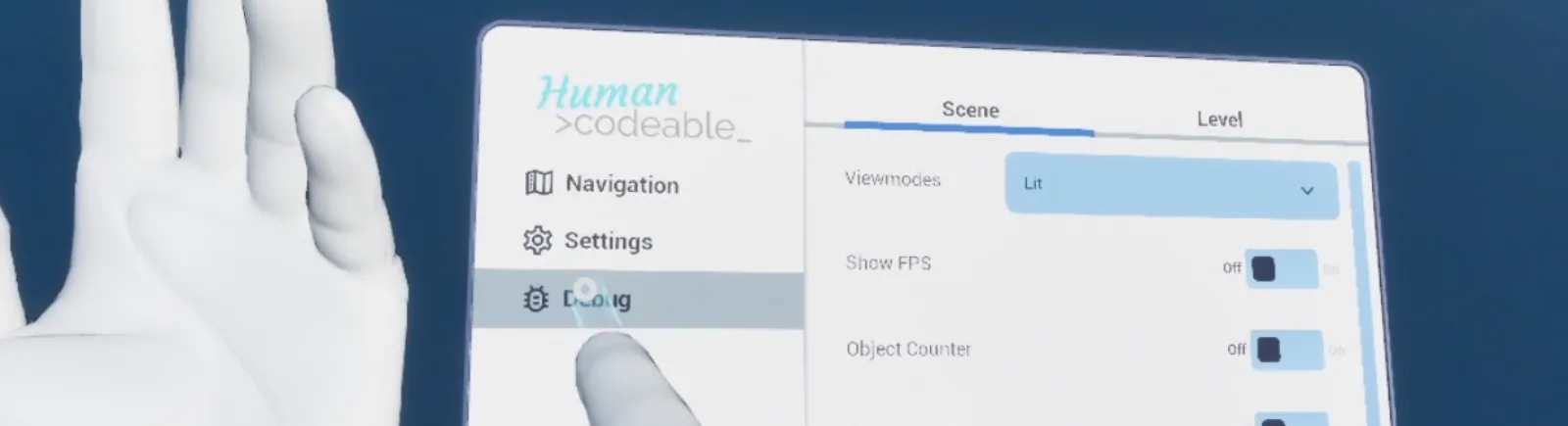
The menu ships twice — WBP_Menu_VR and WBP_Menu_Desktop — over the same page definitions. Pages
are PDA_WidgetPage data assets naming a widget class and a button label, listed on the pawn's
BPC_Pawn_Menu component.
That indirection means adding a page is a data change that appears in both variants at once, and a
project can reorder or remove pages per pawn without touching either menu widget.
Setup
Enable AFS_UI_Menu.
Add BPC_Pawn_Menu to your pawn.
Populate Pages with PDA_WidgetPage assets. DA_WidgetPage_Settings_Desktop and DA_WidgetPage_Debug are ready to use.
AFS_UI_Menu_details.pngMenu pages listed on the pawn component
The page list lives on the pawn, so a VR pawn and a desktop pawn can offer different pages.
AFS_UI_Menu_vr.pngThe VR menu
The VR menu
Key properties
Property
When to change
Pages
On BPC_Pawn_Menu, to change which pages appear and in what order
Extending
Derive your page widgets from WBP_Base. To restyle the menu itself, derive from WBP_Menu_VR or WBP_Menu_Desktop.
Example map
The menu in Map_Examples_Lobby is the shipped menu with navigation, settings and debug pages.
Troubleshooting
A page does not appear. Its data asset is not in the pawn's Pages list — the menu reads the list from the pawn, not from the level.
API reference
Every blueprint asset in this plugin. Expand an asset to see its members.
Components
BPC_Pawn_Menu1 members
extends ActorComponent
Kind
Name
Signature
Description
var
PagesContent
ST_Menu_Page[]
Top level entries of the pawn's menu, each holding the button that opens it and the widget pages shown once it is open. The menu widgets look the array up by index the moment a menu button is selected, so an entry whose page list is empty opens an empty subpage.
Widgets
WBP_Menu_Desktop2 members
extends WBP_Base
Kind
Name
Signature
Description
event
WidgetElement_PostInitiate
()
Called once the whole widget tree has been initiated and themed. Left empty here, so the vertical bar keeps the buttons it was given in the designer; the entries in Pages on the pawn's menu component are only read once a button is selected.
event
OnButtonSelectionChanged
(Group: WBP_Group_Button)
Called whenever the selection in the vertical button bar changes. Empties the switcher of any subpage that is already showing, then either leaves the panel blank when nothing is selected, or builds a subpage for the selected index and hands it the pages of the matching entry on the owning actor's menu component.
WBP_Menu_VR5 members
extends WBP_Base
Kind
Name
Signature
Description
event
WidgetElement_PostInitiate
()
Called once the whole widget tree has been initiated and themed. Left empty on the wrist menu, so its tab column keeps the tabs set in the designer; the entries in Pages on the pawn's menu component are only read once a tab is selected.
event
OnButtonSelectionChanged
(Group: WBP_Group_Button)
Called whenever the tab selection in the vertical column changes; builds a subpage for the selected index and hands it the pages of the matching entry on the player pawn's menu component. The pawn is taken as player zero, and there is no branch for an empty selection, so the column has to keep a tab selected at all times.
event
WidgetElement_Initiate
(Parent: WBP_Base, ReplicationIndex: name)
Empty override of the set-up call made once as the owning widget walks its tree. The base version, which caches the parent, builds the replication identifier and registers the widget for replication, is not run; the wrist menu is spawned as the root of its own tree and takes no part in replication.
event
OnClicked
(Button: WBP_Button)
Called when the quit button under the tab column is pressed. Opens a blocking confirmation overlay asking whether to quit the game, with a cancel and a quit button, and subscribes Confirmation Pressed to the answer it reports.
event
ConfirmationPressed_Event
(Confirm: bool)
Handles the answer coming back from the quit confirmation overlay. Quits the game to the platform when Confirm is true; a refusal closes the overlay and leaves the menu as it was.
Widgets/Helper
WBP_Menu_Desktop_Subpage2 members
extends WBP_Base
Kind
Name
Signature
Description
event
InitiateWithPages
(const Pages: PDA_WidgetPage[])
Stores the page assets handed over, adds a tab for each of their buttons and selects the first, which brings its widget up. The tab row collapses when only one page was passed, so a single page entry shows nothing but its content. Called by the desktop menu as it creates the subpage.
event
OnButtonSelectionChanged
(Group: WBP_Group_Button)
Called whenever the tab selection changes; brings the widget of the page at the selected index into the content area. That widget is created on first use and then kept, so a tab you return to is still in the state you left it.
WBP_Menu_VR_Subpage2 members
extends WBP_Base
Kind
Name
Signature
Description
event
InitiateWithPages
(const Pages: PDA_WidgetPage[])
Stores the page assets handed over, adds a tab for each of their buttons and selects the first, which brings its widget up. The tab row collapses when only one page was passed, so a single page entry shows nothing but its content. Called by the wrist menu as it creates the subpage.
event
OnButtonSelectionChanged
(Group: WBP_Group_Button)
Called whenever the tab selection changes; brings the widget of the page at the selected index into the content area. The switcher here removes widgets once they have faded out, so every tab is rebuilt from scratch and loses whatever state it held.
Widgets/Settings
WBP_Settings_Desktop3 members
extends WBP_Base
Kind
Name
Signature
Description
event
WidgetElement_PostInitiate
()
Called once the whole widget tree has been initiated and themed. Left empty here, as the graphics, sound and gameplay pages and the tabs that switch between them are all wired up in the designer.
event
OnClicked
(Button: WBP_Button)
Called when the reset button is pressed, and asks the settings component on the game state to reset every value object it holds. Only settings already created by being read or shown are affected, and nothing is written to the save slot.
event
OnClicked_1
(Button: WBP_Button)
Called when the save button is pressed, and left empty. Values are not written to the save slot until you run Save All Settings on the settings component of the game state from here.
WBP_Settings_Desktop_Gameplay0 members
extends WBP_Base
No editor-visible members; this asset configures defaults only.
WBP_Settings_Desktop_Graphics0 members
extends WBP_Base
No editor-visible members; this asset configures defaults only.
WBP_Settings_Desktop_Sound0 members
extends WBP_Base
No editor-visible members; this asset configures defaults only.
Widgets/Settings/Helper
WBP_SettingItem3 members
extends WBP_Base
Kind
Name
Signature
Description
var
SettingsSettings
Class<BP_Value_Settings>
Value class of the setting this row edits, picked per instance in the designer or passed in when the row is spawned. The shared object for that class lives on the game state's settings component, which creates it on first use. Leave it unset and the row has nothing to read from or write to.
fn
WidgetElement_getNamedSlots
(out Slots: NamedSlot[])
Returns the single config item slot that sits beside the info row's title and caption, so that the control you place there is initiated and themed with the rest of the tree.
event
WidgetElement_PostInitiate
()
Called once the whole widget tree has been initiated and themed. Empty on the base row, which is where a row of your own resolves Settings into its shared value object and binds the control in the config slot to it.
WBP_SettingItem_Boolean_Toggle1 members
extends WBP_SettingItem
Kind
Name
Signature
Description
event
WidgetElement_PostInitiate
()
Called once the whole widget tree has been initiated and themed. Empty on the toggle row, so nothing yet ties the switch in the config slot to the boolean value object named by Settings; that binding belongs here.
WBP_SettingItem_Color_Picker1 members
extends WBP_SettingItem
Kind
Name
Signature
Description
event
WidgetElement_PostInitiate
()
Called once the whole widget tree has been initiated and themed. Empty on the colour row, so the swatch in the config slot neither shows the value object named by Settings nor writes a new colour back to it until you bind it here.
WBP_SettingItem_Float_Slider1 members
extends WBP_SettingItem
Kind
Name
Signature
Description
event
WidgetElement_PostInitiate
()
Called once the whole widget tree has been initiated and themed. Empty on the slider row, so the slider in the config slot is not yet driven by the float value object named by Settings, and a drag is not written back to it.
WBP_SettingItem_Integer_Selector1 members
extends WBP_SettingItem
Kind
Name
Signature
Description
event
WidgetElement_PostInitiate
()
Called once the whole widget tree has been initiated and themed. Empty on the selector row; this is where the button group in the config slot is handed the integer value object named by Settings, which supplies both the choices to show and the index selected.
WBP_SettingItem_Name_DropDown1 members
extends WBP_SettingItem
Kind
Name
Signature
Description
event
WidgetElement_PostInitiate
()
Called once the whole widget tree has been initiated and themed. Empty on the drop-down row; this is where the list in the config slot is handed the name value object named by Settings, which supplies the identifiers and labels to offer.