AFS_UX_Gaze
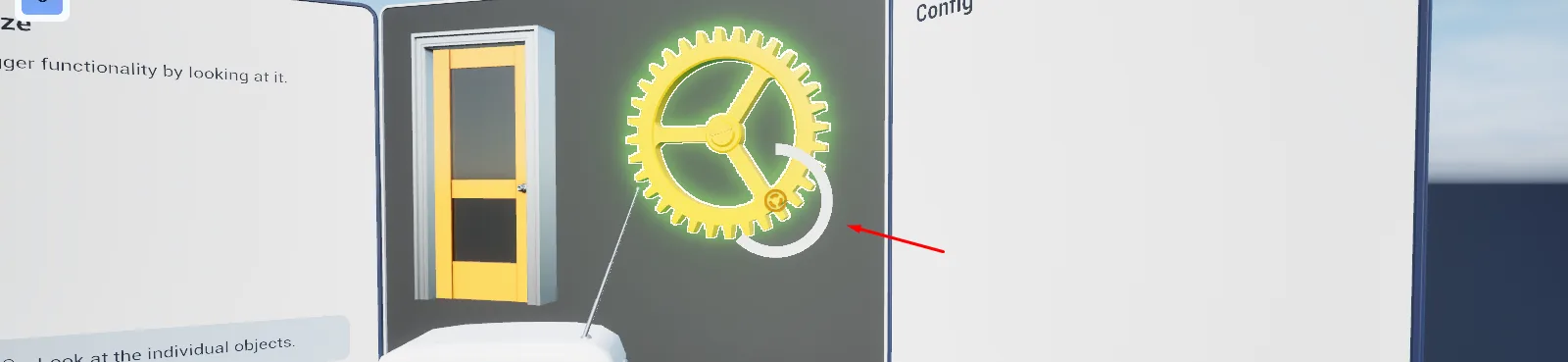
Dwell-based interaction: look at an object for a configurable time to trigger it, with a filling indicator.
What it gives you
- Hands-free interaction for headsets without controllers
- A configurable dwell time per object
- Circular and linear indicator styles
- An accessibility path on every platform
Required by
Description
Gaze interaction exists for two audiences: headsets without controllers, and users who cannot use controllers comfortably. It works on desktop and mobile too, where it becomes a look-and-wait interaction driven by the camera.
BPC_PawnAbility_Gaze traces from the camera each frame. BPC_Interaction_Gaze on the target
declares a dwell time and an indicator widget, and fires Progress Finished once the player has
held their gaze long enough. Interface_Gaze on the owning actor can veto.
The dwell timer is driven by the same tick-and-timeout pattern as highlighting, so looking away cancels it without any explicit event.
Setup
- Enable
AFS_UX_Gaze. - Add
BPC_PawnAbility_Gazeto the pawn and set Gaze View Distance. - Add
BPC_Interaction_Gazeto the target, set Trigger Time and pick a Widget Progressbar. - Bind to Progress Finished.
Usage
Tuning dwell
Trigger Time is the dwell duration. Under about 0.8 s users trigger things accidentally; over about 2.5 s it feels unresponsive.
Choosing an indicator
Widget_GazeIndicator_Circular reads well on small targets; Widget_GazeIndicator_Linear suits
wide ones. Derive from Widget_GazeIndicator for your own.
Vetoing
Implement Interface_Gaze and return false from CanGazeView.
Key properties
| Property | When to change |
|---|---|
Gaze View Distance | How far gaze reaches from the camera |
Trigger Time | Dwell duration per object |
Widget Progressbar | Indicator style |
Sound Progressbar | Audio feedback while dwelling |
Extending
Derive from Widget_GazeIndicator and override SetProgress for a custom indicator.
Performance notes
The gaze ability raises its own tick interval when nothing is hovered, so idle gaze is cheap. Keep Gaze View Distance no longer than the scene needs.
Example map
Map_Examples_Gaze shows dwell interaction on several object types.
Troubleshooting
The indicator never appears. Widget Progressbar is empty, or the object's collision does not block the gaze trace.
API reference
Every blueprint asset in this plugin. Expand an asset to see its members.
Components
BPC_Interaction_Gaze7 members
| Kind | Name | Signature | Description |
|---|---|---|---|
| var | Widget_ProgressbarProgressbar | Class<Widget_GazeIndicator> | Indicator widget shown while the player dwells on this object. Choose the circular or linear variant, or subclass for your own. |
| var | TriggerTimeProgressbar | float | How long the player must keep looking at this object before it triggers, in seconds. |
| var | Sound_ProgressbarSound | SoundBase | Sound played while the dwell indicator fills. |
| fn | CanGazeHighlight | (HitComponent: PrimitiveComponent, SourceInfo: ST_SourceInfo, out CanHighlight: bool) | Returns whether this object currently accepts gaze, consulting Interface Gaze on the owner if it is implemented. |
| fn | CalculateLocationAndRotation | (Pawn: Pawn, ref const Impact: Vector, out Location: Vector, out Rotation: Rotator) | Works out where to place the dwell indicator and how to orient it towards the player. |
| event | TickHighlight | (SourceInfo: ST_SourceInfo, TraceResult: HitResult) | Keeps the gaze alive for this frame and advances the dwell timer. Triggers once Trigger Time is reached. |
| event | ProgressFinished | () | Fires when the dwell completes. Bind to this to run the gaze action. |
BPC_PawnAbility_Gaze1 members
| Kind | Name | Signature | Description |
|---|---|---|---|
| var | GazeViewDistanceSettings | float | How far the gaze trace reaches from the camera. |
Helper
BP_Helper_GazeIndicator7 members
| Kind | Name | Signature | Description |
|---|---|---|---|
| var | ProgressBar | Class<Widget_GazeIndicator> | Widget class used to draw the dwell progress. |
| var | OwningPlayer | PlayerController | Player controller this indicator belongs to, so it is only drawn for the gazing player. |
| var | ProgressSound | SoundBase | Sound played while the indicator fills. |
| event | PlayProgressBar | (Duration: float) | Starts filling the indicator over the given duration. |
| event | SetPercent | (NewProgress: float) | Sets the indicator fill directly, for driving progress from outside. |
| event | StopProgressBar | () | Stops and resets the indicator when the player looks away. |
| event | HideAndDestroy | () | Fades the indicator out and destroys it. |
Interfaces
Interface_Gaze1 members
| Kind | Name | Signature | Description |
|---|---|---|---|
| fn | CanGazeViewGazeView | (GazeComp: BPC_Interaction_Gaze, SourceInfo: ST_SourceInfo, out CanHighlight: bool) | Implement on an actor to veto or allow gaze under your own conditions. Returning false suppresses the gaze highlight and dwell. |
Widgets
Widget_GazeIndicator1 members
| Kind | Name | Signature | Description |
|---|---|---|---|
| event | SetProgress | (Progress: float) | Sets the indicator's fill from 0 to 1. Override in a subclass to draw progress differently. |
Widget_GazeIndicator_Circular1 members
| Kind | Name | Signature | Description |
|---|---|---|---|
| event | SetProgress | (Progress: float) | Drives a radial fill from the dwell progress. |
Widget_GazeIndicator_Linear1 members
| Kind | Name | Signature | Description |
|---|---|---|---|
| event | SetProgress | (Progress: float) | Drives a horizontal bar fill from the dwell progress. |