AFS_UISpace_Hand
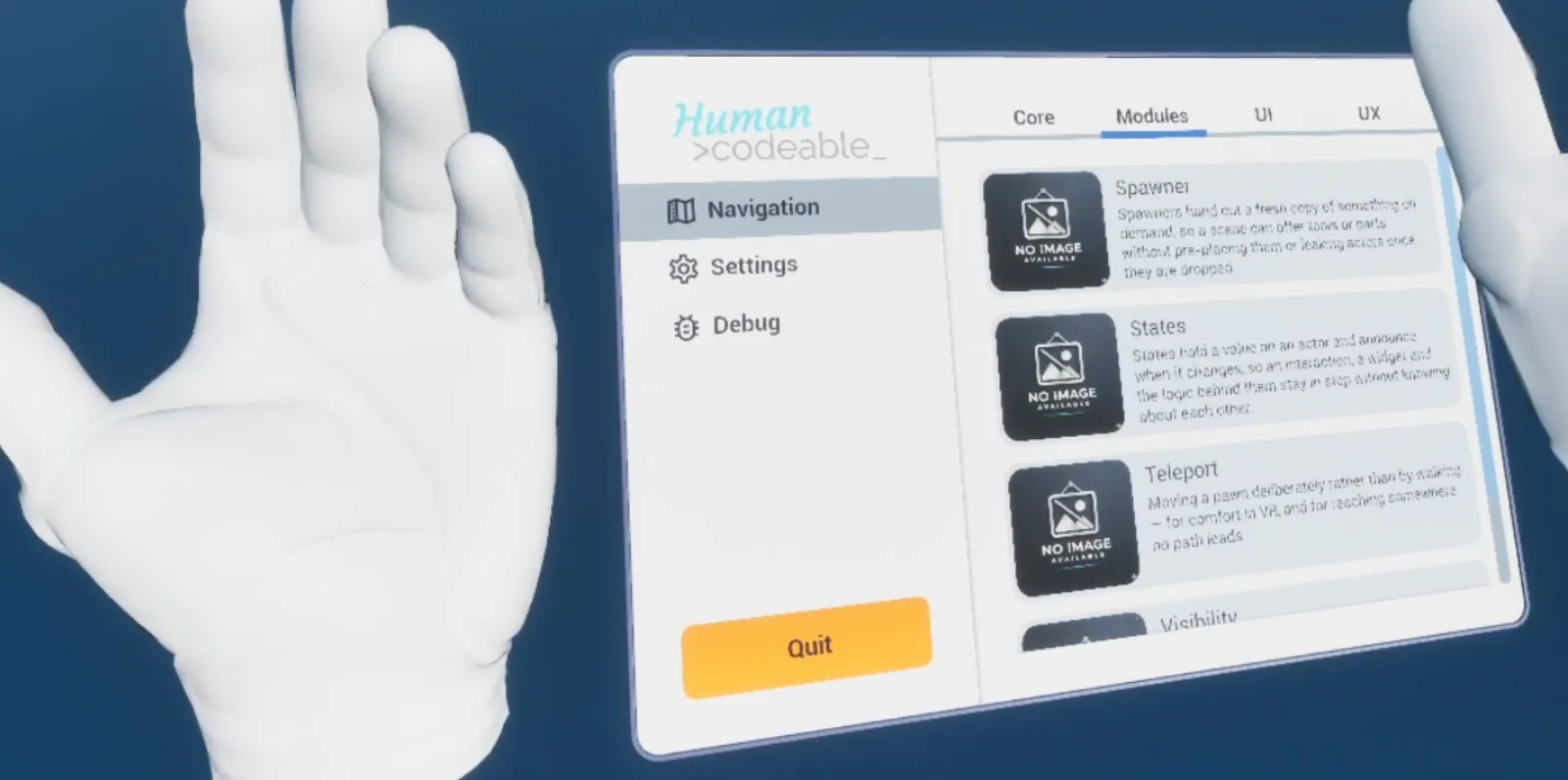
Wrist-mounted UI that appears when the palm turns toward the face, within a configurable angle.
What it gives you
- A watch-style panel anchored to the hand
- Automatic show and hide from palm orientation
- No input needed to summon it
Required by
Description
Hand UI solves the problem of where to put persistent information in VR. Anchored to the world it gets lost; anchored to the head it is intrusive. Anchored to the wrist it behaves like a watch — you look at it when you want it and forget it otherwise.
BPC_ControllerAbility_HandUI spawns a helper actor holding your widget and shows it when the angle
between the palm normal and the direction to the head falls within Appear Angle. There is no
input to press and nothing to toggle.
Setup
- Enable
AFS_UISpace_Hand. - Add
BPC_ControllerAbility_HandUIto the motion controller that should carry the panel. - Set Widget VR to a widget deriving from
WBP_Base. - Tune Appear Angle — 40° is the default and works well for most users.
Usage
Choosing content
Keep it glanceable. Status, a clock, a small set of toggles. Anything needing sustained attention belongs in pawn UI or the menu.
Which hand
Add the component to one controller only. Most users prefer the non-dominant hand, mirroring a watch.
Key properties
| Property | When to change |
|---|---|
Appear Angle | Widen if the panel is hard to summon, narrow if it appears unintentionally |
Widget VR | The widget class shown on the wrist |
Extending
Derive from BP_Helper_HandUI to change how the panel is positioned or animated.
Example map
Map_Examples_HandUI demonstrates the wrist panel.
Troubleshooting
The panel never appears. The component is on a controller whose palm normal is not oriented as expected — check the hand mesh's forward axis, or widen Appear Angle to confirm.
API reference
Every blueprint asset in this plugin. Expand an asset to see its members.
Components
BPC_ControllerAbility_HandUI3 members
| Kind | Name | Signature | Description |
|---|---|---|---|
| var | AppearAngleConfig | float | Angle threshold, in degrees, handed to the hand panel as its Hand Angle when the helper is spawned. The comparison carries a fifty per cent deadzone, so at the default of 40 the panel opens once the measured angle drops below 20 degrees and closes again above 60. Read once as the ability activates; changing it afterwards does nothing to a panel already spawned. |
| var | Widget_VRContent | Class<WBP_Base> | Widget class shown on the hand, passed to the helper actor as its widget class at the moment the ability activates. Leave it empty and the panel still spawns with nothing drawn in it. Only read on activation, so swapping it at runtime takes effect after the ability has been deactivated and reactivated. |
| var | ReferencesReferences | Struct_References | Dynamic references carried through to the widget when the panel is built, each entry resolved into an actor by class, or by class and tag, and stored under its key for the widget to look up by name. Leave empty for widgets that need no context. |
Helper
BP_Helper_HandUI8 members
| Kind | Name | Signature | Description |
|---|---|---|---|
| var | IsVisibleState | bool | Whether the panel is currently open. Defaults to true, but the hand UI ability spawns the helper with it false and Show Hand UI owns it from then on; writing to it directly moves nothing on screen, because it is the scale curve started by Show Hand UI that opens and closes the panel. |
| var | ReceiverReceiver | Object | Object the panel was raised on behalf of, filled in on spawn with the hand UI ability that created this helper. Nothing in the helper itself reads it; it is held as the trail back to the owner for the element and the widget it hosts. |
| var | Widget ClassContent | Class<WBP_Base> | Class of widget the panel is meant to show, handed down from the ability's VR widget as the helper is spawned. The helper creates no widget of its own; the element snapped onto its anchor is what builds one, so this is carried rather than used here. |
| var | ReferencesContent | Struct_References | Dynamic references travelling alongside the widget class, resolved into actors at the moment the widget is finally created and stored under their keys for it to read. Leave empty for widgets that need no context. |
| var | HandAngleSettings | float | Angle threshold, in degrees, that the tick check compares the hand's current angle against to decide whether the panel should be open, overwritten on spawn with the ability's Appear Angle. The deadzone is half the threshold, so at the default of 30 the panel opens below 15 degrees and closes above 45, which stops it flickering at the boundary. Checked ten times a second after physics. |
| event | ShowHandUI | (Set: bool) | Opens or closes the panel by playing the 0.3 second scale curve forwards, growing the handle from a tenth of its size and sliding it 5 centimetres into place, or reversing it to fold it away. Repeated calls with the value it already holds are swallowed. Called from tick as the hand crosses the hand angle; the curve's visibility key is what shows or hides the attached element. |
| event | OnConnectorDetached | (Anchor: BPC_Anchor, Connector: BPC_Connector_Anchor) | Bound to the hand anchor and called when an element leaves it, typically because the panel has been grabbed out of the hand. The body is empty, so the departing element keeps whatever visibility it had; it exists as the hook to fill in on a derived helper. |
| event | OnConnectorAttached | (Anchor: BPC_Anchor, Connector: BPC_Connector_Anchor) | Bound to the hand anchor and called when an element snaps onto it. Hides the arriving element at once while the panel is closed, so a panel returned to a lowered hand does not flash into view; with the panel open it does nothing and the element keeps its own visibility. |
BP_Helper_HandUI_Element5 members
| Kind | Name | Signature | Description |
|---|---|---|---|
| var | ReceiverReceiver | Object | Object this element was raised on behalf of, filled in when it is spawned. Nothing in the element reads it; it is the trail back to whatever asked for the panel, left for the hosted widget to follow. |
| var | WidgetClassContent | Class<WBP_Base> | Class of widget created on the element's widget component at begin play, along with the reference struct. Leave it empty and the element still spawns and snaps to the hand, but the panel stays blank. Read once, so assigning it later has no effect. |
| var | ReferencesContent | Struct_References | Dynamic references resolved into the widget at the moment its class is created on begin play, each entry found by class, or by class and tag, and stored under its key for the widget to read. Leave empty for widgets that need no context. |
| var | HelperHandUIState | BP_Helper_HandUI | The hand panel helper this element belongs to. Its anchor is what the element's connector attaches itself to on begin play, so leaving this empty strands the element wherever it was spawned instead of seating it on the hand. |
| fn | SetElementVisibility | (Show: bool) | Shows or hides the hosted widget, fading it over 0.4 seconds with the hand UI open or close cue, and registers or unregisters the stand-in that other clients see through the local player pawn's replicated UI component. Called by the hand panel helper as the hand is raised and lowered, and when an element snaps onto a hand that is already lowered. |